ChatPromptTemplate is a structured template in LangChain designed for multi turn conversations and chat based workflows. It allows developers to define messages, roles and variables systematically for consistent LLM outputs.
Using ChatPromptTemplate helps manage complex conversation flows and ensures predictable responses.
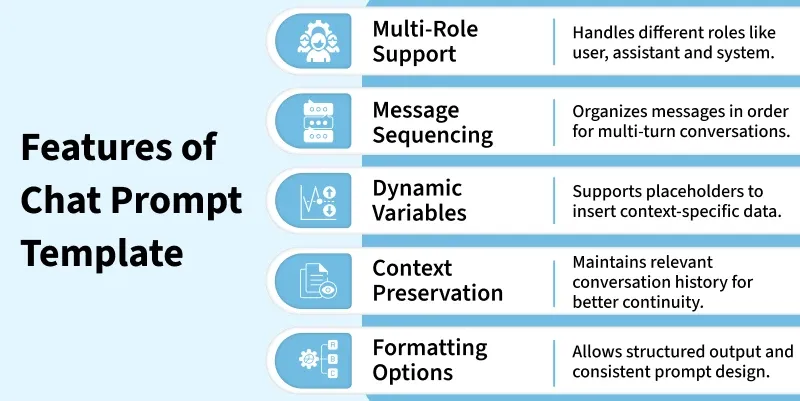
👁 features_of_chatprompttemplate Features Components of a ChatPromptTemplate Some of the core components are:
Roles: Specify who is speaking like user, assistant, system. Messages: Define individual messages or instructions within the template. Variables: Placeholders for dynamic content like names, topics or context. Instructions: Clear guidance for the model to follow in each message. Formatting Rules: Ensure the generated output follows a consistent style. Using Variables in ChatPromptTemplate Some of the ways variables enhance templates are:
Dynamic Input: Replace placeholders with real time user data or contextual information to make prompts more relevant. Consistency: Maintain a standardized structure across prompts while still allowing flexibility for different scenarios. Multiple Variables: Support multiple placeholders within a single template to handle complex inputs efficiently. Context Injection: Include conversation history, user preferences or other relevant data dynamically to improve response accuracy. Error Reduction: Minimize mistakes and inconsistencies by clearly defining where and how each variable should be used. Implementation Step wise implementation of ChatPromptTemplate:
Step 1: Install Required Libraries Installing LangChain for building prompt and OpenAI to access GPT models.
Step 2: Import Modules Importing required modules.
Prompt templates: SystemMessagePromptTemplate, HumanMessagePromptTemplate Chat models: ChatOpenAI to call GPT-4 Chain: LLMChain to connect prompts with LLM os: for environment variables like API keys Step 3: Setup Environment Setting up environment using OpenAI API Key, we can also use any other model access.
Refer to this article: Fetching OpenAI API Key
Step 4: Define System and Human Messages Defining System and Human Messages.
System message: instructs AI how to behave. Human message: user query with a variable {topic} that can change dynamically. Step 5: Combine Messages into a ChatPromptTemplate Combining both messages into a structured prompt that preserves roles for GPT.
Step 6: Initialize the LLM Here, we are initializing LLM by choose GPT-4 and sets temperature: 0 = deterministic, 1 = creative or random responses.
Step 7: Create an LLMChain Connecting the prompt template with the model into a pipeline: input to LLM to output.
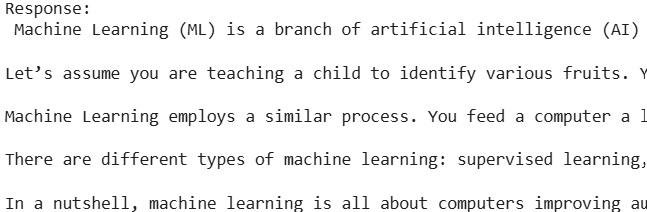
Step 8: Provide Variables and Run the Chain Replacing {topic} in the human message with "LangChain ChatPromptTemplate" and sends it to GPT-4. Returning the LLM generated explanation. Step 9: Print the Response Displaying GPT-4’s explanation in the console.
Output:
👁 ChatPrompt-IM Result Integrating with LLMs Some of the ways to connect ChatPromptTemplate with LLMs are:
LLMChain Integration: Use the template as input to LLMChain to generate reliable single-turn responses. Multi-Turn Workflows: Preserve conversation context across multiple LLM calls for coherent multi-turn interactions. Dynamic Prompting: Inject variables or context dynamically just before sending the prompt to the model. Custom LLMs: Compatible with OpenAI, Hugging Face or any custom LLM integrated into LangChain workflows. Automation: Enable fully automated conversational agents by using predefined templates consistently across tasks. Applications Some of the applications of ChatPromptTemplate are:
Chatbots: Allows AI systems to maintain structured, context-aware conversations with users. Customer Support: Provides automated, accurate and consistent responses to user inquiries. Multi-Turn Q&A: Handles follow up questions and complex dialogues smoothly across multiple turns. Interactive Tutorials: Guides users step-by-step through instructions while adapting to responses dynamically. Conversational Agents: Powers virtual assistants with predictable, coherent and efficient behavior. Benefits Some of the benefits of using ChatPromptTemplate are:
Reusability: Templates can be reused across different tasks or workflows saving time and effort. Consistency: Standardized prompts help maintain uniform responses across different use cases. Scalability: Easily scale conversational workflows without rewriting prompts for each new scenario. Error Minimization: Reduces mistakes by providing a clear and structured format for variables and messages. Efficiency: Streamlines the development of conversational agents by simplifying prompt management. Challenges Some of the challenges when using ChatPromptTemplate are:
Variable Mismatches: Errors can occur if placeholders are incorrectly defined or not properly replaced. Overfitting Examples: Few-shot templates may bias the model if example messages are too specific. Complexity Management: Templates can become overly complex making them hard to maintain or debug. Context Management: Maintaining relevant multi-turn context can be challenging in long conversations.