VOOZH about

URL: https://www.geeksforgeeks.org/artificial-intelligence/conversation-buffer-window-memory-in-langchain/

โ‡ฑ Conversation Buffer Window Memory in Langchain - GeeksforGeeks


  • Courses
  • Tutorials
  • Interview Prep

Conversation Buffer Window Memory in Langchain

Last Updated : 9 Oct, 2025

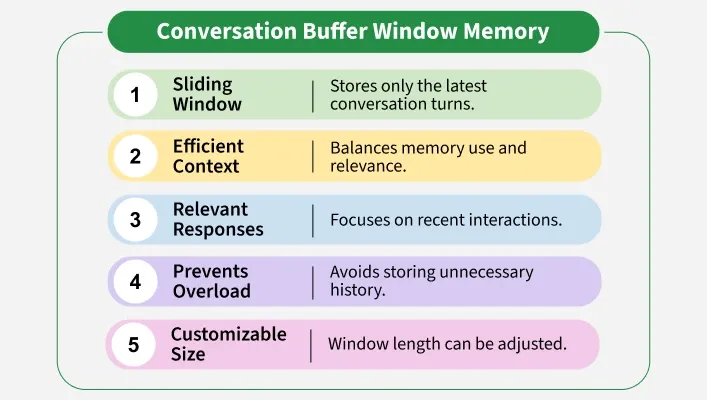
Conversation Buffer Window Memory in LangChain stores only the most recent exchanges in a conversation instead of the full dialogue history. It functions like a sliding window that holds a fixed number of turns ensuring the language model has the most relevant context for generating responses.

๐Ÿ‘ features_of_conversation_buffer_memory
Features

This approach helps chatbots and assistants stay focused, prevents token overload and keeps interactions efficient. It is especially useful for short to medium conversations where only the latest context is important while older messages can be safely discarded.

Architecture

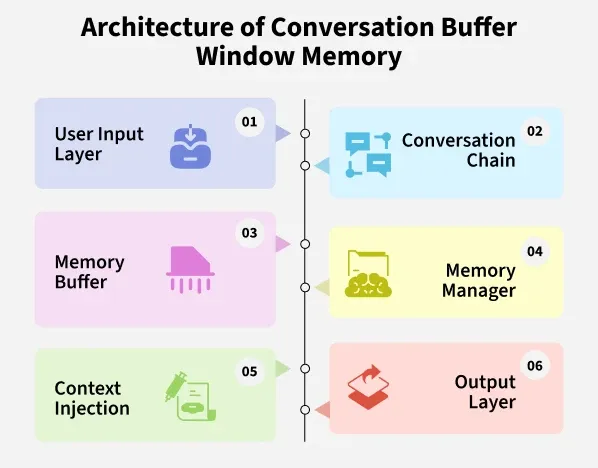
Architecture Overview of Conversation Buffer Window Memory in LangChain:

๐Ÿ‘ architecture_of_conversation_buffer_window_memory
Training Pipeline
  1. User Input Layer: The system captures the userโ€™s query or message.
  2. Conversation Chain: The user input is passed to the conversational chain or language model.
  3. Memory Buffer: Stores the last k user LLM exchanges as a rolling window. Older messages are discarded once the limit is reached.
  4. Memory Manager: Handles saving new interactions with save_context() and retrieving recent context with load_memory_variables().
  5. Context Injection: The preserved messages are added to the LLM prompt so it can generate responses with awareness of recent history.
  6. Output Layer: The LLM generates a reply which is both returned to the user and saved back into the memory buffer for the next turn.

How Does it Work

Hereโ€™s the workflow of Conversation Buffer Window Memory in LangChain:

  1. Initialization: The memory is initialized with a window size k which defines how many past exchanges to retain.
  2. Saving Context: After each user input and AI response, the save_context() method stores the new exchange in the buffer.
  3. Sliding Window Mechanism: The new exchange is added to the buffer. If the buffer exceeds k exchanges, the oldest ones are automatically discarded.
  4. Loading History: Before generating the next response, the load_memory_variables() method retrieves the current buffer and provides it as conversation history to the LLM.
  5. Continuous Update: This cycle repeats at every turn ensuring only the latest k exchanges are kept for efficient and context aware responses.

Implementation

Steps to implement Conversation Buffer Window Memory in Langchain are:

Step 1: Install Dependencies

Installing LangChain core, OpenAI integration, FAISS for vector storage, dotenv for env vars and community modules.

Step 2: Import Libraries

Importing LangChain modules and Operating System.

Step 3: Environment Setup

Setting up environment using OpenAI API Key, we can also use Gemini's API Key.

Refer to this article for using OpenAI API Key: Fetching OpenAI API Key

Step 4: Initialize Memory

Initializing memory with a fixed window size, for example, 3 messages.

Step 5: LLM Instance

Creating an LLM instance.

Step 6: Conversation Chain

Building a conversation chain that uses the memory.

Step 7: Interact with the Chain

Interacting with the Conversation chain.

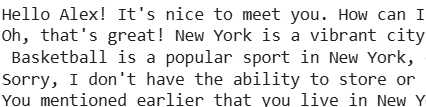
Output:

๐Ÿ‘ CBWM-IM1
Result

Comparison of Memory Types in LangChain

Comparison table among different memory types is mentioned below:

Memory Type

Conversation Buffer Memory

Conversation Buffer Window Memory

Conversation Summary Memory

Vector Store Retriever Memory

What it Stores

Entire conversation history as plain text

Only the most recent k exchanges

Condensed LLM generated summary of past

Embeddings of past conversations in a vector DB

Strengths

Full context preserved, simple to use

Keeps context relevant, avoids token overload

Saves tokens, retains long term context

Semantic recall across long histories

Limitations

Can grow too large and exceed token limits

Loses older parts of the conversation

Summaries may miss important details

Needs external vector DB, higher setup

Applications

Conversation Buffer Window Memory is applied in several areas like:

  1. Customer Support Chatbots: Retains only the most recent exchanges with users while ignoring older ones to keep responses focused.
  2. Personal Assistants: Tracks the last few tasks or queries during active use without storing unnecessary long term context.
  3. Interactive Prototypes: Useful for testing conversation flow quickly without managing large histories.
  4. E-learning Bots: Keeps the latest student questions and explanations to maintain context during lessons.
  5. Productivity Tools: Remembers recent commands or notes so users can work seamlessly in short sessions.

Advantages

Some of the advantages of Conversation Buffer Window Memory in LangChain are:

  1. Efficient Context Management: Keeps only the most relevant part of the conversation, avoiding overload.
  2. Improved Performance: Reduces token usage since older history is trimmed.
  3. Focused Responses: Ensures the model responds based on recent context rather than outdated inputs.
  4. Easier Debugging: Smaller memory windows make it simpler to track and test conversation flow.
  5. Scalability: Works well in applications with high user volume since memory is lightweight.

Disadvantages

Some of the disadvantages of Conversation Buffer Window Memory in LangChain are:

  1. Loss of Long Term Context: Older conversation details are discarded and cannot be recalled.
  2. Limited Personalization: The system cannot remember user preferences beyond the window.
  3. Risk of Repetition: Users may need to repeat information that was trimmed from memory.
  4. Not Suitable for Complex Tasks: Applications requiring deep history like legal or medical chat may struggle.
Comment

Explore