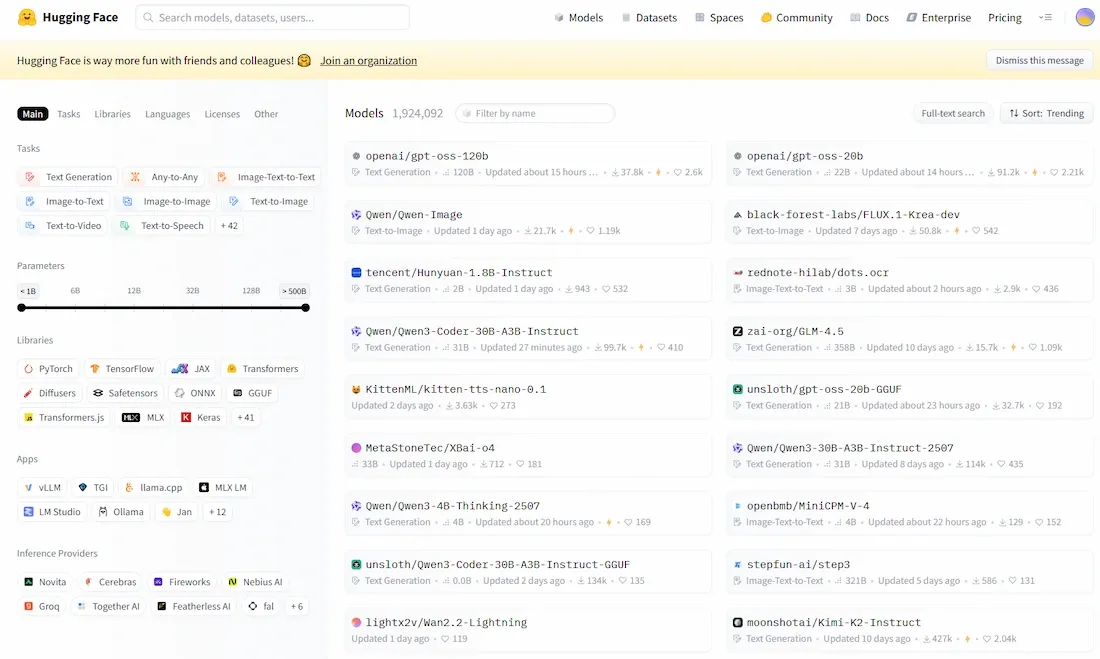
Hugging Face Model Hub is a platform for sharing and discovering pre-trained machine learning models across various domains like NLP, computer vision, and more.
Allows users to upload, explore and download models easily
Supports a wide range of tasks across different AI fields
Helps researchers and developers reuse models instead of building from scratch
Promotes collaboration and knowledge sharing within the AI community
Hugging Face Model Hub offers several features that simplify model sharing and discovery.
Model Sharing: Users can upload and update pre-trained models, making them accessible for research and real world applications
Model Discovery: Provides search and filtering options by task, framework and language to easily find relevant models
Pre-trained Models: Offers ready-to-use models fine tuned on various datasets, reducing the need for training from scratch
Model Versioning: Supports version control, allowing users to track updates and access previous model versions
How to Use the Hugging Face Models Hub?
Using the Hugging Face Models Hub is eand straightforward, let’s see how we can use it:
1. Browse and Search for Models
We can visit the Hugging Face Models Hub from there official website.
And use the search bar or browse through the categories to find the model that fits our task.
Also we can filter models by task, language, framework and other tags to find exactly what we need.
2. Download a Model
Once we've found a model, click on the model name to view more details including model architecture, performance and instructions for use.
To download the model, we can use the transformers library. For example:
Note: You can change the 'model-name' with the original model you want to download.
3. Upload our Own Model
If we want to share our own model, we can upload it to the Hugging Face Hub by creating a new model repository.
This process typically involves setting up a Hugging Face account and Prepare our model for upload.
Then using Git or the Hugging Face CLI to push the model to the Hub.
4. Integrate with Other Tools
Hugging Face integrates well with popular machine learning libraries such as Transformers, Datasets and Tokenizers. We can easily load and use models in our machine learning pipelines using these tools.
Applications
Hugging Face Model Hub supports a wide range of real-world machine learning tasks.
Used in NLP tasks like sentiment analysis, text classification, and text generation with models such as BERT, GPT and T5
Applied in computer vision for image classification and object detection using models like ResNet, EfficientNet, YOLO and Faster R-CNN
Supports multimodal tasks with models like CLIP for image captioning and visual question answering
Enables development and sharing of custom models for specific industries and use cases
Advantages
Hugging Face Model Hub offers several benefits for both developers and researchers.
Provides easy access to pre-trained models, saving time and computational resources
Encourages collaboration and knowledge sharing within the AI community
Supports multiple frameworks like PyTorch, TensorFlow and JAX
Includes model cards with documentation, usage details and limitations
Offers deployment tools like the Inference API for production use
Limitations
Despite its benefits, there are some challenges to consider.
Model quality may vary since anyone can upload models
Some models may be outdated or not actively maintained
Pre-trained models may contain biases from training data