Memory in LangChain is a system component that remembers information from previous interactions during a conversation or workflow. This memory enables language model applications and agents to maintain context across multiple turns or invocations, allowing the AI to generate responses informed by past dialogue or events. Without memory, every user query is treated as an isolated input with no awareness of previous exchanges, limiting the chatbot's conversational ability and continuity. Let's see some key points about Memory in LangChain,
Passes relevant past conversation or state as additional context to the language model.
Helps maintain conversational context and coherence over time.
Can store raw messages, summarized history or structured knowledge.
Critical for building intelligent chatbots, personal assistants and multi-turn workflows.
Supports both short-term interactive memory and long-term persistent memory use cases.
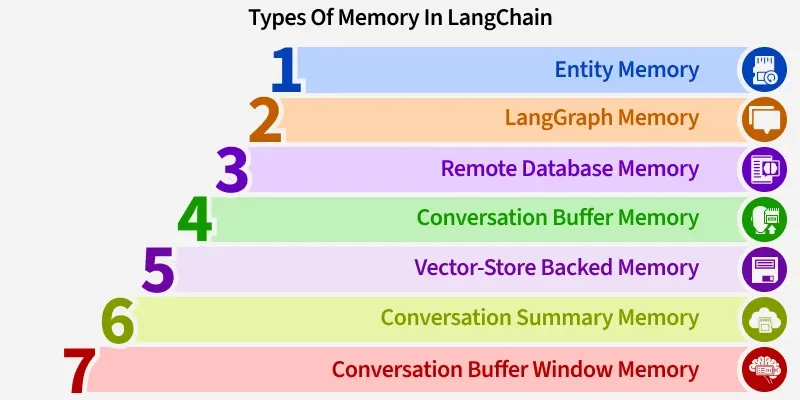
LangChain provides various memory implementations for different application needs. These memory types vary in how they store, retrieve and manage conversational context or knowledge.
1. Conversation Buffer Memory: Conversation Buffer Memory stores the entire conversation history exactly as it occurred, keeping all messages sequentially. It is simple and direct but can become inefficient with long conversations due to token limits and cost considerations.
Stores full raw message history.
Suitable for short conversations or prototyping.
Easy to implement but unbounded growth can affect performance.
2. Conversation Buffer Window Memory: Buffer Window Memory limits the stored history to only the most recent k messages or turns. This maintains a manageable context size that fits within model token limits and prioritizes recent interactions.
Keeps only the last k exchanges.
Controls prompt size and token usage.
Useful for applications relying on recent context.
3. Conversation Summary Memory: Instead of raw messages, this memory type maintains a running summary of the conversation, updated using a language model. It provides a compact representation of long dialogues, reducing token usage without losing essential context.
Creates periodic conversation summaries.
Efficient for long or multi-topic chats.
Balances detail retention and cost.
4. Entity Memory: Entity Memory extracts and remembers structured facts about specific entities (users, places, topics) mentioned during the conversation. This enables personalized, fact-based interactions rather than plain text recall.
Captures and updates entity-specific data.
Supports personalized assistants and domain knowledge.
Stored as structured representations for easy retrieval.
5. Vector-Store Backed Memory: This memory stores conversation snippets or knowledge in vector databases, enabling retrieval by similarity search. It’s ideal for retrieval-augmented generation where relevant past information is fetched as needed.
Enables similarity-based context retrieval.
Scales well for large knowledge bases.
Supports integration with vector databases like Pinecone or FAISS.
6. Remote Database Memory: To support persistence and multi-user applications, memory can be backed by remote DBs such as Redis or DynamoDB, ensuring conversation state survives across sessions and scales with demand.
Persists memory externally for durability.
Allows multi-user and distributed access.
Suitable for production environments.
7. LangGraph Memory: LangGraph Memory is a modern persistence layer designed for complex, multi-user conversational AI applications. It offers advanced features such as branching conversations, workflow orchestration and deep integration with LangChain’s architecture.
LLMChain: To chain LLM calls with prompts and memory.
ChatPromptTemplate, MessagesPlaceholder, HumanMessagePromptTemplate: For structured chat prompts.
ConversationBufferMemory: To maintain conversational context.
InMemoryChatMessageHistory: Stores conversation history as message objects.
Step 3: Initialize Conversation History
We use InMemoryChatMessageHistory to store conversation messages instead of plain strings. This ensures proper structured history.
Step 4: Configure Memory for the Conversation
We set up ConversationBufferMemory to store chat history and allow retrieval of messages in structured format.
Step 5: Initialize the Language Model and Create a Chat Prompt Template
We initialize the OpenAI chat model (GPT-4) using ChatOpenAI and we define a prompt template that integrates the chat history and accepts user queries.
MessagesPlaceholder: Inserts past messages.
HumanMessagePromptTemplate: Placeholder for the current user query.
Step 6: Create Conversation Chain and Run Example Query
We combine the LLM, prompt template and memory into an LLMChain.
This chain will handle query inputs, maintain memory and generate responses.
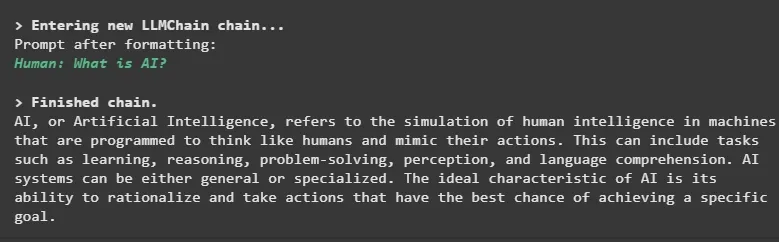
We run the chain with a sample question and format the output.