VOOZH about

URL: https://www.geeksforgeeks.org/artificial-intelligence/named-entity-recognition-with-bert/

⇱ Named Entity Recognition with Hugging Face - GeeksforGeeks


  • Courses
  • Tutorials
  • Interview Prep

Named Entity Recognition with Hugging Face

Last Updated : 14 Apr, 2026

Named Entity Recognition (NER) is an NLP task that identifies and classifies entities in text, such as people, organizations and locations. It helps systems automatically understand important information within sentences, even when language and context vary.

For example, in the sentence: Barack Obama was born in Hawaii and served as President of the United States.

NER identifies:

  • Barack Obama: Person
  • Hawaii: Location
  • United States: Location

Implementation of Named Entity Recognition

Run the following command in your command prompt to install required libraries

pip install transformers torch

1. Without Pipeline

Let's see the implementation of Named Entity Recognition using a BERT model without using the Hugging face transformer's pipeline API

Step 1: Import Required Classes

  • BertTokenizer: Converts text into tokens the model can understand
  • BertForTokenClassification: BERT model adapted for tasks like NER
  • torch: Handles tensor operations and model execution

Step 2: Load Model and Tokenizer

  • The tokenizer converts text into tokens
  • The model predicts entity labels for each token

Output:

👁 hugging_face
Loading pretrained model

Step 3: Tokenize Input

This converts the sentence into tensors that the model can process, preparing it for entity prediction.

Step 4: Run Model Inference

We use torch.no_grad() to disable gradient calculations because we are only performing inference, not training. This makes prediction faster and more memory efficient.

Step 5: Extract Predictions

  • logits: Raw scores output by the model for each token and each possible entity label
  • argmax: Selects the label with the highest score (most probable entity class) for each token

Step 6: Map Token IDs to Labels

  • convert_ids_to_tokens: Converts numeric token IDs back into readable tokens
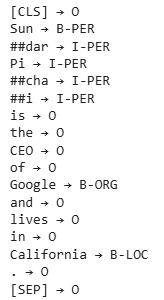
  • id2label: Maps predicted label IDs to actual entity names (e.g., PER, ORG, LOC)
  • The loop prints each token along with its predicted entity label

Output:

👁 withoutpipeline
Output

2. With Pipeline

Step 1: Import Required Libraries

Import the pipeline from Transformers, as it provides a high level interface that automatically manages tokenization, model loading, inference and output formatting in a single streamlined workflow.

Step 2: Initialize NER Model

  • ner: Specifies token classification task
  • dslim/bert-base-NER: Pretrained BERT model for NER
  • aggregation_strategy="simple": Merges split tokens

Output:

👁 hugging_face_pretrained_model
Pretrained model

Step 3: Run NER

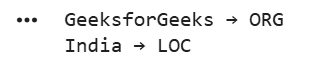
The pipeline processes the sentence, identifies named entities and returns them with their categories like Person, Organization, Location, etc. The loop simply prints each detected entity along with its label. The output shows the entities detected by the NER model:

  • GeeksforGeeks: ORG (Organization)
  • India: LOC (Location)

Output:

👁 Output_huggingface
Output

We can see our model is working fine.

You can download the full code from here

Comment
Article Tags:

Explore