AI pair programming is a way of coding where you work and alongside an AI tool acts like a helpful teammate. Instead of typing every single line from scratch you can describe what you want in plain language and the AI suggests code, completes functions and even points out mistakes.
Tools like GitHub Copilot, Amazon CodeWhisperer and Tabnine are popular examples of AI pair programmers that plug right into your code editor. It’s really useful for speeding up boring or repetitive tasks, like writing boilerplate code or fixing small bugs.
Key features
Real Time Code Suggestions: AI Pair Programming tools provide instant code completions, suggest entire lines or functions and adapt to your coding style as you work.
Natural Language Prompts: You can describe what you want in plain language and the AI understands and generates code accordingly making it feel conversational.
Error Detection and Fixes: Some AI pair programming tools help spot bugs, syntax errors or inefficient code and recommend fixes on the fly.
Multi Language Support: Most AI coding assistants work with multiple programming languages, frameworks and libraries making them versatile for different projects.
Tools and Technologies
AI Coding Assistants: The core of AI pair programming is intelligent tools like GitHub Copilot, Tabnine, Codeium and Replit Ghostwriter. These tools generate code suggestions, autocompletions and explanations.
Large Language Models (LLMs): Technologies like OpenAI’s Codex or similar models are trained on massive code datasets. They understand natural language prompts and turn them into usable code.
IDE Plugins and Extensions: AI pair programming works through plugins for popular IDEs like VS Code, JetBrains, PyCharm, Visual Studio and even online editors like Replit. This makes AI suggestions appear as you type.
Cloud Infrastructure: Many AI coding tools run partly in the cloud using secure servers to process your code prompts and generate smart suggestions in real time.
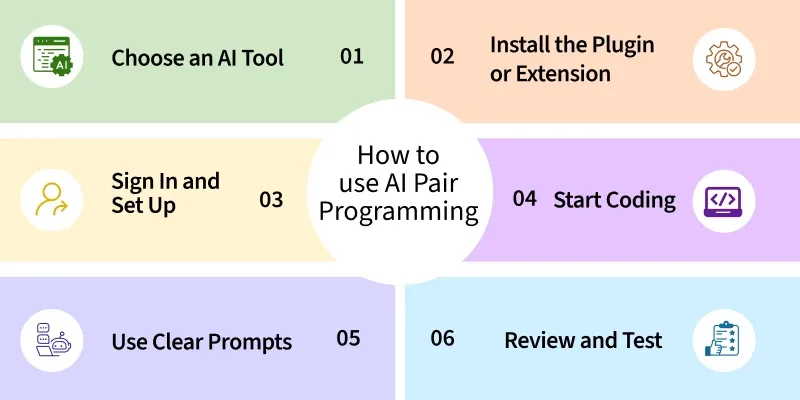
Pick an AI coding assistant that suits you popular ones are GitHub Copilot, Tabnine, Codeium or Replit Ghostwriter.
Step 2: Install the Plugin or Extension
Install the AI assistant’s extension in your preferred IDE like VS Code, JetBrains or your online editor. Most tools have easy setup guides.
Step 3: Sign In and Set Up
Create an account if needed and sign in. Some tools may ask for access to your project files to give better suggestions.
Step 4: Start Coding
Write your code as you normally would. As you type, you’ll see real time suggestions for lines, functions or entire blocks of code.
Step 5: Use Clear Prompts
When needed write a comment or instruction clearly like 'Create a REST API endpoint for user login' and let the AI generate the code.
Step 6: Review and Test
Always read, test and refine the AI generated code to make sure it’s correct and secure. Don’t blindly accept suggestions.
Applications
Rapid Prototyping: AI pair programming is very useful for quickly turning ideas into working code so you can test features and get feedback faster.
Boilerplate Code Generation: It saves time by automatically writing repetitive or standard code like file structures, configuration files or API endpoints.
Debugging Assistance: The AI can help spot mistakes in your code, suggest fixes and sometimes explain why an error happens making debugging easier.
Code Refactoring: It can suggest cleaner ways to write existing code, improve readability and make your projects more maintainable.
Collaborative Development: It acts like a virtual coding partner, giving you instant feedback and ideas which is helpful when you’re working solo or in small teams.
Advantages
Faster Coding: AI pair programming speeds up your work by suggesting code, completing functions and writing repetitive parts so you don’t have to do everything manually.
Better Focus and Flow: It helps you stay in the coding zone because you don’t have to keep pausing to search for syntax, examples or boilerplate code.
Learning Support: You get to learn new ways to solve problems, understand best practices and explore unfamiliar frameworks with help from the AI’s suggestions.
Idea Prototyping: It makes it easier to test ideas quickly and see if they work without spending too much time writing drafts from scratch.
Disadvantages
Over Reliance Risk: Depending too much on AI can weaken your problem solving, debugging and core coding skills if you don’t practice doing things yourself.
Hidden Bugs: AI generated code might look fine but could have subtle bugs, inefficiencies or security flaws so you always need to review it carefully.
Limits with Complex Logic: For tasks that need deep domain knowledge or very custom logic AI pair programming might generate generic suggestions that don’t fully fit.
Privacy Concerns: Using AI tools means your code might be processed on external servers which can be risky if you’re working with sensitive or proprietary projects.