Google’s Agent Development Kit (ADK) is an open-source framework that helps developers build, test, evaluate and deploy autonomous AI agents and multi-agent systems. Unlike basic prompt-based approaches, ADK is designed like real software development, with modules, tools, testing and monitoring. It works with any AI model but is deeply integrated with Google’s ecosystem including Gemini and Vertex AI. ADK provides easy-to-use building blocks for agents, tools, memory, orchestration patterns, evaluation and deployment.
Agent: the core execution unit i.e autonomous, goal-driven and able to call tools, consult memory and interact with users.
Tools: modular capabilities the agent calls to act in the world (APIs, DBs, other agents, long-running ops). ADK ships with many built-in tools and adapters.
Runners / Executors: components that run agents (local dev server, cloud infra, managed Vertex runtimes).
Memory & Artifacts: mechanisms to store agent state, knowledge and artifacts across sessions (supports retrieval tools).
Workflows / Orchestration primitives: sequential, parallel, loop constructs and patterns for coordinating multiple agents into complex applications.
Telemetry & evaluation: logging, metrics and evaluation harnesses for reproducible testing and monitoring.
Need of ADK
Software engineering-first approach: ADK introduces structure (modules, unit-testable components, telemetry) rather than prompt-scripts which improves maintainability and production readiness.
Multi-agent orchestration: It makes building, coordinating and debugging multi-agent workflows (parallel, sequential, looped) much easier.
Tool ecosystem & connectivity: It supports many tool types (APIs, databases, search, apps) and integrates with Google Cloud services, enabling agents to perform real-world actions.
Evaluation & safety: It includes evaluation frameworks to measure agent behaviour and reliability — essential for iterating safely.
Agent Architecture and Design Patterns
Modern agentic systems often require multiple agents collaborating intelligently. Google ADK provides a structured way to define and orchestrate these patterns efficiently.
Single-Purpose Agents: Focused, lightweight agents designed to perform one task well — such as fetching calendar data, summarizing documents or converting currencies. These are ideal for scenarios requiring reliability and simplicity.
Multi-Agent Pipelines: A structured sequence where specialised agents work in stages. For example, a Research Agent gathers data, a Summarizer Agent condenses insights and an Execution Agent performs an action. ADK simplifies this chaining with orchestration primitives.
Orchestrator–Specialist Framework: A higher-level Orchestrator Agent coordinates multiple Specialist Agents, each handling domain-specific logic (e.g., data retrieval, human interaction, report generation). This pattern scales well for enterprise workflows.
Tool-as-Agent Abstraction: ADK allows developers to encapsulate external APIs or other agents as callable tools. This means an agent can treat another agent as a tool hence promoting modularity and reusable design across applications.
Agent Development Lifecycle
Building and deploying agents through ADK follows a systematic, engineering-oriented lifecycle that emphasizes testing, observability and governance.
Prototype Locally: Use the official ADK quickstarts (Python or Java) to scaffold agents in a sandboxed local environment. The local developer UI allows fast iteration and debugging.
Implement Testing and Validation: ADK’s code-first approach promotes robust testing practices. Developers can create unit tests for agent logic and integration tests for multi-agent workflows to ensure consistent results.
Evaluate Behavior and Performance: The built-in evaluation harness enables scenario-driven testing to measure correctness, consistency and reliability across multiple runs. This is crucial before production deployment.
Deploy Securely on Vertex AI or Containers: Choose a deployment strategy i.e either containerized workloads or fully managed Vertex AI runtimes, with telemetry and observability pre-integrated for performance monitoring.
Monitor, Iterate and Govern: After deployment, developers can analyze logs and telemetry data, retrain or fine-tune agent prompts and enforce compliance or access policies using ADK’s governance tools.
Integrations and Extensibility
Google ADK is designed to fit seamlessly into modern AI and cloud ecosystems. It supports a wide range of integrations and connectors that make it adaptable for both enterprise and experimental workflows.
Native Google Cloud Integrations: Direct connectors for Vertex AI, BigQuery and Application Integration enable agents to access structured data, invoke LLMs and interact with enterprise apps within a secure GCP environment.
Search and Knowledge Retrieval: Built-in connectors for enterprise search, web loaders and retrieval chains make information retrieval straightforward. These tools empower retrieval-augmented generation (RAG)-style applications.
Third-Party and OpenAPI Connectors: The framework supports external APIs via OpenAPI specifications, allowing agents to interface with CRMs, data warehouses and SaaS tools without custom integration code.
Framework Compatibility (LangChain, LlamaIndex, etc.): ADK’s modular design allows developers to integrate it with existing agentic frameworks like LangChain or LlamaIndex, ensuring interoperability with diverse ecosystems.
Implementation
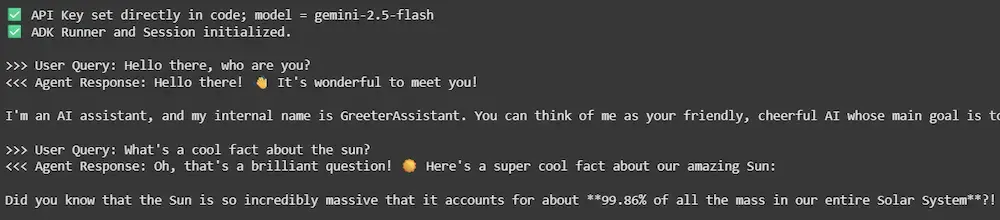
Let's see an example to see how ADK works:
Step 1: Install Dependencies
Let's install all the necessary packages and libraries,
Step 2: Load API Key and Choose Model
We will load our Gemini API key and choose the model,