|
VOOZH | about |
|
VOOZH | about |
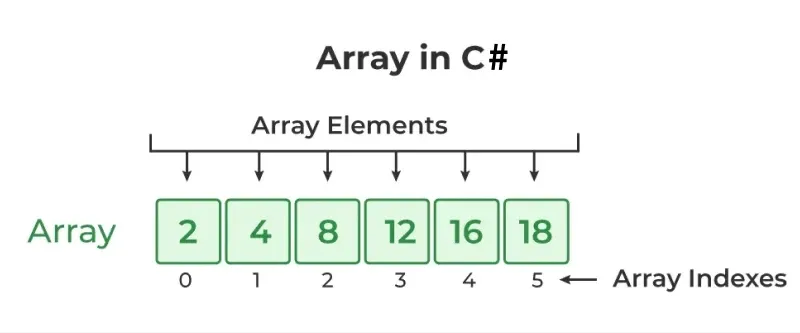
An array is a linear data structure that stores a fixed-size sequence of elements of the same data type in contiguous memory locations. It allows accessing elements using an index, starting from 0.
Example: Declaring and initializing an array
The following figure shows how array stores values sequentially:
<Data Type>[ ] <Name_Array>
Here,
Note : Only Declaration of an array doesn’t allocate memory to the array. For that array must be initialized.
Array is a reference type so the new keyword used to create an instance of the array. We can assign initialize individual array elements, with the help of the index.
Syntax:
type [ ] < Name_Array > = new < datatype > [size];
Here, type specifies the type of data being allocated, size specifies the number of elements in the array and Name_Array is the name of an array variable. And new will allocate memory to an array according to its size.
Examples: To Show Different ways for the Array Declaration and Initialization
Syntax | Use Cases | Example |
|---|---|---|
<data_type>[] <arr_name> = new <data_type>[size]; | Defining array with size, but not assigns values | int[] arr1 = new int[5]; |
<data_type>[] <arr_name> = new <data_type>[size]{ array_elements}; | Defining array with size and assigning the values at the same time | int[] arr2 = new int[5]{1, 2, 3, 4, 5}; |
<data_type>[] <arr_name> = { array_elements}; | The value of the array is directly initialized without taking its size | int[] intArray3 = {1, 2, 3, 4, 5}; |
Arrays can be initialized after the declaration. It is not necessary to declare and initialize at the same time using the new keyword.
Example:
// Declaration of the array
string[] str1, str2;// Initialization of array
str1 = new string[5]{ “Element 1”, “Element 2”, “Element 3”, “Element 4”, “Element 5” };
str2 = new string[5]{ “Element 1”, “Element 2”, “Element 3”, “Element 4”, “Element 5” };
Note :
Initialization without explicitly specifying size is valid when values are provided directly.
Example: Wrong Declaration for initializing an array
// Compile-time error: must give size of an array
int[] intArray = new int[];// Error : wrong initialization of an array
string[] str1;
str1 = {“Element 1”, “Element 2”, “Element 3”, “Element 4” };
We can access an array value through indexing, placed index of the element within square brackets with the array name.
Example: Accessing Array elements using different loops
For loop : 10 20 30 40 50
For-each loop : 10 20 30 40 50
while loop : 10 20 30 40 50
Do-while loop : 10 20 30 40 50
There are three types of Arrays C# supports as mentioned below:
A one-dimensional array stores elements in a single linear sequence. All values of this array are stored contiguously starting from 0 to the array size.
For example, declaring a single-dimensional array of 5 integers :
int[] arrayint = new int[5];
The above array contains the elements from arrayint[0] to arrayint[4]. Here, the new operator has to create the array and also initialize its element by their default values. Above example, all elements are initialized by zero, Because it is the int type.
Example:
Sun Mon Tue Wed Thu Fri Sat
The multi-dimensional array contains more than one row to store the values. It is also known as a Rectangular Array in C# because it’s each row length is same. It can be a 2D-array or 3D-array or more. To store and access the values of a multidimensional array, nested loops are required.
Syntax:
// creates a two-dimensional array of four rows and two columns.
int[,] intarray = new int[4, 2];
//creates an array of three dimensions, 4, 2 and 3
int[,,] intarray1 = new int[4, 2, 3];
Example: Demonstration of multi- dimensional array
arr[1][0][1] : 8
arr[1][1][2] : 12
Jagged arrays (array of arrays) allow storing arrays of different sizes.
For detailed explanation, refer to the dedicated Jagged Arrays article: Jagged Arrays in C#