|
VOOZH | about |
|
VOOZH | about |
The Hello World Program is the most basic program when we dive into a new programming language. This simply prints "Hello World!" on the console. In C#, a basic program consists of the following:
Example: Hello World program in C#.
Hello World!
This program is a simple C# console application that prints Hello World to the screen. Every C# program starts execution from the Main method.
Inside the namespace, we define a class Geeks which contains the Main method. The Main method is special because it acts as the entry point for the program.
There are generally three ways to compile and execute a C# program.
Now follow the below steps:
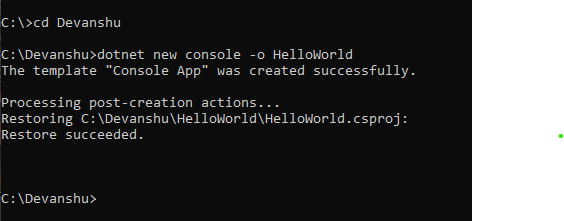
Step 1: Open a command prompt and create an empty .NET project using the following command:
dotnet new console -o <Project-Name>
In <Project-Name>, specify the desired project name (e.g., HelloWorld). This command creates an empty project template with all required packages to run a .NET project.
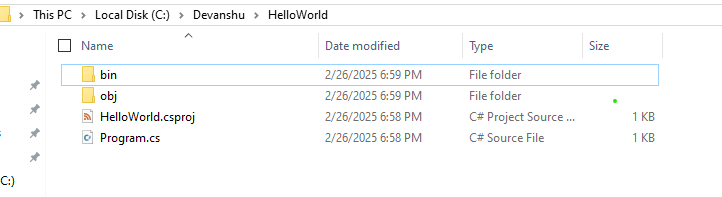
👁 DotNETProjectCreationThis is the complete folder structure which is created using the above command.
👁 FolderStructure
Program.cs is the entry point of a C# project where the main code is written. It can be opened in IDEs like Visual Studio or VS Code and contains the default starter code for the application.
This is a simple program we can run it using the following command mentioned in the below steps.
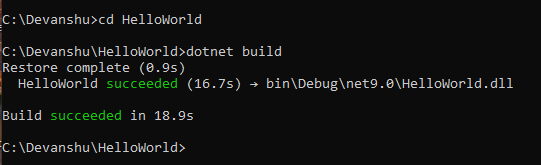
Step 2: Now we need to build the project using the command mentioned below.
Navigate to the project directory:
cd HelloWorld
Build the project using:
👁 dotNETBuildCMDdotnet build
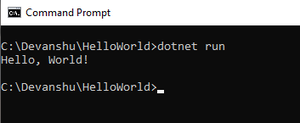
Step 3: Now to see the output run the command mentioned below.
👁 DotnetRunCMDdotnet run
This will execute the default Program.cs file and display output in the console.