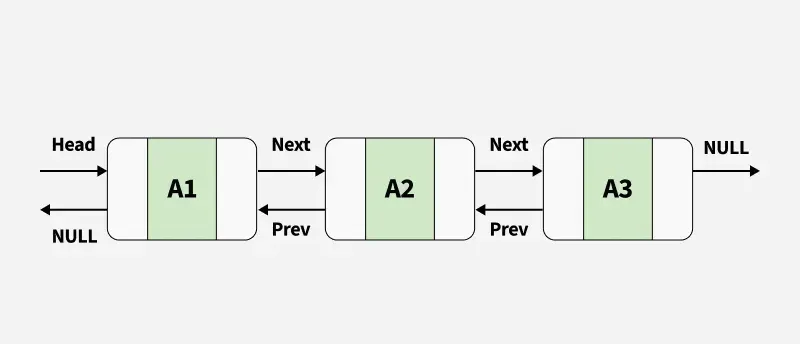
A LinkedList<T> in C# is a doubly linked list that allows fast insertion and deletion of elements at any position. Unlike arrays or lists, it does not use contiguous memory. Instead, each element (called a node) contains the value and references to both the previous and next nodes.
We can remove nodes and reinsert them, either in the same list or another list, resulting in no additional objects allocated on the heap.
Every node in a LinkedList<T> object is of the type LinkedListNode<T>.
It can store duplicate elements of the same type.
LinkedList does not have a fixed capacity, it dynamically grows as elements are added.
Interface Implementation
In C#, the LinkedList<T> class implements the interfaces which are listed below:
ICollection<T>
IEnumerable<T>
IEnumerable
ICollection
Constructors
In C#, the LinkedList<T> class has 3 constructors which are used to create a LinkedList which are as follows:
LinkedList<T>(): This constructor is used to create an instance of the LinkedList class that is empty.
LinkedList<T>(IEnumerable<T>): This constructor is used to create an instance of the LinkedList class that contains elements copied from the specified IEnumerable and has sufficient capacity to accommodate the number of elements copied.
LinkedList(SerializationInfo, StreamingContext): This constructor is used to create an instance of the LinkedList class that is serializable with the specified SerializationInfo and StreamingContext.
Creating a LinkedList
Let’s see how to create a LinkedList using LinkedList<T>() constructor:
Step 1: Include System.Collections.Generic namespace in your program with the help of "using" keyword.
using System.Collections.Generic;
Step 2: Create a LinkedList using LinkedList class
LinkedList <String> l = new LinkedList<String>();
Performing Different Operations on LinkedList
1. Adding Elements
LinkedList class provides four different methods to insert nodes and these methods are listed below:
AddAfter(): Thismethod is used to add a new node or value after an existing node in the LinkedList.
AddBefore(): Thismethod is used to add a new node or value before an existing node in the LinkedList.
AddFirst(): This method is used to add a new node or value at the start of the LinkedList.
AddLast(): This method is used to add a new node or value at the end of the LinkedList.
Example: This example demonstrates how to create a LinkedList<int>, adding elements to it using AddLast() and displaying the elements using a foreach loop.
Output
List of numbers:
10
20
30
40
50
2. Removing Elements
LinkedList<T> class provides five different methods to remove elements and the methods are:
Clear(): Clear() method is used to remove all nodes from the LinkedList.
Remove(LinkedListNode): Remove(LinkedListNode) method is used to remove the specified node from the LinkedList.
Remove(T): Remove(T)method is used to remove the first occurrence of the specified value from the LinkedList.
RemoveFirst(): RemoveFirst() method is used to remove the node at the start of the LinkedList.
RemoveLast(): RemoveLast() method is used to remove the node at the end of the LinkedList.
Example:
Output
Initial List of Numbers: 10 20 30 40 50 60

After Removing the First Element: 20 30 40 50 60

After Removing Number 20: 30 40 50 60

After Removing the First Element Again: 40 50 60

After Removing th...
3. Checking the Availability of Elements in the LinkedList
LinkedList class provide Contains(T) method to check if the element is present in the LinkedList or not.
Output
The element 20 is present in the LinkedList: True
The element 100 is present in the LinkedList: False