|
VOOZH | about |
|
VOOZH | about |
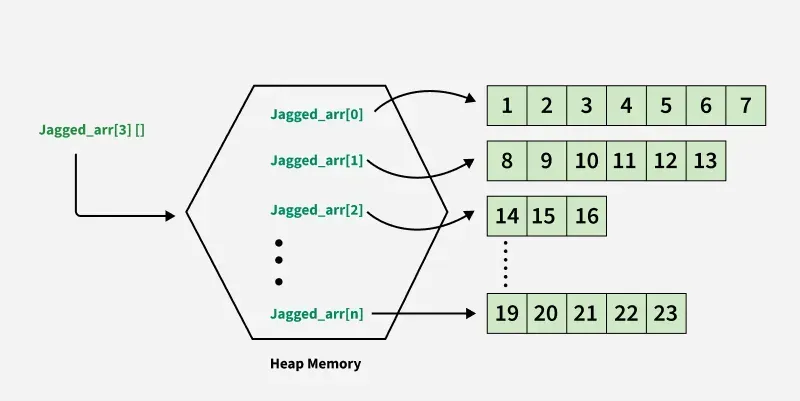
A jagged array is an array of arrays, where each element is itself an array that can have a different length. Rows are fixed at declaration, but columns can vary. It can also combine with multidimensional arrays.
Example: Declaring a jagged array with 3 rows
Here's a visual representation how Jagged Arrays in C# are stored in Heap Memory:
For declaring we specify the type of elements inside the inner arrays and the number of rows in the outer array. Unlike multi-dimensional arrays, where the size of all dimensions is fixed, a jagged array allows for variable lengths of inner arrays.
Syntax
data_type[ ][ ] name_of_array = new data_type[rows][ ]
Method 1: Initialized with indexes.
// Add in the first row
jagged_arr[0][0] = 1;
jagged_arr[0][1] = 2;
Method 2: We can directly insert the arrays in each row of the jagged array in this way.
// Each row having different size of array as a element
jagged_arr[0] = new int[] {1, 2, 3, 4};
jagged_arr[1] = new int[] {11, 34, 67};
There are two methods to perform these operations one is
Method 1: Using the Direct Method
int[][] jagged_arr = new int[][] {
new int[] {1, 2, 3, 4},
new int[] {11, 34, 67}
};
Method 2: Using Short-hand Method.
By default, the elements of a jagged array are initialized to null. Each inner array must be explicitly created using the new keyword before assigning values.
int[][] jagged_arr = {
new int[] {1, 2, 3, 4},
new int[] {11, 34, 67}
};
Example: Basic program to implement jagged array
Row 0: 1 2
Row 1: 3 4 5
Row 2: 6 7 8 9
We can access elements in a jagged array using two indices. The first index is from the outer array and the second index corresponds to the element in the row of the inner array
Example: In this example, we learn how to access and modify elements of a jagged array
10
Accessed value: 6
To iterate through a jagged array, we can use nested loops. The outer loop iterates through the rows and the inner loop iterates through the elements in each row. Example:
arr[0][0, 0] => 1 arr[0][0, 1] => 3
arr[0][1, 0] => 5 arr[0][1, 1] => 7

arr[1][0, 0] => 0 arr[1][0, 1] => 2
arr[1][1, 0] => 4 arr[1][1, 1] => 6
arr[1][2, 0] => 8 arr[1][2, 1] => 10