|
VOOZH | about |
|
VOOZH | about |
Given data, now our task is to read data from the stream and cast data to chars in C#. So to do this task we use the following class and methods:
Syntax:
Stream object = new FileStream(path, FileMode.Open)
Where path is the location of your file - @"c:\A\data.txt" and FileMode is the mode of the file like reading and writing.
Syntax:
FileStream_object.ReadByte()
Example:
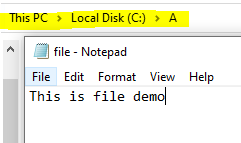
Let us consider a file named "file.txt" is present in the A folder of C drive like as shown in the below image:
👁 ImageNow we read data from stream and cast data to chars. So to this follow the following approach.
Approach
- Read the file named "file.txt" using FileStream with the help of specified path.
- Read the data in file byte by byte using ReadByte() method until it reaches end of file.
while ((obj = s.ReadByte()) != -1)
{

 // Convert the data into chars and display
 Console.Write("{0} ", (char)obj);
}
- Display file data into chars using Casting to char.
(char)obj
Output:
T H I S I S F I L E D E M O