|
VOOZH | about |
|
VOOZH | about |
In C#, threads are the smallest units of execution that allow concurrent execution of code, enabling multiple tasks to run concurrently within a single process.
Example 1: Demonstration of a Single-Threaded Console Application with a Main Method.
Hello, Geek
Explanation: In the above example, the Main method simply writes the message "Hello, Geek" to the console using the Console.WriteLine method. The Main method must be a static method and can return either void or int. It may also accept a string array (string[] args) as a parameter for command-line arguments.
Example 2: Main Method That Takes Command-Line Arguments
Output:
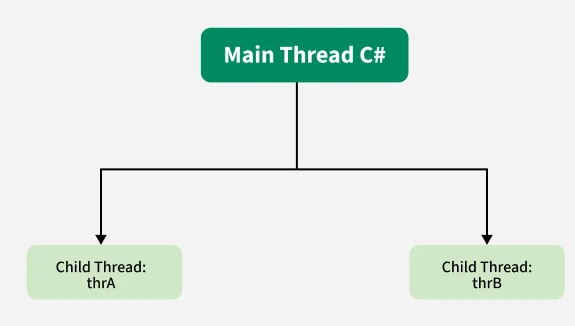
No arguments were passed.When a C# program starts up, one thread begins running immediately. This is usually called the main thread of our program.
Properties of the Main Thread:
Example: Main Thread and Child Threads
Welcome to the Main thread
Welcome to the Child thread
Welcome to the Child thread
Explanation:
To access the main thread, you can use the Thread.CurrentThread property. This property returns a reference to the current thread. By using it inside the main thread, you can get a reference to the main thread itself.
Example: Demonstration of How to access the main thread in C#
Main thread does not have a name

The priority of the main thread is: Normal

The name of the main thread is: Main Thread
Explanation: This example demonstrates how to access the main thread using Thread.CurrentThread. It checks whether the main thread has a name (by default, it does not), displays the priority of the main thread, sets the name of the main thread, and then displays the new name.
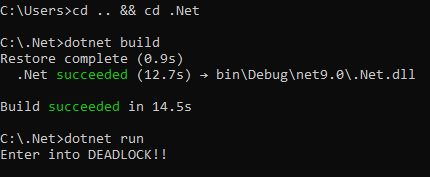
A deadlock occurs when two or more threads are waiting on each other indefinitely, preventing further execution, causing the program to hang. This can be demonstrated using Thread.CurrentThread.Join(), which tells the main thread to wait for itself to complete, resulting in a deadlock.
Example:
Output:
Runtime Error:
The program hangs due to a deadlock caused by the thread waiting on itself.
Explanation: The statement “Thread.CurrentThread.Join();” , will tell the Main thread to wait for this thread (i.e. wait for itself) to die. Thus the Main thread waits for itself to die, which is nothing but a deadlock.