|
VOOZH | about |
|
VOOZH | about |
Multidimensional arrays can be termed as arrays of arrays, extending the capabilities of one-dimensional arrays to store data in a structured format.
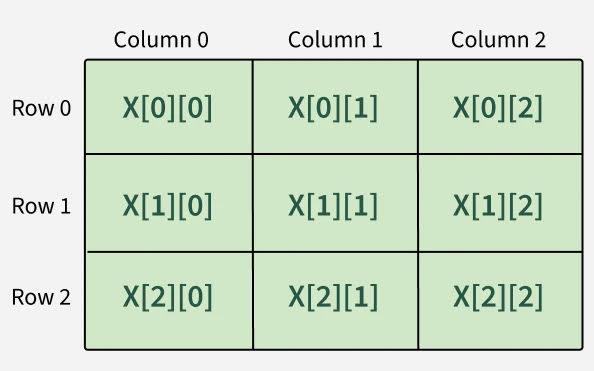
Example: Declaring and initializing a 2D array (3 rows × 3 columns)
data_type[ , , ... ] array_name = new data_type[size1, size2, ..., sizeN];Parameters:
Two-Dimensional Array is the first step to make an array multidimensional. 2-D array can be interpreted as a collection of multiple One-Dimensional Arrays.
Syntax:
// Initializing
data_type[ , ] arr = new data_type[ rows , col ];
The above syntax is a good way only when we need for user input array. For other case, we can initialize and declare array together.
Example:
// Initializing and Declaration
int[,] arr= { {1,2},{3,4});
After creating the array we need make sure that we can access and iterate the elements of the Array.
Just like any other programming language an array can be accessed using the index of the array. For an example element at ith row and jth column can be accessed using arr_name[i,j].
Example:
Elements of Arrays:
1 2
3 4
Array is just not limited to predefined values we can take input from the user. So, to create a user input array follow the steps mentioned below:
Example:
Input:
Enter arr[0][0]: 1
Enter arr[0][1]: 2
Enter arr[0][2]: 3
Enter arr[1][0]: 4
Enter arr[1][1]: 5
Enter arr[1][2]: 6
Output:
Elements of Array:
1 2 3
4 5 6
A 3D Array is just a complex representation of Multidimensional Array. It can be said that a 3-Dimensional Array is a combination of multiple 2-Dimensional Array.
Example: Taking input and iterating the three dimensional array.
Input:
Enter arr[0][0][0]: 1
Enter arr[0][0][1]: 2
Enter arr[0][1][0]: 3
Enter arr[0][1][1]: 4
Enter arr[1][0][0]: 5
Enter arr[1][0][1]: 6
Enter arr[1][1][0]: 7
Enter arr[1][1][1]: 8
Output:
Elements of the Array:
1 2
3 4
5 6
7 8
There are some common heard use applications of Multi-Dimensional Arrays: