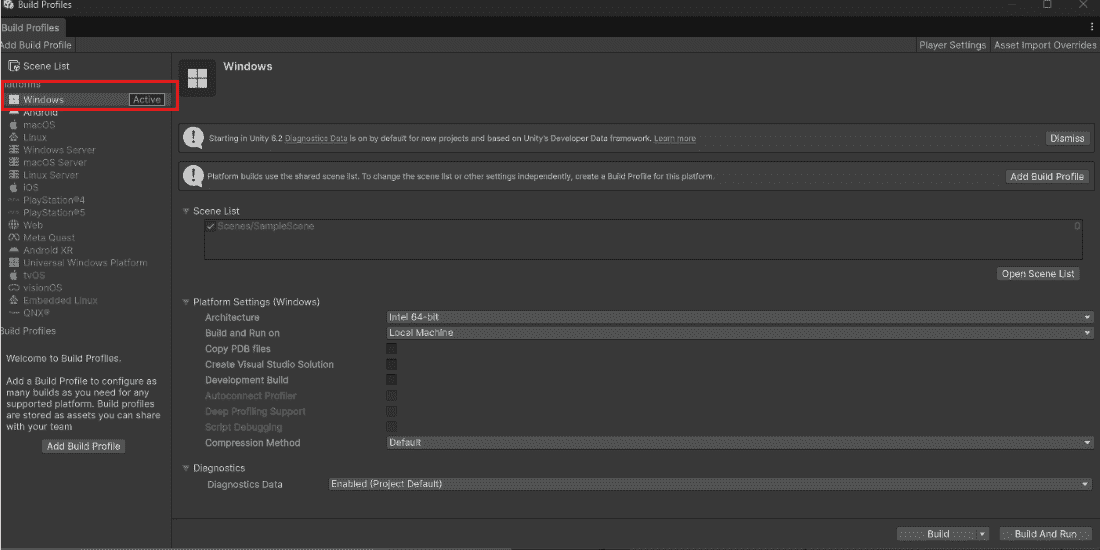
PC build creates a standalone executable file. Players can run it without Unity installed. Windows creates .exe, Mac creates .app and Linux creates .x86_64.
No additional software required to play One-click execution Easy to share with friends Step 1: Switch Platform to PC File - Build Settings. Click "PC, Mac & Linux Standalone". Click "Switch Platform". Select Target Platform: Windows. 👁 Switch-Platform-to-PC-In-unity Switch Platform to Window In Unity Step 2: Configure Architecture In Build Settings, choose architecture:
x86: Best for old 32-bit computers (rare). x86_64: Best for most modern PCs (recommended). Arm64: Best for new ARM-based Windows laptops. Note : Most games should use x86_64.
Step 3: Configure Player Settings Click "Player Settings" button in Build Settings. Important settings for PC:
Setting Where Recommended Company Name General Your name Product Name General Game name Default Icon Icon 256×256 or 512×512 PNG Fullscreen Mode Resolution Fullscreen Window Default Screen Width Resolution 1280 Default Screen Height Resolution 720 Supported Aspect Ratios Resolution 16:9, 16:10, 4:3
Step 4: Configure Resolution and Display Player Settings -> Resolution and Presentation:
Fullscreen Mode: Fullscreen Window (allows Alt+Tab). Default Screen Width: 1280. Default Screen Height: 720. Allow Fullscreen Switch: Enabled (Checked). Resizable Window: Enabled (Checked, optional). Step 5: Build the Game Add all scenes to Scenes in Build. Click "Build" button. Choose folder (create new folder for build). Name the executable (example: MyGame.exe). Click Save and wait. Build and Run (Quick Testing) Click "Build and Run" instead of "Build". Unity builds AND launches the game automatically. Useful for quick testing without navigating folders. Common PC Build Issues Game shows red errors. Check Console for errors before building. Game runs slow in build. Enable Development Build and use Profiler. Missing DLL errors. Reinstall Unity or check antivirus. Black screen on launch. Update your graphics drivers. Antivirus flags your .exe. Add the game folder to antivirus exception list.