VOOZH about

URL: https://www.geeksforgeeks.org/c-sharp/scriptableobjects-in-unity/

⇱ ScriptableObjects In Unity - GeeksforGeeks


  • Courses
  • Tutorials
  • Interview Prep

ScriptableObjects In Unity

Last Updated : 4 May, 2026

ScriptableObjects are a special type of data container used to store and manage game data independently of scene objects. They help in organizing data efficiently and reducing memory usage by allowing multiple objects to share the same data.

👁 ScriptableObjects-In-Unity
ScriptableObjects In Unity

Creating a ScriptableObject

Step 1: Create this script.

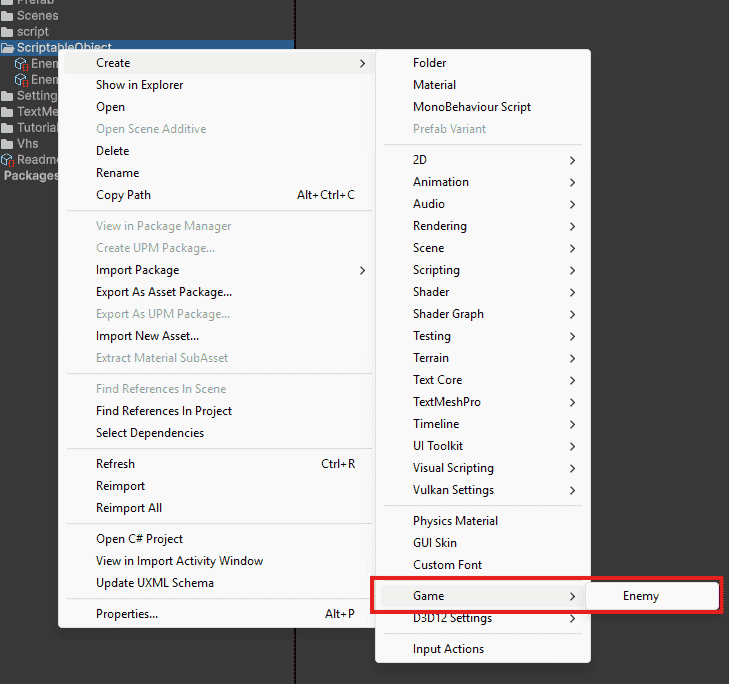
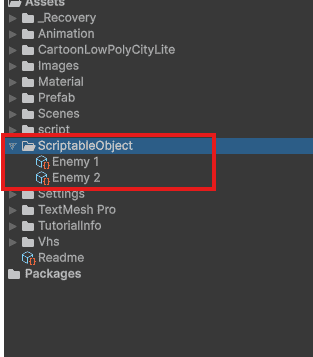
Step 2: Right-click Project - Create - Game - Enemy.

Step 3: Fill values in Inspector (Name: Goblin, Health: 50, Damage: 10).

Output:

👁 Creating-a-ScriptableObject-In-Unity
Creating a ScriptableObject In Unity

Using ScriptableObject

Attach the ScriptableObject to your enemy script as a public field. Then drag the asset from Project into that field in Inspector.

You can create 50 enemies in your scene. All 50 will reference the same Goblin ScriptableObject. If you change Goblin health from 50 to 60 in the asset, all 50 enemies automatically have 60 health.

Real Example for Weapon System

Create a ScriptableObject for weapons. Each weapon type becomes its own asset.

Create three assets from this class:

  • Sword (damage 20, fireRate 1.5).
  • Bow (damage 15, fireRate 0.8).
  • Axe (damage 30, fireRate 1.0).

Now attach the weapon script to any character and drag any weapon asset into the data field. The character will use that weapon's stats automatically.

ScriptableObject vs MonoBehaviour

ScriptableObject

  • Used to store data only (no gameplay logic).
  • Exists as an asset in the Project window.
  • A single asset can be shared across multiple GameObjects.
  • Helps reduce memory usage by avoiding duplicate data.
  • Best for: Game settings, Item data (weapons, inventory), Configurations.

MonoBehaviour

  • Used to handle data + behavior (logic).
  • Attached to GameObjects in the scene.
  • Each GameObject has its own separate copy of values.
  • Used for gameplay features like movement, input, AI.
  • Best for: Player scripts, Enemy behavior, Game mechanics.
Comment
Article Tags:
Article Tags:

Explore