|
VOOZH | about |
|
VOOZH | about |
Whether you're making a first-person shooter, a top-down action game or a space shooter, shooting is often the primary way players interact with enemies. Implementing shooting mechanics correctly is essential for responsive and satisfying gameplay.
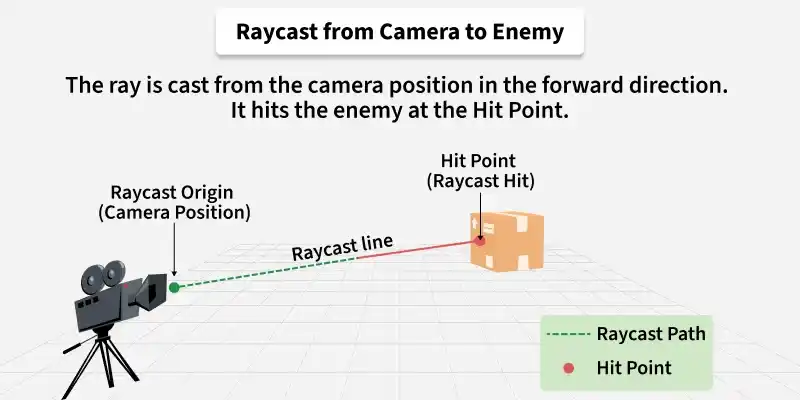
Raycast shooting creates an invisible line from the camera or gun forward. It instantly hits whatever comes first in its path. This is ideal for guns, lasers, and snipers where bullets travel too fast to see.
Example:
Physics.Raycast() casts an invisible line from the camera forward. If it hits something within range, it returns true and stores hit information in the hit variable.
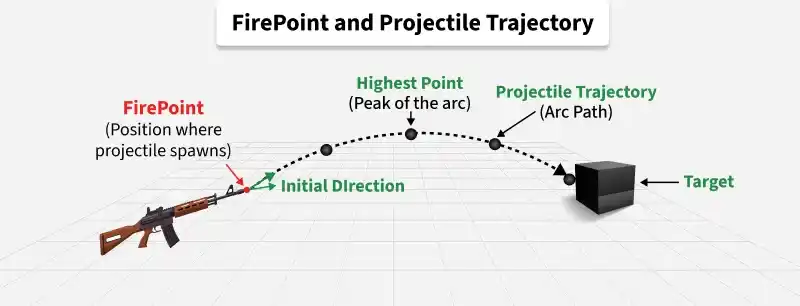
Projectile shooting creates a physical object that flies through the air with real physics. The bullet has travel time and can arc, bounce, or explode. This is ideal for rockets, arrows, and grenades where bullet visibility adds to the gameplay feel.
Example:
The projectile gets forward velocity at start and destroys itself after lifetime seconds to prevent cluttering the scene with old bullets.
Example:
firePoint is an empty GameObject placed at the gun muzzle. Instantiate() creates the bullet at that exact position and rotation.
Without a cooldown, a single mouse click would fire hundreds of bullets in one frame. Fire rate adds a delay between shots, making shooting feel controlled and balanced.
Example:
Time.time stores the total game time since start. nextFireTime stores when the next shot is allowed. A smaller fireRate value means faster shooting.
Ammo adds strategy to combat. Players must manage their bullets and find time to reload instead of holding down the fire button endlessly.
Example:
The code checks for remaining ammo before allowing a shot. Each successful shot reduces ammo by one. Press R to restore ammo to full.