VOOZH about

URL: https://www.geeksforgeeks.org/c-sharp/state-machines-in-unity/

⇱ State Machines In Unity - GeeksforGeeks


  • Courses
  • Tutorials
  • Interview Prep

State Machines In Unity

Last Updated : 4 May, 2026

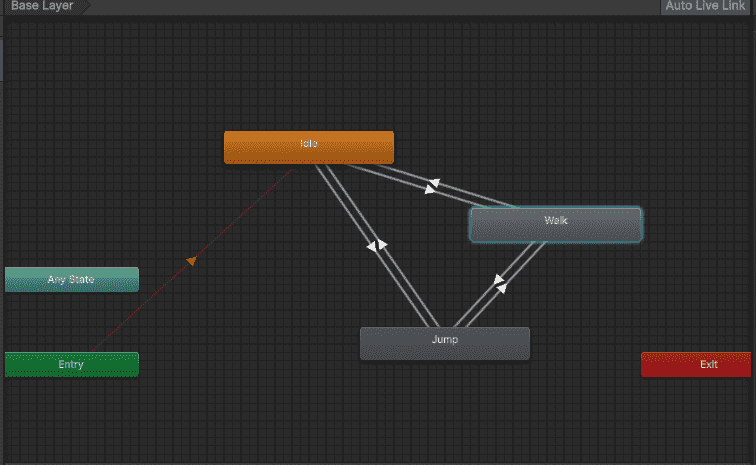
A state machine controls which behavior is active at any time. Only one state runs at a time. When conditions change, the machine switches to a different state.

  • Player standing still - Idle state
  • Player presses arrow - Walk state
  • Player presses space - Jump state
👁 States-In-Unity
States In Unity

Basic State Machine Structure

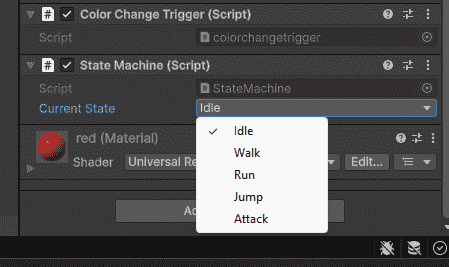
First, create an enum to list all possible states.

Then create a manager script that switches between states.

Output:

👁 State-Machine-Structure-In-Unity
Basic State Machine In Unity

Complete Player State Machine Example

Here's a full working example for a player character

State Machine with Separate Classes

For complex games, create separate classes for each state.

And the state machine manager:

When to Use a State Machine

Good for

  • Player behavior (idle, walk, jump, attack).
  • Enemy AI (patrol, chase, attack, flee).
  • Game states (menu, playing, paused, game over).
  • Any system with multiple modes or transitions.

Not needed for

  • Simple moving platforms.
  • Static obstacles.
  • Single-state objects (no behavior change).
  • Very basic scripts with no state switching.
Comment
Article Tags:
Article Tags:

Explore