|
VOOZH | about |
|
VOOZH | about |
Games run at different frame rates on different devices. A game running at 30 FPS on a mobile phone and 144 FPS on a gaming PC will behave very differently if your code depends on frame rate. Unity provides time-related properties to make your game run consistently on any device.
Without proper time handling, your game will run faster on powerful machines and slower on weak ones.
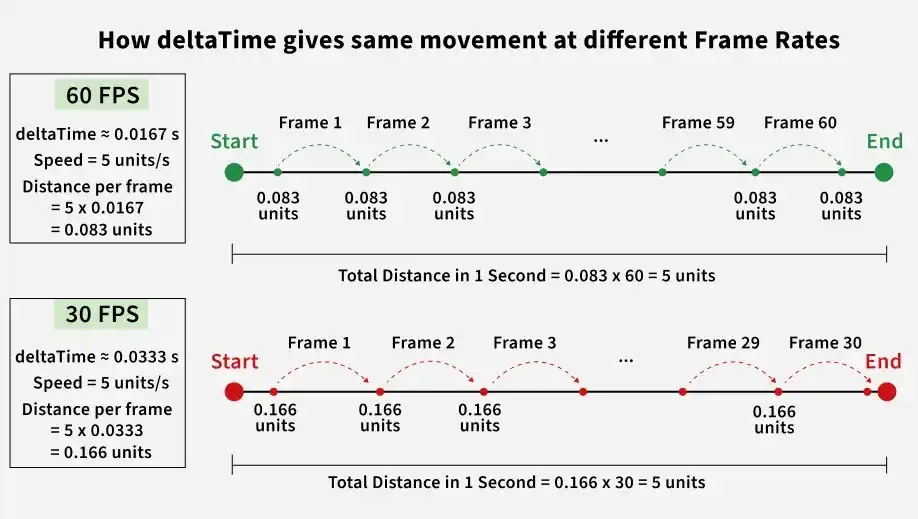
Time.deltaTime is the time in seconds since the last frame. Multiply by it to convert "per frame" to "per second".
How it works:
Moves the object smoothly at a constant speed regardless of frame rate.
transform.Translate(speed * Time.deltaTime, 0, 0);
Rotates the object at a consistent angular speed on any device.
transform.Rotate(0, rotateSpeed * Time.deltaTime, 0);
Gradually changes a value towards a target over time, independent of frame rate.
health = Mathf.Lerp(health, targetHealth, smoothSpeed * Time.deltaTime);
Decreases a timer value each frame based on real time, ensuring cooldowns last the correct duration.
For physics-related code, use FixedUpdate() instead of Update().
Key differences: