 |
VOOZH | about |
|
VOOZH | about |
Network Security Groups (NSG) play a crucial role in securing the virtual environment within Azure. Azure provides various services to help users secure their applications and the infrastructure that users create.
Table of Content
Azure is the leading cloud computing platform provided by Microsoft that offers various range of services and solutions for users to build, deploy, and manage applications on the pay-as-you-use module. To know more about Microsoft Azure refer to this Article - Azure Tutorials.
Azure networks are virtual networks that allow users to connect their organizational resources and services. All the things related to Azure Networks are monitored and maintained by Azure. So user has to just create their virtual networks, subnets, IP addresses, network interfaces, and other network components.
Consider a scenario where we have five servers: three dedicated to handling web application traffic, one managing business logic, and an additional server hosting our database. As per our organization's architectural decision, we segment these servers into subnets. For instance, one subnet is designated for microservices and web application traffic, while another subnet is dedicated to handling our data-tier applications. These subnets must reside within a virtual network.
Without additional configuration, if we create an infrastructure in this manner, all incoming traffic from the internet would be allowed to reach all these servers, and inter-server communication would also be unrestricted. Consequently, every component could communicate with each other a situation we want to avoid. It's imperative that internet traffic doesn't reach our database, and not all services should have unrestricted communication with one another. This is where NSG comes into play.
By placing a Network Security Group on the first subnet, we can permit traffic from the internet to reach our web-tier services. Simultaneously, by implementing an NSG on the second subnet, we can prevent internet traffic while still allowing communication from our internal services.
NSG is a tool for activating rules that manage traffic to the Virtual networks. Within NSG, an inbound rule refers to incoming traffic requests, while an outbound rule relates to outgoing traffic requests. These rules align with our organizational policy, dictating the permissions for both incoming and outgoing access.
After the creation of NSG, there are default security rules that we can't change, but we can override those rules with custom rules. By default, NSG allows inbound and outbound traffic from the same virtual network.
Azure Network security provides custom control over the inbound and outbound traffic to the Azure services. It facilitates with secure cloud network by defining the network security groups with customized rules specifying what protocol, IP address, ports based traffic are allowed to Azure services. The following are the some of the key points:
Azure provides the default security rules for both incoming and outcoming traffic in each network security group that we create:
| Priority | Name | Source | Source Port Ranges | Destination | Destination Port Ranges | Protocol | Action |
|---|---|---|---|---|---|---|---|
| 100 | AllowVnetInBound | VirtualNetwork | * | VirtualNetwork | * | * | Allow |
| 200 | AllowAzureLoadBalancerInBound | AzureLoadBalancer | * | Any | * | * | Allow |
| 65000 | DenyAllInBound | Any | * | Any | * | * | Deny |
| Priority | Name | Source | Source Port Ranges | Destination | Destination Port Ranges | Protocol | Action |
|---|---|---|---|---|---|---|---|
| 100 | AllowVnetOutBound | VirtualNetwork | * | VirtualNetwork | * | * | Allow |
| 65000 | DenyAllOutBound | Any | * | Any | * | * | Deny |
Augement ed security rules in Azure network security groups provides the simplified definition for larger and complex network security policies. These rules lets to combine the multiple ports and explicit IP addresses and ranges into a single rule enhancing the clarity and see of understanding. The service tags or application security groups with augmented rules maintenance of security rule definitions ensuring the efficient management of network security policies.
Serivce Tags in Azure Neworks facilitates with simplified management of grouping all the commonly used Azure services with predefined IP address ranges. These tags allows the administrators to easily define the network security rules for the Azure services by reducing the complexity and enhancing its security. It associates the security rules with service tags and helps with administrators in ensuring the consistent and secured network access for Azure services across their environment.
Application Security Groups in Azure facilitates with simplifying the network security with managing the groups of virtual machines based on the application tiers or roles. These groups provides the administrators to define the network security rules based on the application level of constructs rather than the individual IP addresses. By associating Azure network security groups with network security rules it facilitates with dynamic and scalable policies to adapt the changes in the Azure environment.
Azure Network Security Groups filter the network traffic by letting in or out for the communication based on defining the rules, offering a crucial layer of security for Azure resources. The following aspects discusses on Azure network security groups filters:
It represents the data that leaving from the network to outside or a specific resources within a network. we have to restrict the data flow that going to outside to avoid it is not get collected to authorized users and unsecured networks. It typically subjects to the filtering and monitoring of outbound traffic to ensure a security, compliance and efficient resource utilization.
It facilitates with establishing the communication between the resources within the same subnet or virtual network. It often considered the trusted traffic but still requires the monitoring and ensuring potential security measures to prevent the authorized access or security breaches.
Step 1: Firstly Sign in to your Microsoft Azure Portal.Search for "Network Security Group" and click on respective.
👁 Click on Network Security Groupstep 2: Now, click on "Create," fill in the details in the Azure Portal, and click on "Review + Create." Finally, click on "Create."
👁 Creating Network Security GroupStep 3: After successfully creation of NSG click on "Go to resource".
👁 Successful creation of NSGsStep 4: To associate this NSG with a subnet or interface, click on the "Subnets" service interface from the left menu present under Settings section.
Step 5: Sign in to your Microsoft Azure Portal.Search for "Virtual Machine" and click on respective.
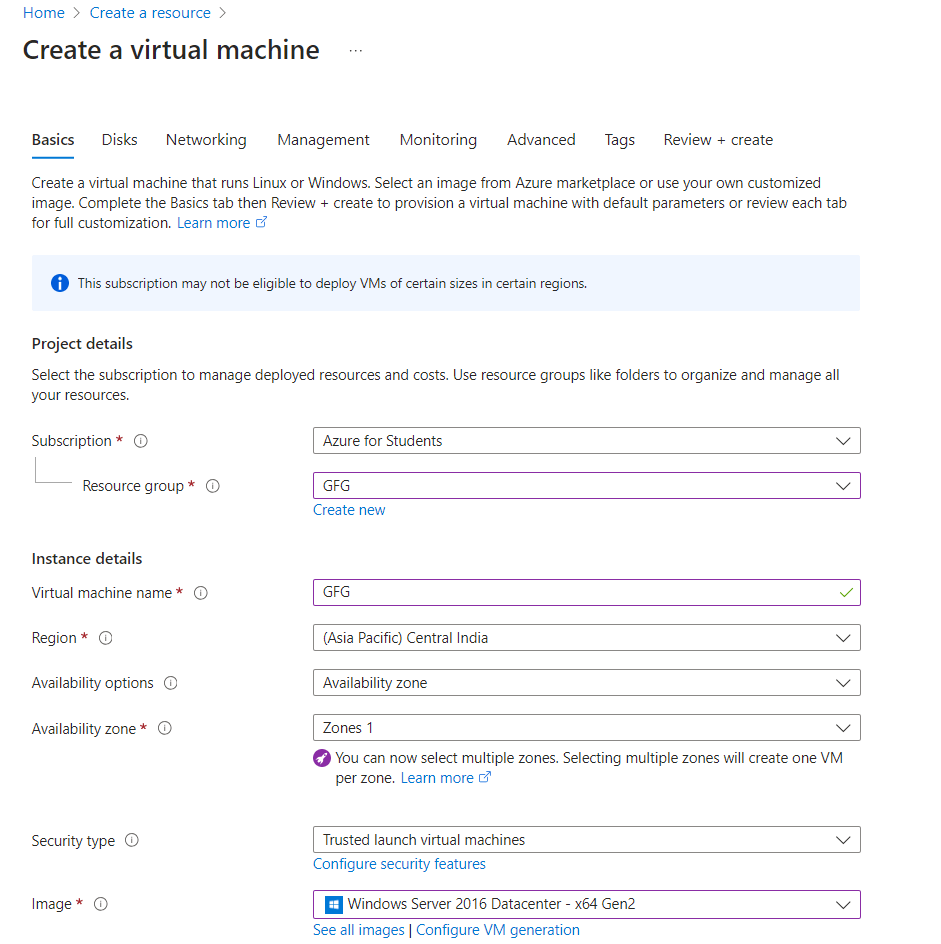
👁 Searching Virtual MachineStep 6: Enter and choose the configuration for your VM. Pick the 'Subscription' and 'Resource group' for your VM. Provide a unique name for your VM and select the 'Region' where you want to host it.
👁 Configuring the Virtual Machine
Step 7: After configuring the Virtual Machine resources, Review once the configuration of resources and Click on Create as confirmation to create the Virtual Machine.
Step 8: After creating the VM successfully, click on "Go to resource."
👁 Go to Resource Interface
Once connect the respective VM try on downloading the RDP File by clicking on "Download RDP file"
Step 9: Click on the file you downloaded and provide the necessary permissions. Enter your VM password and click OK.
👁 Login the VM with Credentials👁 Accessing the VM from Windows
Step 10: Go to the "Network Settings" of your VM and delete the Inbound rule that we made. After that, try connecting to your VM again.
Congratulations! Now, in just a few seconds, you can access your VM.
This video shows how we use Azure Network Security Groups with Azure Virtual Machine. It demonstrates the process of connecting to the VM. When we delete our inbound rule, we are unable to connect to our VM. However, after creating an inbound rule specified during VM creation, we regain access to our VM.
The following are the considerations for deploying applications on the Azure platform:
In this article, we have observed the practical use of NSG by making changes in Virtual Machine configuration. Additionally, we discussed Traditional Server Management at the beginning and how to overcome it with NSG. We also covered best practices for implementing NSG and the steps to create NSG in the Azure portal




.png)

