A hard disk drive (HDD) is a fixed storage device inside a computer that uses magnetic technology to retrieve and store digital data for long-term. Unlike RAM, HDDs retain data even when powered off, making them essential for operating systems, applications and files.
Some space in each sector is used for formatting, so the actual storage available is slightly less than the total capacity.
The R-W head moves over the rotating disk to read and write data.
To access a specific memory location, the head must be positioned correctly, which affects the speed of data retrieval.
Note: Even though outer tracks are larger than inner tracks, they contain same number of sectors, because the same amount of data is stored over a larger circumference, outer tracks have lower storage density, meaning bits are spaced farther apart. Inner tracks have higher storage density, where data is packed more tightly.
Hard Disk Drive Components and Form Factors
HDD has the Aluminium components
Platters: Magnetic platters are disk-like in shape and used to store data. Typically, they are made from glass or aluminium and laid down on a spindle where layers of such disks are kept one after the other.
Spindle: The spindle maintains the platters in place and rotates them as required. The Revolution Per Minute(RPM) rating controls how fast data can be written to and read from the hard drive.
Actuator Arm: The actuator, also known as the head actuator, is a tiny motor that controls the movement of the read/write haed and monitors data transfer between the platters. It is in charge of ensuring that the read/write heads are always in the proper direction.
Read/write Head: The read/write arm controls the movement of the read/write heads, that perform the actual reading and writing on the disc platters.
HDD Form Factors
3.5 inches: Among the drive types that are common for desktops, 3.5-inch is the most commonly used form factor, it represents the approximate diameter of the platter within the drive enclosures
2.5 inches: These are used in laptops and other portable devices and they also used to represent the approximate diameter of the platter within the drive enclosures
1.8 inches: The 1.8-inch drives are generally employed in extremely light and thin devices like tablets and some MP3 players with large storage capacity
Enterprise Form Factor: Some HDDs are designed to be used in corporation environments and are available in larger form elements which include 3.5-inch and a pair of.5-inch but with one-of-a-kind specs optimized for excessive overall performance, reliability and durability in server and garage structures.
External HDDs
External hard drives can be used as a portable data backup device or to increase a computer's storage capacity. Through connectors like USB 2.0, USB-C or External SATA (eSATA), external disks can be connected to a computer or other device.
Additionally, compared to internal HDDs, external hard drives may transport data more slowly.
In addition to being able to increase a system storage capacity, an external hard drive also has the benefit of being portable.
Users are able to physically carry their stored data on numerous devices with them wherever they go.
Features of HDD
Non-Volatile: Data remains stored even when the power is off, making it ideal for long-term storage.
High Capacity: Can store large amounts of data, with modern HDDs reaching terabytes in size.
Relatively Slow: Slower than RAM, with access times in milliseconds, making it better for storage than frequent data access.
Mechanical Parts: Contains spinning disks and moving read/write heads, which can wear out or get damaged.
Cost-Effective: Cheaper than SSDs, especially for high-capacity storage.
Reliable: Despite mechanical parts, HDDs are durable and widely used for enterprise storage.
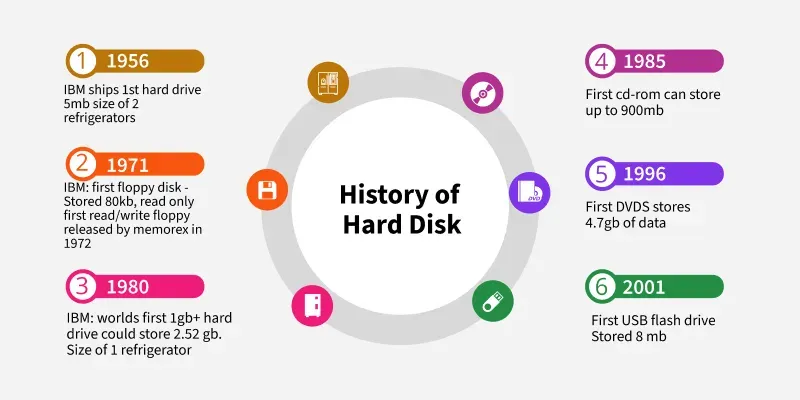
IBM began developing the first HDD for low-cost random access storage.
1956
IBM shipped the first HDD (IBM 305 RAMAC) with 3.75MB capacity, the size of a refrigerator.
1960s-70s
Memorex, Seagate and Western Digital entered the HDD market.
1980s
2.5-inch and 3.5-inch form factors were introduced and standardized for personal computers.
2007
HGST (Hitachi Global Storage Technologies), now a Western Digital brand, released the first 1TB HDD.
2015
HGST introduced the first 10TB HDD.
2021
Western Digital launched two 20TB HDDs for enterprise use.
2025
Modern HDDs have reached up to 36TB, using advanced storage technologies like HAMR & MAMR
How HDDs Work?
Most basic hard drives are made up of numerous disk platters, which are circular disks composed of aluminium, glass or ceramic that are arranged around a spindle inside a sealed chamber
Platters spin at high speeds (typically 5,400 to 15,000 RPM).
Read/Write heads move to the correct track and position themselves over the sector containing data.
Magnetic signals are written to or read from the spinning platters.
The disk controller processes data and transfers it to the computer.
Note: The platters rotate at up to 15,000 rotations per minute by the motor. A second motor regulates the location of the read and write heads that magnetically record and read information on each platter as the platters rotate. .
Hard Disk Drive Storage Capacity
Three storage options 16 GB, 32 GB and 64 GB. This is one of the lowest HDD storage space ranges and is often seen in older and smaller devices.
There are two sizes 120 GB and 256 GB. This category is commonly regarded as an entry-level for HDD devices like desktops.
500 GB, 1 TB and 2 TB are available. HDD storage of 500 GB or more is often deemed adequate for the average user. Individuals with large-file games should find 1 TB to 2 TB of HDD capacity adequate.
More than 2 TB of storage. Anything with more than 2 TB of HDD space is appropriate for users who work with high-resolution files.
Recently, the highest capacity of HDD is 20 TB.
Delays in HDDs
Seek time: The time taken by the R-W head to reach the desired track from its current position.
Rotational latency: Time taken by the sector to come under the R-W head.
Data transfer time: Time is taken to transfer the required amount of data. It depends upon the rotational speed.
Controller time: The processing time taken by the controller.
Average Access time: Seek Time + Average Rotational Latency + Data Transfer Time + Controller Time.
Note: Average Rotational latency is mostly 1/2*(Rotational Latency).
Points to remember on solving Questions
If the seek time and controller time are not mentioned, consider them to zero
If the amount of data to be transferred is not given, assume that no data is being transferred. Otherwise, calculate the time taken to transfer the given amount of data.
The average rotational latency is taken when the current position of the R-W head is not given. Because the R-W may be already present at the desired position or it might take a whole rotation to get the desired sector under the R-W head.
But, if the current position of the R-W head is given then the rotational latency must be calculated.
Example: Consider a hard disk with - 4 surfaces, 64 tracks/surface, 128 sectors/track & 256 bytes/sector. On the basis of this answer the following questions:
1. What is the capacity of the hard disk?
Disk capacity = surfaces * tracks/surface * sectors/track * bytes/sector
Disk capacity = 4 * 64 * 128 * 256
Disk capacity = 8 MB
2. The disk is rotating at 3600 RPM, what is the data transfer rate?
60 sec -> 3600 rotations
1 sec -> 60 rotations
Data transfer rate = number of rotations per second * track capacity * number of surfaces (since 1 R-W head is used for each surface)
Data transfer rate = 60 * 128 * 256 * 4
Data transfer rate = 7.5 MB/sec
3. The disk is rotating at 3600 RPM, what is the average access time?
Since seek time, controller time and the amount of data to be transferred is not given, we consider all three terms as 0. Therefore, Average Access time = Average rotational delay
Rotational latency => 60 sec -> 3600 rotations
1 sec -> 60 rotations
Rotational latency = (1/60) sec = 16.67 msec.
Average Rotational latency = (16.67)/2 = 8.33 msec.
Electrical Error: If the hard disc powers on but cannot read or write data, one or more of its components has most likely failed electrically.
Logical Failure: Logical failure occurs when the hard disk's software is hacked or stops working properly. All types of data corruption may lead to logical failure.
Disk Failure: Disk failure occurs When the hard disk is not working properly and may lead to data loss.
Disk Full: One more common issue is The disk full Issue which occurs when there is no more space on the disk to store data.
Bad Sector: Bad sector failure occurs when the magnetic surface on a hard disk's platter is displaced, making a specific area of the platter inaccessible.
Firmware Failure: Firmware failure occurs when the software that performs maintenance duties on a disk becomes corrupted
Advantages
High Storage Capacity & Cost-Effective: HDDs offer large storage options (up to 36TB in 2025) & these are are cheaper per GB than SSDs making them ideal for storing huge amounts of data & budget-friendly.
Data Retention & Recovery: HDDs retain data even when powered off and data recovery tools can restore lost files in case of failure.
Easy to Upgrade & Widely Compatible: HDDs can be easily swapped or expanded, allowing users to upgrade storage capacity & can work with most computers, OSs and external storage devices.
Disadvantages
Slower Performance: HDDs are slower than SSDs, especially when handling large or complex files.
High Power Consumption: The mechanical parts of an HDD require more energy to operate compared to SSDs.
Less Durable: Moving parts make HDDs more prone to damage if dropped, making them less suitable for portable devices.
Noisy Operation & Heat Generation: The spinning platters and moving parts generate noise and heat, affecting system efficiency.