|
VOOZH | about |
|
VOOZH | about |
The align-content property changes the behavior of the flex-wrap property. It aligns flex lines. It is used to specify the alignment between the lines inside a flexible container. This property defines how each flex line is aligned within a flexbox and is only applicable if flex-wrap: wrap is applied i.e. if there are multiple lines of flexbox items present.
List of align-content property values:
Description of property value with example:
center: Displays the flex lines at the center of the flex container.
Syntax:
align-content:center;Example:
Output:
stretch: The line stretched to take the remaining space of flex container. It is the default value.
Syntax:
align-content: stretch;Example:
Output:
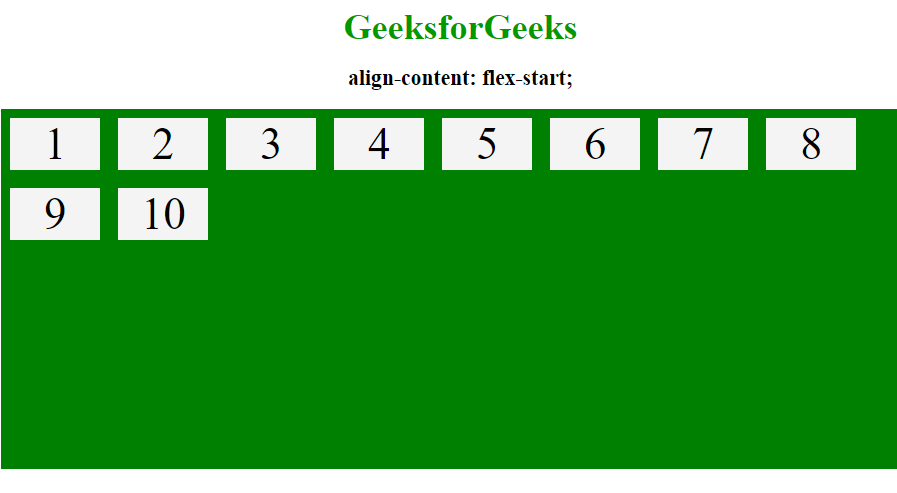
flex-start: Displays the lines at the start of the flex container.
Syntax:
align-content: flex-start;Example:
Output:
flex-end: Displays the flex lines at the end of the flex container
Syntax:
align-content: flex-end;Example:
Output:
space-around: By using space-around property space will be distributed equally around the flex lines.
Syntax:
align-content: space-around;Example:
Output:
space-between: Displays the flex lines with equal space between them.
Syntax:
align-content: space-between;Example:
Output:
Supported browser: The browser supported by CSS | align-content property are listed below: