|
VOOZH | about |
|
VOOZH | about |
CSS (Cascading Style Sheets) is the mechanism used to add style to web documents. Through CSS, we can apply various effects on text, enhancing its appearance and improving user experience on web pages.
In this article, we'll cover several key CSS properties that can be used to apply text effects, including:
Let's learn about each of these in detail:
The text-overflow property in CSS helps handle text that exceeds the width of its container. It defines how the overflowed content should be represented when the text doesn't fit within its container.
Syntax:
element {
 text-overflow: clip | ellipsis;
 //CSS Property
}Example 1: text-overflow: clip
Output:
👁 textclipExample 2: text-overflow: ellipsis
Output:
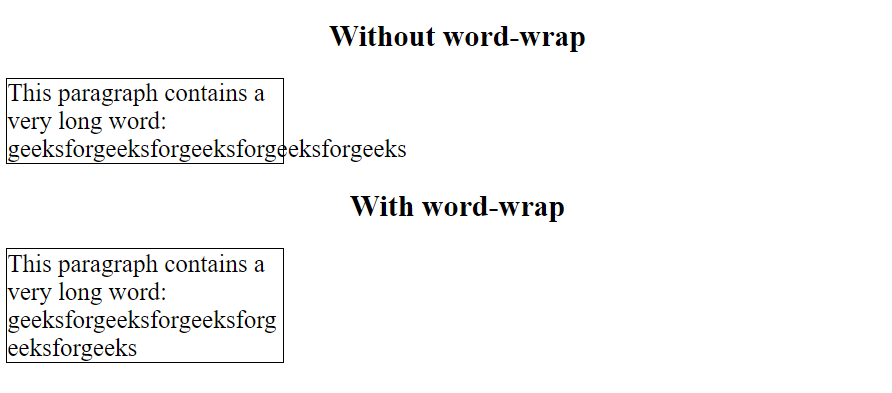
👁 textellipThe CSS word-wrap property defines whether the browser is allowed to line break within words when a word is too long to fit within its parent container. If a word is too long to fit within an area, it expands outside: Syntax:
element {
 word-wrap: break-word;
 //CSS Property
}
Example:
Output:
👁 wordwrapThe word-break CSS property sets whether line breaks appear wherever the text would otherwise overflow its content box. It specifies line breaking rules.
Syntax:
element {
 word-break: keep-all | break-all;
 //CSS Property
}Example: word-break: break-all
Output:
👁 break-allExample: word-break: keep-all
Output:
👁 keep-upThe writing-mode property defines whether text is displayed horizontally (default) or vertically.
Syntax:
The writing-mode property defines whether text is displayed horizontally (default) or vertically.element {
 writing-mode: horizontal-tb | vertical-rl;
 //CSS Property
}Example: writing-mode: horizontal-tb
Output:
👁 horizontal-tbExample: writing-mode: vertical-rl
Output:
👁 vertical-rl