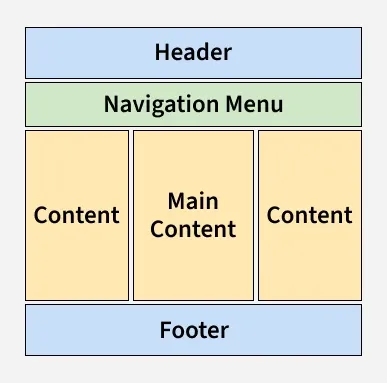
A layout defines how elements are arranged on a page, ensuring that content flows logically and looks visually balanced. CSS provides flexible tools to control spacing, alignment, and responsiveness.
Organizes content clearly for better user experience.
Simplifies design control and improves consistency across pages.
The Header Section appears at the top of a webpage and provides basic navigation and branding for users.
The <div class="header"> element defines the header section of the webpage.
The .header CSS class styles the header with a green background, 15 pixels of padding, and centers the text.
2. Navigation Menu
The navigation menu is used to create a set of links for easy website navigation.
The .nav_menu class defines the style of the navigation menu with a dark background and ensures the links are aligned horizontally.
The a tag inside .nav_menu defines each link's style, including white text and padding for spacing.
3. Content Section
The content section is used to add content to the page, and you can adjust it according to the screen size.
The HTML structure defines three content sections, each inside a <div>, which can be further styled or adjusted as needed for responsive layouts.
The .columnA, .columnB, and .columnC classes style the content areas, aligning the text to the center and coloring it green.
4. Footer Section
The footer section is placed at the bottom of the webpage and typically contains information like contact details, copyright, or about us.
The .footer class defines the footer section, giving it a green background, padding, and centering the text.
Inside the footer, there are links for "About," "Career," and "Contact Us," which provide quick access to those sections.
Important Points to Remember
The header section contains a website logo, a search bar, and user profile information.
The navigation menu includes links to various categories of articles available.
The content section is divided into three parts (columns), with left and right sidebars containing links to other articles and advertisements. The main content section holds the current article.
The footer at the bottom contains the address, links, contacts, etc.