VOOZH about

URL: https://www.geeksforgeeks.org/css/how-to-link-external-css-to-html/

⇱ Link External CSS to HTML - GeeksforGeeks


  • Courses
  • Tutorials
  • Interview Prep

Link External CSS to HTML

Last Updated : 11 Jun, 2026

External CSS is a styling method where CSS rules are stored in a separate .css file and linked to HTML documents. It helps maintain a consistent and organized design across multiple web pages.

  • A single CSS file can style multiple HTML pages efficiently.
  • Improves code reusability and simplifies website maintenance.
  • Keeps the HTML structure separate from presentation and design styles.

Link an External CSS to HTML

An external CSS file is connected to an HTML document using the <link> tag inside the <head> section. This allows the webpage to apply styles stored in a separate CSS file.

  • The rel="stylesheet" attribute specifies the relationship as a stylesheet.
  • The href attribute defines the path to the external CSS file.
  • Linking external CSS helps maintain consistent styling across multiple pages.

Syntax:

<link rel="stylesheet" href="path/to/your/styles.css">

Example 1: Here, we are using an external CSS style to provide styling to our div, h1, and p tags.

Output:

πŸ‘ Screenshot-2026-06-11-154332

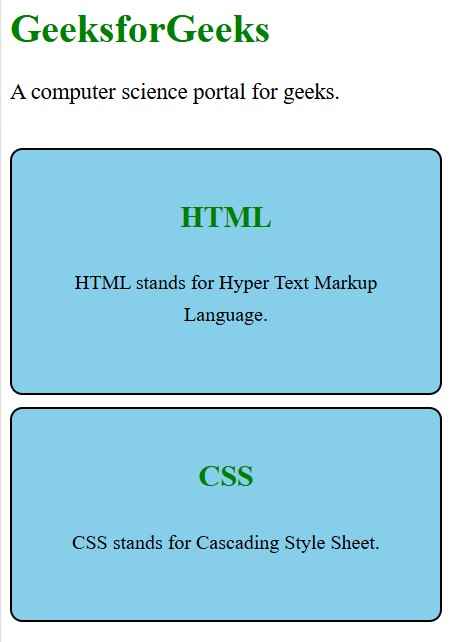
Example 2: Here’s another example demonstrating how to use external CSS to style multiple HTML elements, such as creating card-like sections.

Output:

πŸ‘ Screenshot-2026-06-11-154445

Advantages of External CSS

  • Improved Maintainability: Having styles in a separate file makes it easier to manage and update your styles without modifying each HTML document.
  • Enhanced Reusability: The same CSS file can be linked to multiple HTML files, promoting consistent design across your site.
  • Efficient Caching: Browsers cache external CSS files, leading to faster page load times on subsequent visits.

Disadvantages of External CSS

  • Loading Time: Pages may not render correctly until the external CSS file is fully loaded, potentially causing a flash of unstyled content (FOUC).
  • Performance Concerns: Linking multiple CSS files can increase download times, affecting overall site performance.
  • Versioning and Caching Challenges: Large-scale projects may encounter difficulties in versioning and caching, leading to inconsistencies in styles.
Comment
Article Tags: