 |
VOOZH | about |
|
VOOZH | about |
Before introducing VPC Endpoint, even if your resources were in a private subnet, they had to go through the internet or use a NAT Gateway to reach AWS services. This increases cost, security risks, and slows down connections. For solving these issues, AWS VPC comes in.
With AWS VPC Endpoint, your application can connect to AWS services privately and securely without using the internet, a NAT gateway, VPN, or Direct Connect. Now, everything will stay within the AWS network, which makes it faster, more secure, and cheaper. It’s a great way to improve your cloud setup, especially for businesses that need strong performance and security.
In Company cloud environments, security and performance are the first preference. VPC Endpoints help in maintaining secure, private connectivity to AWS services without using the public internet. Let's try to understand the reasons why you should use VPC Endpoints in your AWS:
If you use AWS services like S3 or DynamoDB without VPC Endpoints, their traffic will go through NAT Gateways, Internet Gateways, or VPNs, which will increase your infrastructure or data transfer costs. By using VPC Endpoints, you can reduce these extra charges, which will save you will going through NAT Gateways, Internet Gateways, or VPNs that will increase your infrastructure or data transfer costs. By using VPC Endpoints, you can reduce these extra charges, which will save your money on AWS networking expenses.
With AWS VPC Endpoint, your applications can communicate privately within your AWS Network, which will reduce their exposure to the public internet. This reduces the risk of cyber threats like DDoS attacks, data interception, or unauthorized access and provides a more secure cloud environment.
VPC Endpoints connect your VPC directly to AWS services without sending traffic over the internet or external networks. This helps your application to run faster due to less delay. This reduction in latency enhances application performance, making it ideal for real-time applications, big data workloads, and high-traffic web services.
You can automatically integrate AWS VPC Endpoints with IAM policies, security groups, and route tables, which provides smooth access control without the need for major changes to your network.
AWS VPC endpoints provides a secure and private communication between the resources within the Amazon VPC and AWS Services without having the requirement of Internet access. They comes with consisting interface endpoints for the AWS services through which the services can be accessed through the private links and gateway endpoints for Amazon S3 and DynamoDB. It uses Elastic Network Interfaces (ENIs) for connectivity. Through it's architecture it facilitates enhanced security within the AWS network and improves the performance by reducing the latency and bandwidth constraints associated with internet based communication.
VPC endpoints use Elastic Network Interfaces (ENIs) to securely connect resources inside your VPC to AWS services. These endpoints essentially act as virtual network devices, providing high availability and scalability within your VPC.
There are two types of VPC endpoints we've:
A VPC Gateway Endpoint is a way to connect your VPC to an AWS service like S3 or DynamoDB without going through the public internet or need to set up a VPN connection. This helps improve security and can also improve network performance since the traffic stays within the AWS network.
So if we want to utilize S3 or DynamoDB services inside VPC then Gateway Endpoints is recommended over Internet Gateway , NAT, or any other service, as this method also improves security, and latency for the application traffic.
To successfully set up a gateway endpoint, here are the steps you need to follow:
Choose the AWS Service(S3 or DynamoDB)
Start by deciding which AWS service you want to connect with, either Amazon S3 or DynamoDB. This choice will dictate the type of gateway endpoint you'll be creating.
Select Your VPC
Identify the Virtual Private Cloud (VPC) where you wish to deploy the gateway endpoint.
Identify Route Tables
Locate the route table(s) within the chosen VPC that you will link to the gateway endpoint. These route tables will be updated with the necessary information to allow access to the selected AWS service.
Define an Access Policy
Create an access policy for the endpoint. This policy outlines which resources—like S3 buckets or DynamoDB tables—can be accessed and what actions can be taken by the components within your subnets. It plays a crucial role in managing and controlling access to the AWS service.
Configure Security Group Rules
Check that the security group linked to your resources includes a rule that allows outbound traffic to the chosen service (S3 or DynamoDB). This step is vital to ensure that data can flow through the gateway endpoint and that your components can effectively communicate with the AWS service.
Interface endpoints enable connectivity to services over AWS PrivateLink. These services include some AWS managed services, services hosted by other AWS customers and partners in their own Amazon VPCs (referred to as endpoint services), and supported AWS Marketplace partner services. The owner of a service is a service provider. The principal creating the interface endpoint and using that service is a service consumer.
To create an interface endpoint, you can follow these straightforward steps:
Select the AWS Service
Start by identifying the specific AWS service or endpoint service you want to connect with privately.
Create a Network Interface
Set up an Elastic Network Interface (ENI) and choose the appropriate subnet to link with the interface endpoint.
Assign a Private IP Address
The interface endpoint will automatically receive a private IP address from the range of the selected subnet. This address will stay associated with the endpoint until it is deleted.
Utilize the Private IP Address
By using this private IP address, all traffic can remain within the Amazon network, which means you won’t need to make any alterations to the route table.
Shared subnets in AWS are part of a feature called VPC Sharing, which allows multiple AWS accounts within the same organization to use the same Virtual Private Cloud (VPC). In this setup, one AWS account, known as the host account, creates and manages the VPC along with its subnets. This account then shares specific subnets with other AWS accounts, called participant accounts, using AWS Resource Access Manager (RAM). The participant accounts can launch and manage their own resources—like EC2 instances, Lambda functions, or RDS databases—directly into the shared subnets.
However, the host account maintains control over the network settings, such as route tables, network ACLs, and security configurations. This setup is especially useful in large organizations where the networking team can manage the VPC centrally, while different teams or departments can deploy applications independently.
Example: if a company has a networking team and an application team, the networking team can create a shared VPC and subnets, and the application team can use those subnets to deploy their services. This approach helps improve security, simplifies management, and ensures better compliance across all environments.
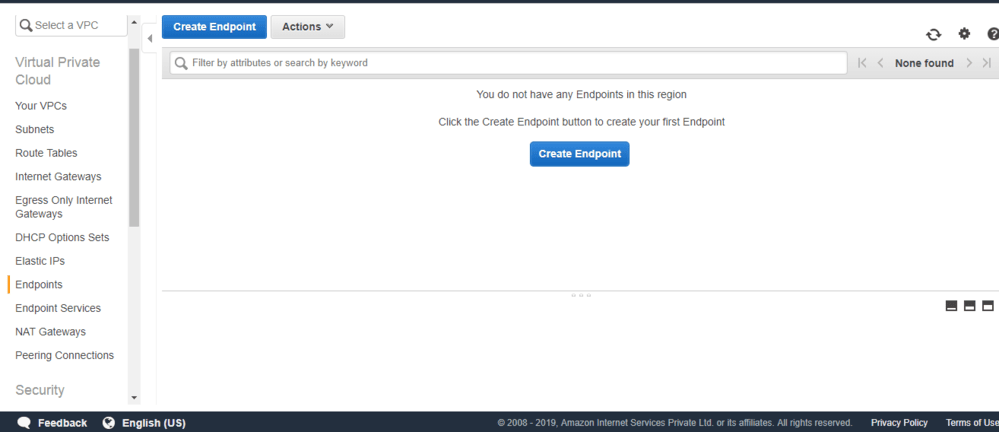
The following are the step by step guide for creating AWS VPC Endpoints:
The following table shows the list of different AWS Services that supports VPC Gateway Endpoint and Interface Endpoint:
| AWS Service | Supports Gateway Endpoint | Supports Interface Endpoint |
|---|---|---|
| Amazon S3 | Yes. | No |
| Amazon DynamoDB | Yes | No |
| Amazon SNS | No | Yes |
| Amazon SQS | No | Yes |
| AWS Lambda | No | Yes |
| AWS Secrets Manager | No | Yes |
| AWS Systems Manager | No | Yes |
| Amazon Kinesis | No | Yes |
| AWS Step Functions | No | Yes |
The following table will shows the list of AWS VPC Key services with their description and key benefits:
| Service | Description | Key Benefits |
|---|---|---|
| Amazon VPC | Enables the creation and management of virtual networks in the cloud, including subnets, route tables, and network ACLs. | 1. Full control over network settings 2. Customizable security with ACLs & Security Groups |
| VPC Peering | Securely connects two VPCs within the same AWS region, allowing resources in different VPCs to communicate. | 1. Private communication between VPCs 2. No need for VPN or Internet Gateway |
| VPC Endpoints | Provides private connectivity between AWS services without using the internet, improving security and reducing costs. | 1. Enhanced security by keeping traffic inside AWS 2. Lower data transfer costs |
| VPC Connects | Establishes a private, secure connection between your on-premises network and AWS VPC using VPC technology. | 1. Secure hybrid cloud setup 2. Reliable private connection between AWS & on-premises |
| AWS Direct Connect | Provides a dedicated, high-bandwidth, low-latency connection between on-premises data centers and AWS. | 1. Lower latency & higher bandwidth than VPN 2. Better performance for hybrid cloud applications |
A VPC Endpoint policy is a resource-based IAM policy that controls who can access AWS services through a VPC Endpoint. It gives permissions to only authorized users, roles or services to interact with AWS resources privately within your Virtual Private Cloud(VPC). By default, a VPC Endpoints grants you full access to the connected AWS service, but you can restrict access using a custom VPC Endpoint Policy.
To ensure secure, optimized, and cost-effective use of VPC Endpoints, follow these best practices:
You should use VPC endpoints only when required it would save or reduce your cost.
Example: Suppose your team is working on any project where you are using S3, DynamoDB, SNS, SQS,Lambda etc. Gateway Endpoints for S3 and DynamoDB are free, but Interface Endpoints (for SNS, SQS, Lambda, etc.) cost money. If your team doesn’t need an Interface Endpoint, try to avoid keeping it active to save your money.
For Interface Endpoints, use strict security group rules so it will allow only those IPs or applications which you allow.
Example: Imagine you have a private messaging system that uses Amazon SQS (a queue service) to handle messages between applications. Instead of allowing anyone to access the SQS queue, you should set up Security Groups to allow access only from your trusted application servers' IP addresses. This way, only your servers can send and receive messages, keeping your data safe from unauthorized access.
You can add layered security in your AWS services by combining IAM permissions and VPC Endpoint policies
Example: Imagine you have a VPC Endpoint for DynamoDB that allows your applications to store and retrieve data. Instead of depending only on IAM roles for security, you can add a VPC Endpoint policy to further limit access to specific tables. This ensures that only the right users and applications can access the necessary data.
You can enable AWS CloudTrail Logging to monitor all access requests whether the request is coming from authorized users or not. It helps you to detect unauthorized activities.
Example: Suppose someone tries to access your private S3 bucket through a VPC Endpoint, but they aren’t authorized. AWS CloudTrail will log the attempt, so you can review the activity and take action to block suspicious users.
The following is the simplified pricing table of the AWS VPC Endpoints:
Endpoint Type | Pricing Model |
|---|---|
Interface Endpoint | It charges $0.01 per VPC endpoint hours and data processing |
Gateway Endpoint (S3) | It usage is free but it charges only for the data that is transferred out of Amazon S3 |
Gateway Endpoint (Dynamo DB) | It charges $0.01 per VPC endpoint hours and data processing |
Gateway Endpoint (Other Services) | It charges $0.01 per VPC endpoint hours and data processing |
The following are the differences between AWS VPC Endpoint and AWS Endpoint Service:
Aspect | VPC Endpoint | Endpoint Service |
|---|---|---|
Purpose | It provides the private connectivity to AWS Services from within a VPC without having the need of internet access. | It provides the AWS Customers to offers their AWS Services to their other AWS Accounts Services via private connections. |
Scope | It is typically used to access the AWS managed services like Amazon S3, DynamoDB or AWS Lambda from within a VPC | It facilitates the customers to expose their services to other AWS Accounts. |
Configuration | It is configured within the VPC and attached to specific subnets or route tables. | It is setuped by AWS Customers using AWS Private Link, configuring the service endpoints and permissions. |
Billing | It includes the charges based on the type of endpoint and data processed. | It may includes the charges based on the data transfer and their requests processed by the service. |
Example | VPC endpoint for Amazon S3, Enabling of Private Access to S3 Buckets from within a VPC. | Allowing customers to access the database securely via private connections. |
The following are the some uses cases of AWS VPC Endpoints:
It allows the VPC resources to securely accessible for Amazon S3 Buckets without internet exposure and it enhances the security for data storage and retrieval. Suppose a healthcare company stores their patient records in an Amazon S3 bucket and wants to make sure that only internal application within their VPC can access the data. By using an S3 VPC Endpoint, the company can restrict public access to S3 and allow only trusted servers to retrieve or upload medical records without needing an internet gateway.
It provides the communication between VPC resources and Amazon DynamoDB tables. It ensure secure and private access to the NoSQL database Service. Suppose an e-commerce platform uses DynamoDB to store customer orders and needs to ensure that only their backend services can access the database securely. By creating a DynamoDB VPC Endpoint, the application servers inside the VPC can communicate privately with DynamoDB without internet exposure.
It comes with facilitating the private communication between the VPC resources and Amazon simple Notification service (SNS). Let's take an example a financial institution uses Amazon SNS to send transaction alerts for banking operations. Since financial data is sensitive, they want to keep all notifications private within their VPC. By using an SNS VPC Endpoint, the bank ensures that alerts (e.g., "Your transaction of $500 was successful") are securely sent to internal systems without exposing them to the public internet.
It provides the private access to the Amazon Simple Queue Service (SQS) from within a VPC. It allows the resources to send and receive the messages securely without the internet connectivity. Suppose a ride-sharing app uses Amazon SQS to queue ride requests and distribute them to available drivers. They want to prevent unauthorized external access to these messages. With an SQS VPC Endpoint, ride requests remain private within the VPC, and only the authorized microservices can process them.


-(1).jpg)
.webp)
.jpg)
