|
VOOZH | about |
|
VOOZH | about |
Docker scratch-based images refer to images that are built from the scratch base, which is the most minimal base image available in Docker. The scratch image is essentially an empty image, meaning it contains no files or pre-installed libraries, making it a blank slate for building Docker containers.
A scratch-based image in Docker is like starting from absolute zero. It’s an empty, minimal base image with nothing pre-installed—no operating system, utilities, or libraries. This gives developers complete control over what goes into the container, allowing them to build extremely lightweight, tailored Docker images.
scratch starts with nothing, the resulting images are incredibly small, often just a few megabytes or less. This makes them perfect for quick downloads, faster container startups, and reduced storage costs.First, you’ll write a simple application to include in the Docker image. We’ll use Go for this example, as it can produce a statically compiled binary that doesn’t require external libraries.
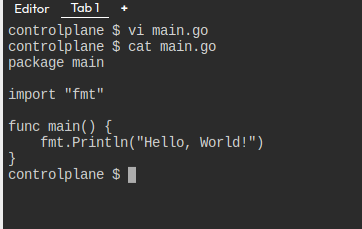
main.goIn your project directory, create a file named main.go with the following code:
package main
import "fmt"
func main() {
fmt.Println("Hello, World!")
}
To make the Go program work in the scratch Docker image, we need to build a statically compiled binary.
Run the following command in your terminal:
GOOS=linux GOARCH=amd64 go build -o appapp in your current directory. This binary will be self-contained and run in the minimal scratch environment.The GOOS=linux flag ensures the binary is compiled for Linux (since Docker runs on Linux by default), and GOARCH=amd64 specifies the architecture. The -o app option specifies that the output binary will be named app.
The Dockerfile tells Docker how to build the image. In this case, we will use the scratch image as the base and add the statically compiled binary to the container.
DockerfileIn the same project directory, create a file called Dockerfile with the following content:
# Start from scratch (minimal base image)
FROM scratch

# Add a label (optional, for metadata)
LABEL maintainer="your-email@example.com"

# Copy the statically compiled binary to the root of the container
COPY app /app

# Define the command to run when the container starts
CMD ["/app"]
Explanation:
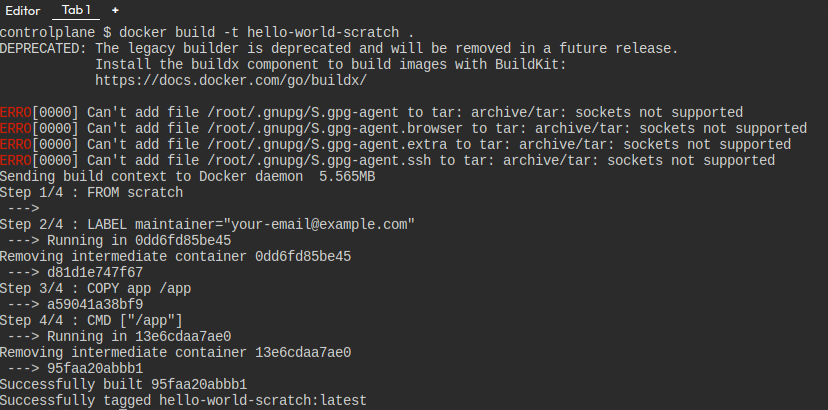
FROM scratch: This specifies that we’re starting with the empty scratch image.LABEL maintainer: Optional metadata for tracking the author or maintainer of the image.COPY app /app: This copies the binary app from the build context (your local directory) into the container's root directory.CMD ["/app"]: This defines the default command that will run when the container starts (our app binary).Now that you have the Dockerfile and the binary (app), you can build the Docker image.
Run this command in the directory containing the Dockerfile and the binary:
docker build -t hello-world-scratch .-t hello-world-scratch: This assigns the tag hello-world-scratch to the image, which you’ll use to refer to the image..: This tells Docker to look in the current directory for the Dockerfile.Now that the image is built, you can run the container to see your program in action.
Run this command to start the container:
docker run --rm hello-world-scratch--rm flag ensures that the container is removed after it runs, so it doesn’t take up space.hello-world-scratch is the name of the image you built earlier.One of the main benefits of using scratch is the minimal size of the image.
To check the size of your image, run:
docker images hello-world-scratchCreating a scratch-based Docker image allows you to build highly optimized and minimal containers that only include what’s essential for your application. These types of images are perfect for statically compiled binaries, like those created with Go or C, where you don’t need any external dependencies. The key benefits of using scratch-based images are their small size, improved security, and faster deployments. By following the step-by-step guide, you can easily build your own scratch-based Docker images, ensuring that your applications are both lightweight and efficient. This approach is particularly useful for microservices and production environments where performance and security are top priorities.