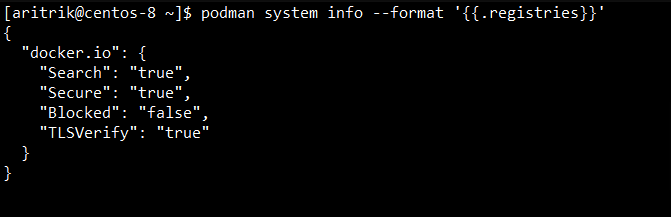
Podman is primarily provided as a container engine that can run and manage containers safely. As a prerequisite to running containers, container images must be obtained from container registries, such as a DockerHub, or a private registry. Podman connects to only a few selected public registries by default to allow quick pulling and running of containers. In case you are using a private registry to do pull images or one of the other non-default registries, you will have to edit the registry.conf file to include it so as to gain entry.
Podman registry is the container image registry used by Podman to pull or push images. These images can be stored on both public as well as private registries, which serve as storage hubs for container images. Registries play an important role in the process of building and deploying containerized applications. Whenever you installed Podman, it comes with a pre-configured list of popular public registries, such as DockerHub, from which you can easily pull images. If you are using publically available container images, there is usually no need to configure an additional registry. But, when working with private images, you may need to set up access to your specific registry.
Step-by-Step Guide To Securely Log Into Podman Registries
Below is the step-by-step implementation to securely log into Podman Registries:
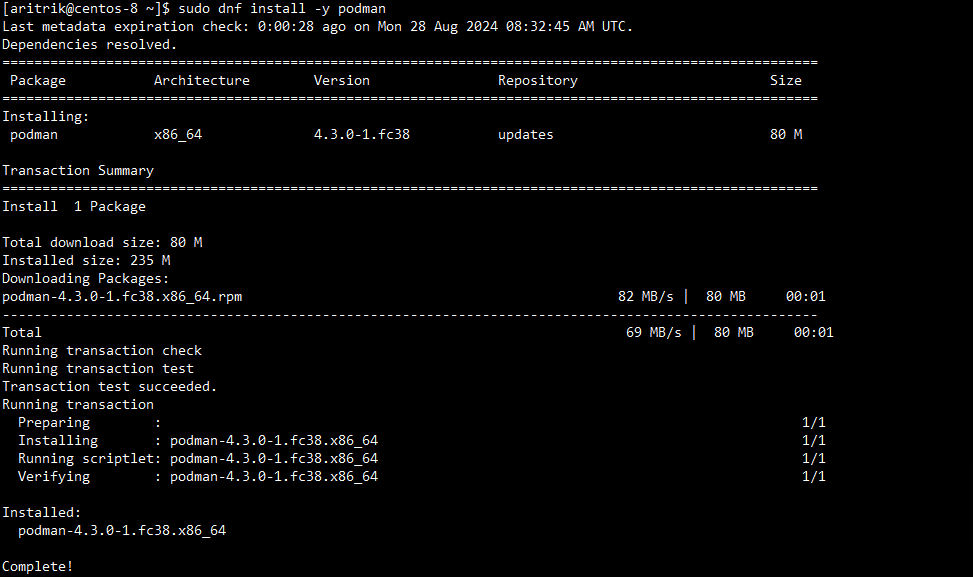
Step 1: Install Podman
Start by making sure that Podman is installed on your system. You can achieve this by using your operating system’s package manager. For example, to install Podman on a system using dnf:
Check if you have access to a registry by searching for an image. Use the podman search command to confirm if the registry URL is correct and reachable.
To interact with private registries, use the podman login command. Make sure to substitute <registry_url>, <username>, and <password> with your actual registry credentials.
As a security best practice, log out of the registry once your tasks are complete to remove any cached credentials. Use the command "podman logout docker.io".
Best Practices Of Securely Log Into Podman Registries
Avoid Hard-Coding Credentials: It makes the possibility of accidental exposure less likely. For example, instead of directly typing your password in the command line, securely receive it through the Podman login prompt.
Audit and Monitor Access: Turn on and check the logging on your registrations to monitor who is using them and to spot any unusual activity. Make a routine audit of your registry sessions and logins.
Regularly Rotate Credentials: To reduce the chance of your passwords or tokens being hacked over time, rotate them regularly.
Use Rootless Podman: This reduces the possibility of privilege escalation. Because Rootless Podman manages everything under your user account, there is less chance of compromised credentials or containers causing harm.
Conclusion
In this article, we have learned about how to securely log into Podman registries. To protect your login credentials, make sure you log out when you're done and use environment variables as needed.