 |
VOOZH | about |
|
VOOZH | about |
When using AWS services like Lambda, SNS, or DynamoDB, it can be challenging to connect and manage these services without writing complex code. AWS Step Functions solve this by allowing you to create workflows that coordinate multiple AWS services in a defined sequence, like a step-by-step process for your cloud tasks. The best part is that you don’t need to manually code the entire workflow logic, Step Functions handle the orchestration for you.
In this article, we will show you how to build a simple Step Function, how to connect it with AWS Lambda and SNS, and how to make decisions and handle errors in your workflow. Whether you are new to serverless or just want to simplify your logic, this article will walk you through everything step by step with clear examples you can try today.
AWS Step Functions is a service that helps you build and run workflows using visual diagrams. Think of it like creating a flowchart where each step is connected such as calling a Lambda function, sending a message, or waiting for a response.
You define how each step should work, what happens next, and how to handle errors. Step Functions makes sure everything runs in the correct order even if something fails or takes time.
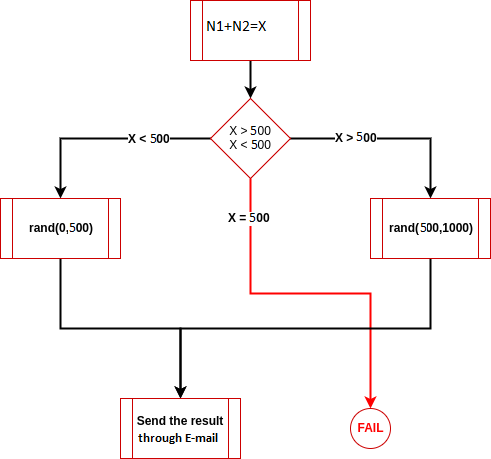
In this example, the algorithm takes two input numbers and add them, then :
Step 1: Create an IAM Role
First, we need to create an IAM Role with the permissions that allow Step functions to get access to lambda.
1. Create a role under the IAM tab from the AWS Management Console.
👁 IAM role
Step 2: Select AWS Service under the Trusted Entity Type, under Use Case make sure to select Step Functions in the dropdown.
Step 3: Under the Add Permissions, leave it as default(Make sure AWSLambdaRole is added in the permissions policies). Then click on next to proceed.
Step 4: Under the Name, Review, and create section, enter the name of the Role according to you.
then Finally, click on create the role.
Now, before creating the step function, we will need to create the lambda functions since we need the ARN of the lambda functions in our step function code.
Step 1: Create the Lambda Functions
We will create the lambda functions which will be used to connect to our state machine which will be created further. Here we will have 4 Lambda functions in this example:
Step 2: Click on Create Function under Lambda Console. Select Author from Scratch, and next give add_numbers as the name of your function, under Runtime select Python from the dropdown (or any other preferred Runtime language of your choice). Then click on Create Function.
Step 3: When the function is created, hover down to the Code section and replace the Function Code with the following code and then click on Deploy.
After this, we need to make 3 more Lambda Functions named as greater_than, less_than, and final_state using the above-mentioned steps.
Below are the three different codes for three different functions:
After completing these steps, all our functions will be created successfully.
Step 1. Create an SNS Topic
Go to Create Topic under SNS in the AWS Management console. Under the type select Standard, also give a suitable name for your topic. Then click on Create Topic.
👁 SNS
Step 2: Then we need to create a Subscription for the SNS Topic, under protocol select Email and in the endpoint add the E-mail ID as per your need. Finally, click on create subscription.
Also, make sure to add the target ARN in the state_machine function code.
Step 3: Create a State Machine and Serverless Workflow. Navigate to the Step Functions under the AWS Management Console.
👁 Application integration
Step 4: Click on State Machine and then click Create State Machine.
Step 5: Select Write your Workflow in Code and type as Standard.
Step 7: Under the definition window, change the code with Amazon States Language. This state machine uses a series of Task states to add numbers. Then, a Choice state is used to determine if the returned number is greater than , less than, or equal to a specified number. Then there is also a final state to conclude the task. Make sure under the resource in the code, change the ARN with the necessary ARN of the lambda functions. Then click on next.
Step 8: Give a suitable name to the State Machine, under the permission click on Choose an existing role, and add the role which we made in the starting.
Step 9: Finally click on Create State Machine.
Step 10. Execution of Workflow. Click on Start Execution.
2. A new dialog box appears in the screen, in the input section enter the following content. and then finally click on start execution.
Once the execution is completed, we can see the visual workflow pane and many other things as depicted in the below images.
Finally, we can check the Email which we provided as an endpoint in SNS Topic Subscription creation, you would have received a random number if the execution is successful.
Using Step Functions for building serverless workflows offers several benefits:
The following table show the list of industries using AWS Step Functions:
| Industry | Use Case | How Step Functions Help |
|---|---|---|
| E-commerce | Order Processing | Coordinates steps like inventory check, payment, and shipping with error handling. |
| Healthcare | Data Collection and Analysis | Automates data gathering, cleaning, and routing for patient records and test results. |
| Fintech | Fraud Detection | Monitors transactions, analyzes risks, and alerts or blocks fraud in real-time. |
| Data Engineering | ETL Pipelines | Manages data extraction, transformation, and loading tasks in a structured and visible way. |
Integrating seamlessly with a range of AWS services such as Amazon SNS, AWS Lambda, and Amazon DynamoDB, AWS Step Functions allows you to take full advantage of these services' functionalities within your workflow. Below, you will find a quick summary of how Step Functions integrates with these services:
We have successfully implemented Serverless Workflow using AWS Step Functions. Don't forget to delete all the services which you have created to avoid incurring any charges.

.png)
.jpg)
.jpg)
.jpg)
.jpg)
.png)
.jpg)
.jpg)
.jpg)
.jpg)
.jpg)
.jpg)
.jpg)
.jpg)
.png)
.jpg)
.jpg)
.jpg)
.png)