 |
VOOZH | about |
|
VOOZH | about |
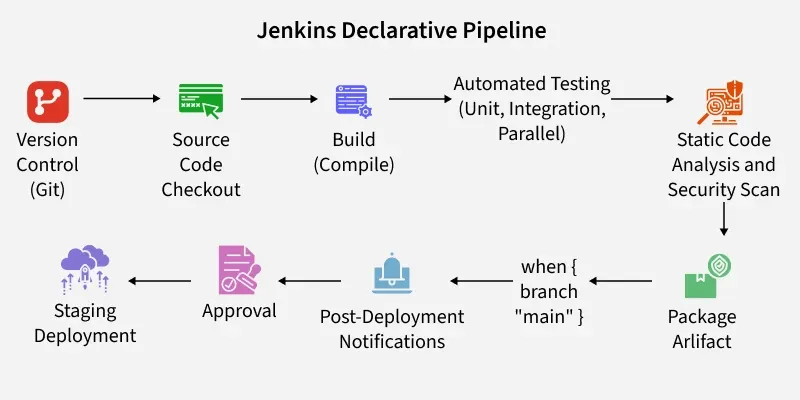
A Jenkins Declarative Pipeline is a structured and simplified approach to defining your continuous integration and continuous delivery (CI/CD) pipelines in Jenkins. Unlike Scripted Pipelines, which provide more flexibility but are harder to maintain, Declarative Pipelines offer a clean, human-readable, and standardized way to define pipeline steps.
This makes it easier for teams to create and manage automated workflows and ensures smooth integration, testing, and deployment processes.
The following Declarative Pipeline can be used to build and docker push the docker image to DockerHub.
pipeline {
 agent any

 tools {
 // Specify Maven tool with version 3.8.6
 maven "maven 3.8.6"
 }

 stages {
 stage('Code Checkout') {
 steps {
 // Git checkout step
 git credentialsId: '<Git Credentials>', url: '<GitHub URL>'
 }
 }

 stage('Building the Code') {
 steps {
 // Maven clean and package step
 sh "mvn clean package"
 }
 }

 stage('Build the Image') {
 steps {
 // Docker build step, naming the image using DockerHub repository name and build number
 sh "docker build -t <dockerhubname>/<image name>:${BUILD_NUMBER} ."
 }
 }

 stage('Login and Push the Image') {
 steps {
 // Docker login step
 sh "docker login -u <Username> -p <password>"
 // Docker push step, pushing the image with tagged with build number to DockerHub repository
 sh "docker push <dockerhubname>/<image name>:${BUILD_NUMBER}"
 }
 }
 }
}
Make sure to replace <placeholders> with your actual values, such as <Git Credentials>, <GitHub URL>, <dockerhubname>, <image name>, <Username>, and <password>.
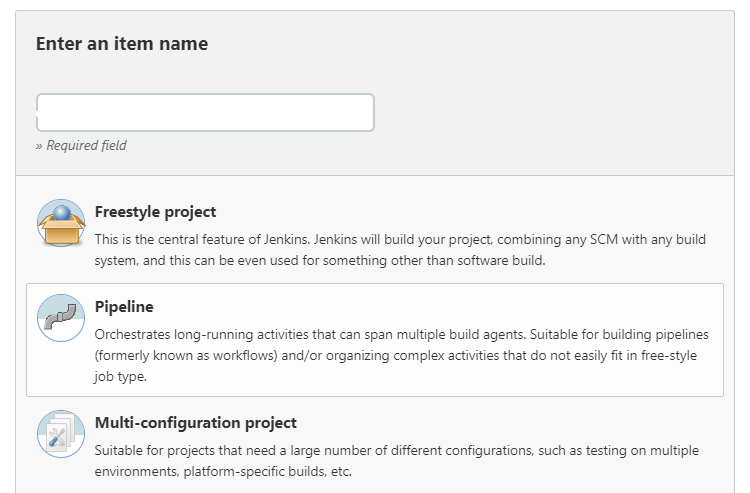
Step 1:Launch Jenkins and select the new project option, as indicated below. Type the project name according to the specifications.👁 Jenkins new project
Step 2: After you scroll down the last bit, you will see a script option where you may enter your desired decleratice pipeline script. Once you have finished writing it, click save and apply.👁 Screenshot-(689)
Step 3: When you select the Build Know option, your pipeline will start running. If there are any errors, you may view them in the console output option. Click the "Build Know" option once more after reading the error and fixing the problem. 👁 Screenshot-(692)-(1)
Step 4:After extensive debugging, view the pipeline execution in Console
👁 Pipeline outputJenkins Declarative Pipeline is a powerful tool used by DevOps teams to automate the software development lifecycle. Here are the key reasons why teams prefer Declarative Pipelines over Scripted Pipelines:

.webp)
-(1).webp)
.webp)