|
VOOZH | about |
|
VOOZH | about |
Digital information is more precious than any other asset in this information era, so it becomes the necessity of each and every organization to secure the data and provide a safe transfer of data over the network. Network in itself is very complex and transferring data attracts unwanted users and attackers who want to steal users' information so to deal with such cases it was essential to understand the network and analyze that for potential threats and vulnerabilities. For this purpose Wireshark was launched which provides the best tools for analyzing, troubleshooting, and finding loopholes in the network.
BACnet stands for Building Automation and Control networks. It is a networking protocol that follows different standards like ANSI, ISO, ASHRAE, etc. for building communication mechanisms of different devices which can be controlled remotely like Air conditioner, fire detecting systems, automatic lights, etc.
BACnet is a window in Wireshark which is used to analyze captured data packets using BACnet protocol. Any data transferred between systems like fire detecting systems sending messages to the owner's phone can be captured through Wireshark and can be analyzed. All the information like time, source IP address, destination IP address, and other related information can be gathered easily.
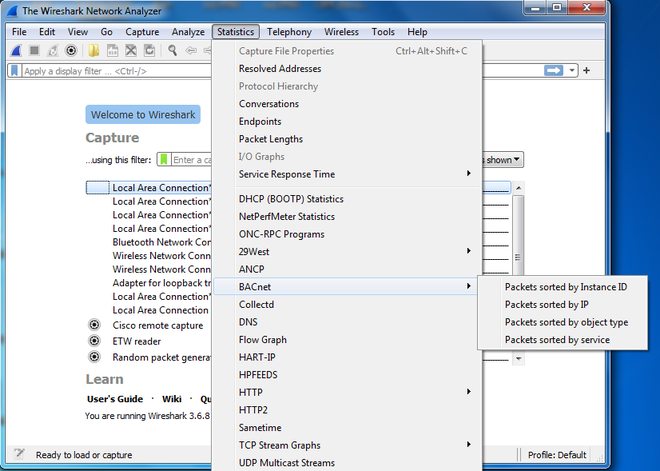
BACnet window can be found under Statistics tab in Wireshark, Click on BACnet to open a drown down menu which shows option of filtering the data packets on the basis of different parameter like Instance ID, IP address, Object type and Service.
On clicking BACnet option detailed information about captured data can be seen as follows:
All the data can be copied and saved in different formats for later use.