Closed-Circuit Television (CCTV) systems are widely used for surveillance, public safety, traffic monitoring and property protection. Unlike broadcast television, CCTV operates on a private network where video feeds are accessible only to authorized users and devices.
Real-Time Threat Detection and Incident Response: AI-powered CCTV systems detect suspicious activities, unauthorized access and security breaches in real time.
Remote Monitoring and Centralized Surveillance Management: IP-based CCTV systems allow remote access through web dashboards and mobile applications.
Cloud Storage, Data Backup and Video Retention: Cloud-integrated CCTV systems provide secure storage, backups and easy access to recorded footage.
Cybersecurity and Privacy Protection in CCTV Networks: Encryption, strong passwords and access controls help protect CCTV systems from unauthorized access and data breaches.
Role of Open Source Tools in Security Testing
Open-source tools play a crucial role in cybersecurity, including CCTV system audits. They are software programs whose source code is publicly available, allowing security professionals, researchers and students to inspect, modify and use them freely.
Transparency and Trust: Open-source software allows users to inspect and verify the code, ensuring there are no hidden backdoors or malicious functions. This makes the tools highly reliable for ethical security testing.
Cost-Effective Security Audits: Many open-source tools are freely available, enabling organizations, security teams and students to perform thorough security assessments without the expense of proprietary software.
Community Support and Continuous Updates: Active open-source communities identify vulnerabilities, release patches and share best practices, keeping the tools up-to-date and effective against emerging threats.
Learning and Research Opportunities: Open-source tools provide a safe environment for students and cybersecurity professionals to study real-world attack techniques, test defenses and build practical skills without risking unauthorized access.
Categories of Open Source Tools for CCTV Security Testing
A compromised CCTV system can expose sensitive video footage, provide attackers with network access or disrupt physical security operations.
1. Network Scanning Tools
These tools help identify all devices connected to a network, detect open ports and map network topology. They are essential for understanding the attack surface of CCTV systems.
Examples: Nmap, Masscan
2. Vulnerability Assessment Tools
Used to detect security weaknesses in camera firmware, communication protocols or web portals. They help security teams prioritize risks and plan mitigation strategies.
Examples: OpenVAS, Nikto
3. Password Auditing Tools
These tools evaluate the strength of login credentials to ensure that cameras and DVR/NVR systems are protected against unauthorized access.
Examples: Hydra, John the Ripper
4. Traffic Analysis Tools
Used to monitor network traffic between cameras, recorders and cloud servers. They help identify unencrypted transmissions, unusual activity or potential intrusion attempts.
Examples: Wireshark, tcpdump
Ethical CCTV Vulnerability Scanning with Nmap in Kali Linux
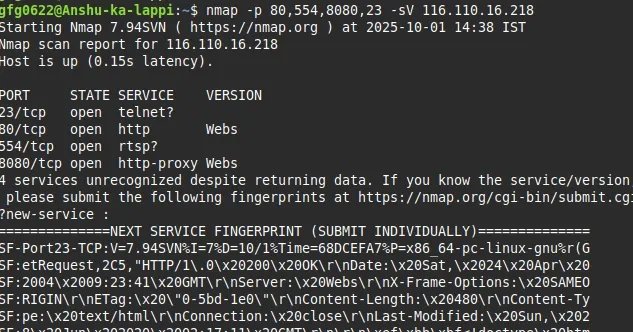
This guide outlines how to use Nmap in Kali Linux to perform a vulnerability assessment on a CCTV system for educational purposes in a controlled, authorized environment. We use the IP address 116.110.16.218, assuming it belongs to a legally accessible test system. Always obtain explicit written permission before scanning any system you do not own.
Requirements
Kali Linux: A penetration testing distribution with Nmap pre-installed.
Authorization: Written consent to test the target system (e.g., 116.110.16.218).
Network Access: Ensure you are on the same network as the target or have legal remote access.
Basic Knowledge: Familiarity with Linux terminal and networking concepts.
Step 1: Set Up Your Environment
Boot Kali Linux (use a virtual machine like VirtualBox for safety).
--script http-vuln*: Runs HTTP vulnerability scripts to detect issues like weak authentication.
Step 6: Analyze Results
Review Nmap output for:
Nmap scan report for 116.110.16.218Host is up (0.010s latency).PORT STATE SERVICE VERSION80/tcp open http Hikvision-Webs554/tcp open rtsp Unknown RTSP server
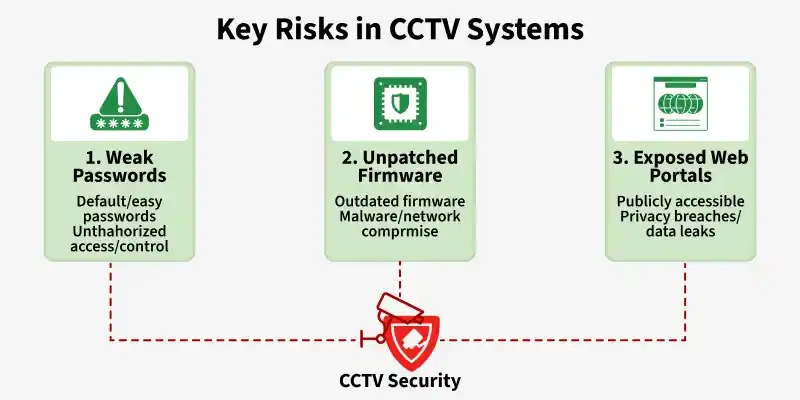
Key Risks in CCTV Systems
Here are the Key Risks in CCTV Systems, especially relevant from both a cybersecurity and physical security perspective:
Many CCTV cameras are shipped with default or easily guessable passwords. If these are not changed, attackers can gain unauthorized access, view live feeds or even take control of the cameras.
Default credentials are often publicly available online, making brute-force attacks easier for hackers.
Compromised CCTV devices can be added to botnets and used in large-scale cyberattacks such as DDoS attacks.
CCTV cameras run on firmware that occasionally requires updates to fix security vulnerabilities. Outdated or unpatched firmware can be exploited by attackers to bypass security, install malware or compromise the entire network.
Vulnerable firmware may contain known exploits that cybercriminals actively target on the internet.
Malware infections in CCTV devices can disrupt surveillance operations and damage network performance.
Automatic firmware updates and vendor-supported security patches help maintain system integrity and reliability.
3. Exposed Web Portals
Some cameras provide remote access via web interfaces or apps. If these portals are improperly configured, publicly accessible or use weak encryption, attackers can connect to the cameras from anywhere in the world.
Open ports and unsecured remote access interfaces increase the attack surface of CCTV networks.
Attackers may intercept unencrypted video streams and sensitive surveillance data during transmission.
Using VPNs, HTTPS encryption and firewall restrictions helps secure remote CCTV access from unauthorized users.
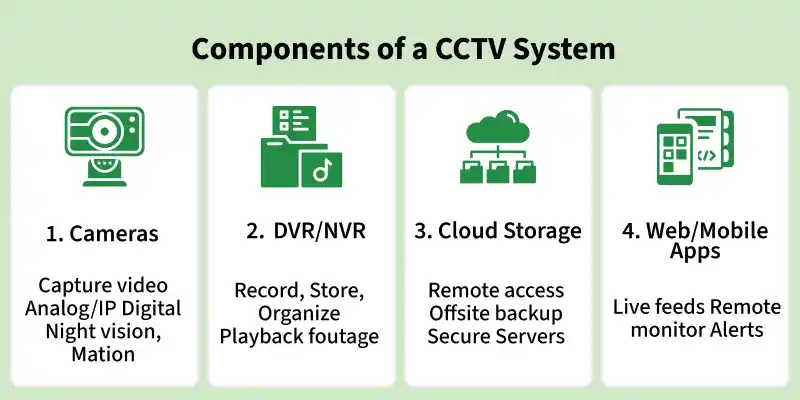
Components of a CCTV System
Here’s a clear breakdown of the main components of a CCTV (Closed-Circuit Television) system, useful for both learning and deployment: