|
VOOZH | about |
|
VOOZH | about |
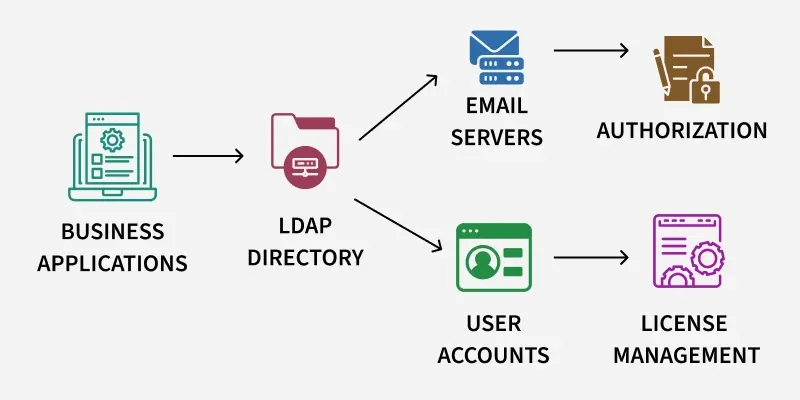
Lightweight Directory Access Protocol (LDAP) is an application-layer protocol used over TCP/IP to access and manage directory services, commonly in Microsoft Active Directory environments. LDAP Enumeration involves extracting information such as users, groups, computers and domain structure. Misconfigurations can expose sensitive data and enable attacks like credential harvesting or social engineering.
LDAP enumeration can expose several types of data:
Before we begin, ensure that the tools are installed on your Linux platform (e.g., Ubuntu or Kali Linux). Open a terminal (Ctrl + Alt + T) and enter these commands:
Update system packages:
sudo apt updateInstall Nmap for scanning:
sudo apt install nmapInstall enum4linux for AD enumeration:
sudo apt install enum4linuxInstall ldap-utils for ldapsearch:
sudo apt install ldap-utilsInstall JXplorer for GUI-based browsing:
sudo apt install jxplorerSeveral tools make LDAP enumeration easier, each with unique strengths.
Using the LDAP-search NSE script of Nmap we can scan for the LDAP service and then we can attempt other arguments to this script such as LDAP.searchattrib, We can also use the ldap-brute script to test for weak or default credentials when no valid credentials are available. It's a good tool for finding LDAP services and pulling details like usernames or server information.
To verify an LDAP service on port 389 and list user accounts.
Command:
nmap -p 389 --script ldap-search --script-args 'ldap.username="cn=ldaptest,cn=users,dc=cqure,dc=net",ldap.password=ldaptest,ldap.qfilter=users,ldap.attrib=sAMAccountName' <IP_ADDRESS>Output:
To find Windows servers and their details (e.g., operating system, creation date).
Command:
nmap -p 389 --script ldap-search --script-args 'ldap.username="cn=ldaptest,cn=users,dc=cqure,dc=net",ldap.password=ldaptest,ldap.qfilter=custom,ldap.searchattrib="operatingSystem",ldap.searchvalue="Windows *Server*",ldap.attrib={operatingSystem,whencreated,OperatingSystemServicePack}' <IP_ADDRESS>If you don’t have credentials try the ldap-brute to test for weak passwords (only with permission)
Command:
nmap -p 389 --script ldap-brute <IP_ADDRESS>enum4linux is a Linux tool designed for enumerating Windows Active Directory and SMB services, including LDAP. It’s excellent for extracting user accounts, groups and domain details without needing a GUI.
To list accounts and groups from an LDAP server.
Command:
enum4linux <IP_ADDRESS> | egrep "Account|Domain|Lockout|group"Output:
Note: enum4linux is simple and doesn’t require credentials for anonymous queries, though authenticated scans yield more data.
windapsearch is a Python script that uses LDAP queries to enumerate users, groups, computers and privileged accounts in a Windows domain. It’s ideal for penetration testers who have valid credentials.
To list computers in the domain:
python3 windapsearch.py --dc-ip <IP_ADDRESS> -u <USERNAME> -p <PASSWORD> --computersTo list groups:
python3 windapsearch.py --dc-ip <IP_ADDRESS> -u <USERNAME> -p <PASSWORD> --groupsTo find privileged users (e.g., Domain Admins):
python3 windapsearch.py --dc-ip <IP_ADDRESS> -u <USERNAME> -p <PASSWORD> --daTo list users with elevated privilege:
python3 windapsearch.py --dc-ip <IP_ADDRESS> -u <USERNAME> -p <PASSWORD> --privileged-usersNote: windapsearch is precise and supports CSV output for further analysis, making it a favorite for Active Directory enumeration.
LDAP search makes a connection to an LDAP server and it executes a search by using different parameters. The filter follows the string representation for search filters as defined in RFC 4515; otherwise, it uses (objectClass=*) as the default filter.
To test if the LDAP server allows anonymous access:
ldapsearch -x -H ldap://<IP_ADDRESS> -D '' -w '' -b "DC=<SUBDOMAIN>,DC=<TLD>"To query with valid credentials:
ldapsearch -x -H ldap://<IP_ADDRESS> -D '<DOMAIN>\<USERNAME>' -w '<PASSWORD>' -b "DC=<SUBDOMAIN>,DC=<TLD>"Note: For secure connections, use LDAPS (-H ldaps://<IP_ADDRESS>:636). If you get a “bind must be completed” error, the credentials are invalid.
JXplorer is a graphical LDAP client that allows users to browse and query LDAP directories visually, making it easier for beginners.
1. Launch JXplorer from the terminal:
jxplorer2. Connect to the LDAP server:
3. Browse the directory tree to view users, groups or computers.
LDAP enumeration can expose sensitive information and should only be performed with proper authorization.