OWASP stands for the Open Web Application Security Project. It is a non-profit global online community consisting of tens of thousands of members and hundreds of chapters that produces articles, documentation, tools, and technologies in the field of web application security.
OWASP releases the Top 10 Web Application Security Risks every 3-4 years based on real-world vulnerability data.
The list is created using frequency, severity, and impact of security flaws found in web applications.
It highlights the most common and most dangerous vulnerabilities that attackers frequently exploit.
The latest update (2021) helps developers and security professionals build more secure applications.
It is considered an essential security guide and industry standard for web application security best practices.
Note: As of 2025, the OWASP Top 10 (2021) remains the latest official release. OWASP has not published a newer Top 10 list yet. This article reflects the current OWASP Top 10 that is still valid and widely used in 2025.
The OWASP Top 10 (2021), which remains current as of 2025, are:
1. Broken Access Control
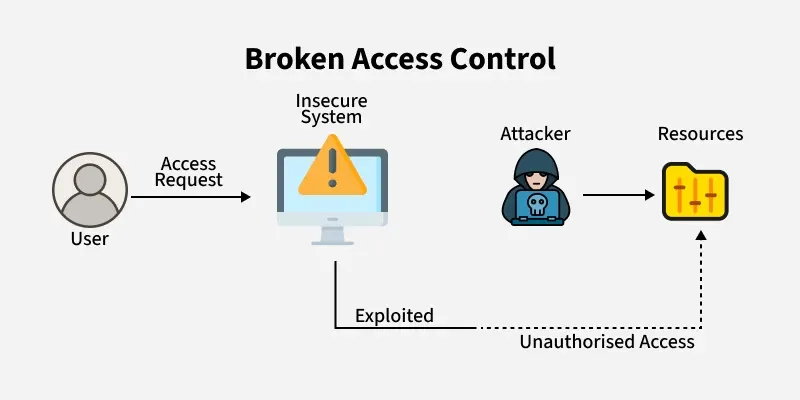
This vulnerability occurs when access controls are poorly enforced, allowing authenticated users to reach data or functions they shouldn’t, such as other users’ accounts or confidential files. Attackers often exploit weak session management or unexpired session tokens to gain unauthorized access to valid accounts.
Vulnerabilities under Broken Access Control
A system where access is not granted as per user roles, i.e. anyone in the system can access any resource, no principle of least privilege is being followed.
Use of insecure direct object references to access someone else's account without their knowledge
Lack of access controls in PUT, POST, DELETE in APIs
Any kind of tampering with JSON web tokens to elevate privileges like changing roles from 'user' to 'admin'.
The reference ID 12345 could be changed to 123456 and the user could simply access the other object with that id.
This is the case of IDOR, where the application has exposed direct reference to internal implementation objects. This can also include database keys, file paths, or any other internal reference. An attacker could brute-force different object IDs and exploit this vulnerability.
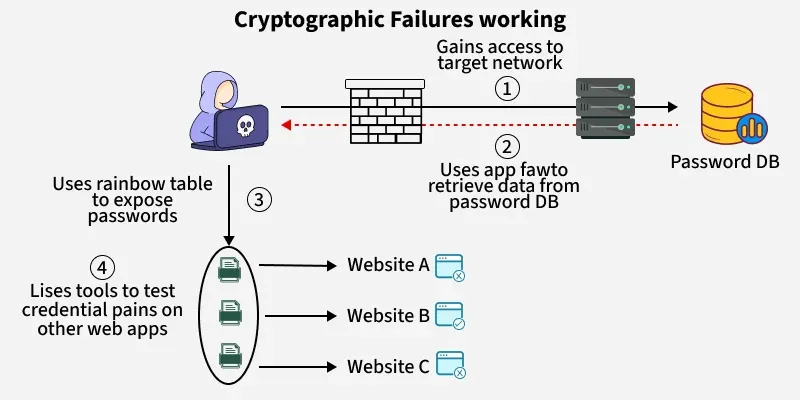
Any organization's data, whether in transit or at rest, is vulnerable to cryptographic failure if it is not properly secured. Sensitive information such as credentials, health records, classified data, and business secrets may be exposed. If this data is protected under privacy laws or regulations, its exposure due to weak or missing encryption is considered a cryptographic failure.
Vulnerabilities under Cryptographic Failures
Old or weak cryptographic measures being used by default in a system.
Data transmission without being encrypted, use of protocols such as HTTP, SMTP, FTP.
Use of unapproved hash functions such as MD5 or SHA1
Server certificate and trust chain is not verified properly
Use of default crypto keys, weak crypto keys, keys being re-used, improper key management in a system
A company stores the passwords of its users without proper encryption. If an attacker successfully gains access to the database, could easily gain credentials of all the users. Hashes that are made by simple hash functions could be easily cracked by strong GPUs.
Ways to Prevent Cryptographic Failures
Use strong, modern encryption algorithms like AES-256 to protect sensitive data.
Rotate cryptographic keys regularly to reduce the risk of exposure.
Generate keys using secure, random processes to avoid predictability.
Implement multi-factor authentication (MFA) for accessing encryption systems.
Ensure encryption of both data at rest and in transit to safeguard information throughout its lifecycle.
Audit cryptographic systems regularly to detect weaknesses and vulnerabilities.
Avoid hard-coding keys in code, store them in secure, external locations.
3. Injection
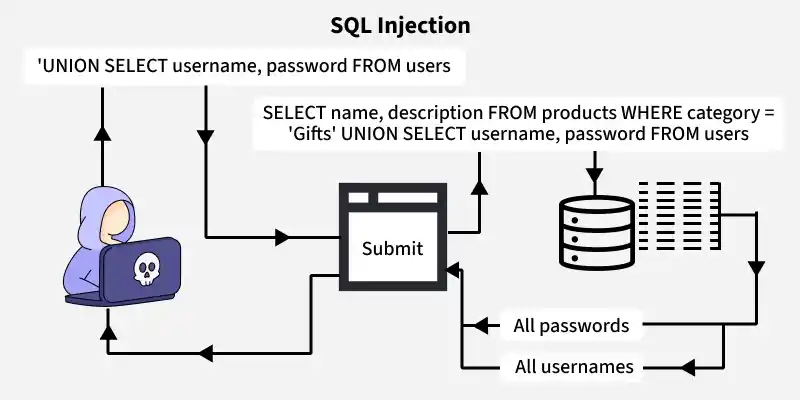
Injection vulnerabilities occur when an attacker uses a query or command to insert untrusted data into the interpreter via SQL, OS, NoSQL, or LDAP injection. The data that is injected through this attack vector makes the application do something it is not designed for. Not all applications are vulnerable to this attack, only the applications that accept parameters as input are vulnerable to injection attacks.
When the data input by users is not verified, sanitized or filtered.
It directly adds user input into SQL or command strings, which mixes trusted code with untrusted data.
It uses user input in ORM queries, letting attackers fetch data they shouldn't access.
It builds database queries using user input without using parameters or escaping, which can lead to injections.
Example of an Injection Vulnerability
The code for querying in the backend of the application
SELECT * FROM users WHERE username = '$username' AND password = '$password';
The attacker inputs the username and password as
Username: admin
Password: ' OR '1'='1
Now, the resultant query will be
SELECT * FROM users WHERE username = 'admin' AND password = '' OR '1'='1';
Given that the condition '1'='1' is true, the query will be successfully carried out and the user gained access to system.
Injection attacks can be prevented by
Use parameterized queries or prepared statements.
Validate and sanitize all user inputs.
Avoid building SQL queries using string concatenation.
Apply the principle of least privilege to database users.
Keep your database and libraries up to date.
Deploy a Web Application Firewall (WAF) as an extra layer.
4. Insecure Design
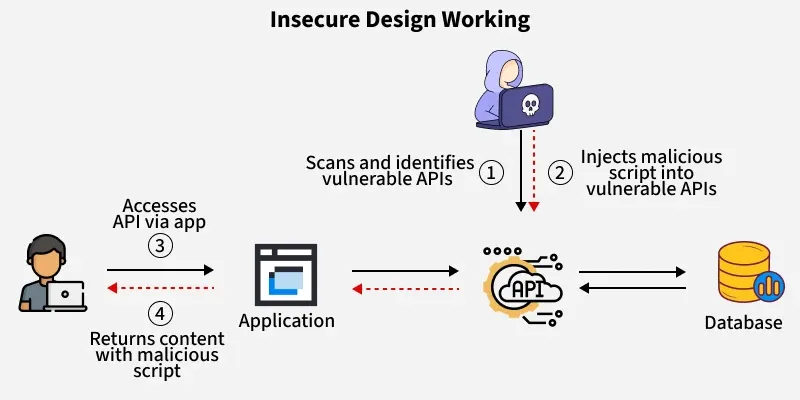
Insecure Design vulnerabilities refer to weaknesses that lie in the designing process of a product. These weaknesses cannot be overcome by secure implementation. They include flaws like lack of assessment of security requirements during the design phase.
Principles like Secure design, SDLC, Resource management are overlooked or not properly configured during development phase.
A mobile banking app allows users to transfer money between accounts.
However, the app's design does not require re-authentication for high-value transactions, like transferring a large sum of money. Instead, it only asks for authentication during the initial login session.
An attacker who gains access to a user's unlocked phone can initiate a high-value transfer without needing to re-authenticate, allowing unauthorized transactions.
How to Prevent Insecure Design Vulnerability
Use Secure development lifecycle during the designing phase of a product
A pre-configured library of secure design patterns to use as a roadmap
Threat modelling for designing authentication, access controls, business logics and key flows
Conduct unit and integration tests to check if all critical flows of the design are safe as per the threat model
A comprehensive document containing use-cases and misuse-cases for each level of the application
Segregate the tier layers and network layers on the system according to the level of protection needed for each of them
5. Security Misconfiguration
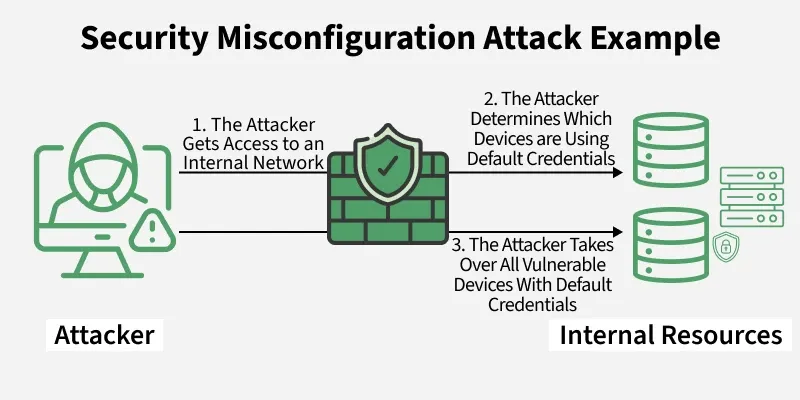
It is estimated that up to 95% of cloud breaches are the result of human errors and this fact leads us to the next vulnerability called security misconfiguration. This vulnerability refers to the improper implementation of security intended to keep application data safe.
Vulnerabilities covered under Security Misconfiguration
Use of default credentials by an account
Latest security features on disabled mode in the updated systems
Outdated software
Insecure security settings like libraries, databases, application frameworks
Lack of appropriate security measures in the cloud services
Security headers not set to secure values
Example of Security Misconfiguration
A company sets up a new content management system (CMS) for its corporate website. The system is installed using default settings, including the default administrator username and password (admin/admin). The team forgets to change these credentials before deploying the website to production.
An attacker scans public-facing sites for common CMS platforms and attempts to log in using known default credentials. The attacker successfully logs in to the admin panel and gains full control of the website, including access to user data and the ability to upload malicious content.
How to Prevent Security Misconfiguration Vulnerabilities
Using Dynamic application security testing (DAST)
Disabling the use of default passwords
Keeping an eye on cloud resources, applications, and servers
Automated process to verify the effectiveness of security configurations time to time
6. Vulnerable and Outdated Components
Nowadays there are many open-source and freely available software components (libraries, frameworks) that are available to developers and if there occurs any component which has got a known vulnerability in it then it becomes a weak link that can impact the security of the entire application.
Attackers can take advantage of these weaknesses to gain unauthorized access, execute code, or disrupt application functionality.
Vulnerabilities due to Vulnerable and Outdated Components
Lack of information about all the components including client and server side, including direct and nested dependencies
Vulnerable or outdated software, including databases, OS, servers, DBMS, APIs, runtime environments, libraries and all other components of an application.
Irregular scan of vulnerabilities in a system
Untested compatibility of updated, upgraded and patched libraries by software developers
Example of Vulnerable and Outdated Components
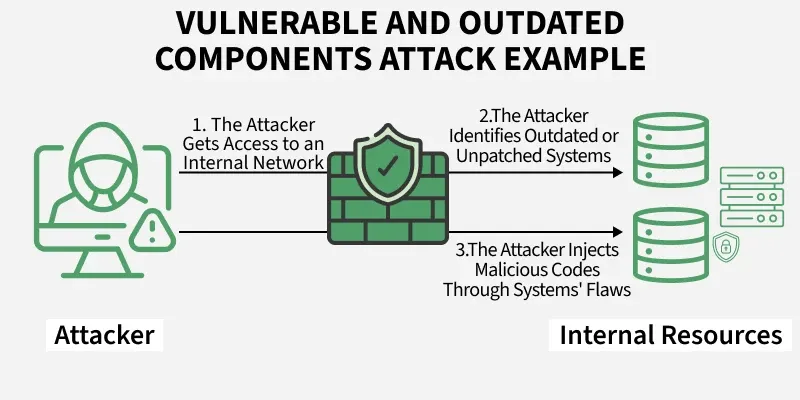
A company’s web application runs on Apache Struts 2.3, a version with a known vulnerability that allows remote code execution (RCE). Despite the patch being available for months, the company fails to update the framework.
An attacker scans for applications using this outdated version, exploits the vulnerability, and gains control of the server allowing them to execute arbitrary commands, access sensitive data, and potentially pivot deeper into the network.
Vulnerable and Outdated Components attacks can be prevented by
Remove unnecessary dependencies, features, components and files
Install components of a system only from official sources through secure channels only.
Properly maintain the libraries and components and regularly check for updates and upgrades for each.
7. Identification and Authentication Failures
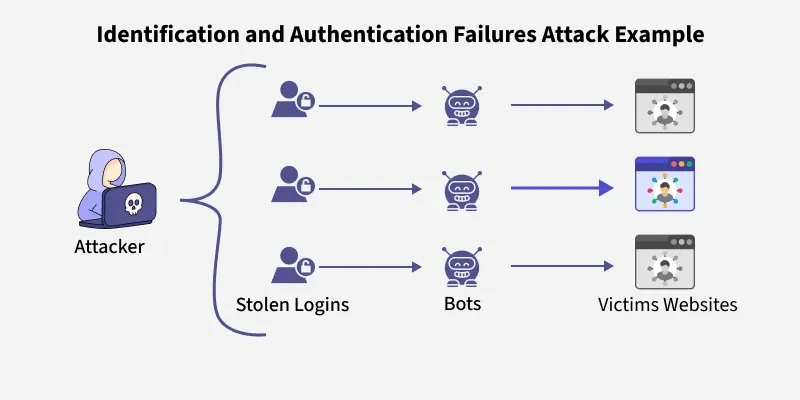
This vulnerability was previously listed as Broken Authentication, It is a vulnerability that allows an attacker to use manual or automatic methods to try to gain control over any account they want in a system. In worse conditions, they could also gain complete control over the system.
Causes of Identification and Authentication Failures
Automated attacks like credential stuffing, brute-force attacks to gain unauthorized access to a system
Default and weak credentials are allowed by any system
Lack of Multi-factor authentication
Insecure password recovery mechanisms
Unencrypted storage of usernames and passwords
Improper validation of Session IDs
Example of Identification and Authentication Failure
A mobile app allows users to log in using only their email address, without requiring a password or any second factor of authentication. Once an attacker identifies a valid email address, they can impersonate that user and gain full access to their account without needing to prove their identity.
Identification and Authentication Failures can be prevented by
Implementing multi-factor authentication
Protecting user credentials
Sending passwords over encrypted connections
Weak passwords should not be allowed for any user
Credential Recovery process must be secured
8. Software and Data Integrity Failures
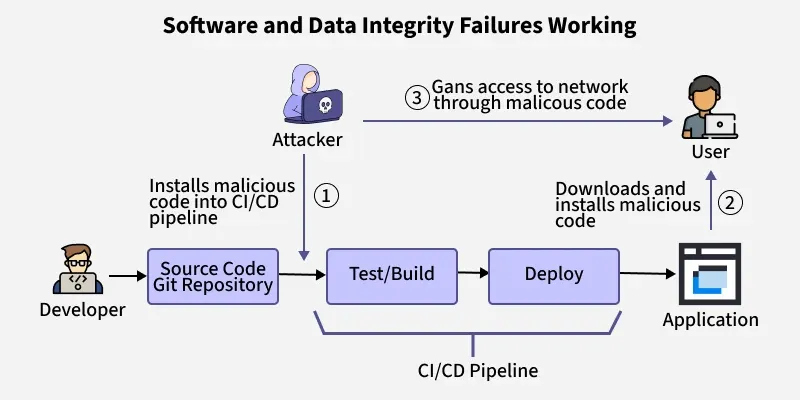
When the integrity of a software or data could be compromised by an attacker leads to software and data integrity failures. If an application relies on dependencies like libraries, modules or plugins from a untrusted source or repository it could lead to Software and Data Integrity Failures. Auto-update functionality where systems are updated automatically without a proper integrity verification are vulnerable to attacks.
Vulnerabilities under Software and Data Integrity Failures
Untrusted sources of dependencies for plugins, libraries, modules
Insecure CI/CD pipeline leading to unauthorized access, malware upload or system compromise
Auto-update without proper integrity verification
Example of Software and Data Integrity Failures
A company sets up automatic updates for its desktop software but does not verify the authenticity of the update source or use digital signatures. An attacker compromises the update server and pushes a malicious software update. All clients that download the update unknowingly install malware.
Software and Data Integrity Failures can be prevented by
Ensuring libraries and dependencies are installed from trusted repositories
Unencrypted serialized data should not be sent to untrusted clients without an integrity check
Use of digital signature to verify the integrity of any software or data
Efficient code review process for code and configuration changes to reduce the chance of injected malicious code into the software pipeline
9. Security Logging and Monitoring Failures
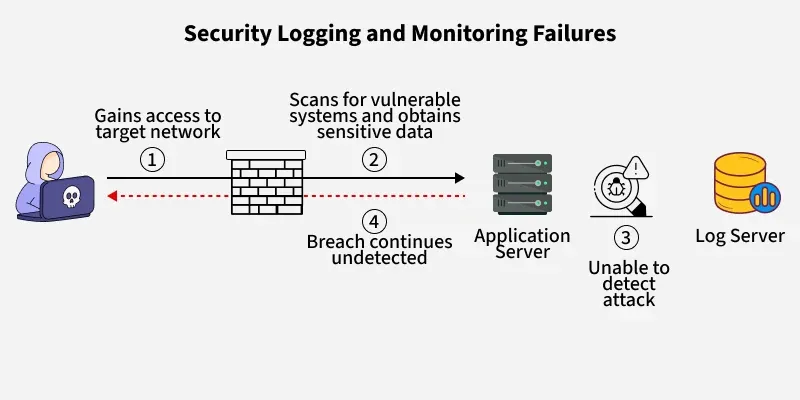
Security Logging and Monitoring Failures occur when applications do not properly log critical events or fail to monitor and alert on suspicious activities. This can delay detection of breaches, hinder incident response, and allow attackers to operate undetected within systems.
Example of Security Logging and Monitoring Failure
An e-commerce website suffers a brute-force login attack, where an attacker makes thousands of login attempts using different username and password combinations. However, the system lacks proper logging and monitoring, so the repeated failed login attempts go unnoticed by the security team until user accounts are compromised.
Security Logging and Monitoring Failure can be prevented by
Login controls, access controls and server-side input validation must be ensured
Logs generated by the system should follow a particular format that can be easily stored and processed by log management solutions
Effective monitoring and flagging of suspicious activities that are responded addressed
A proper implementation of an incident response plan in case of security incident
10. Server-Side Request Forgery
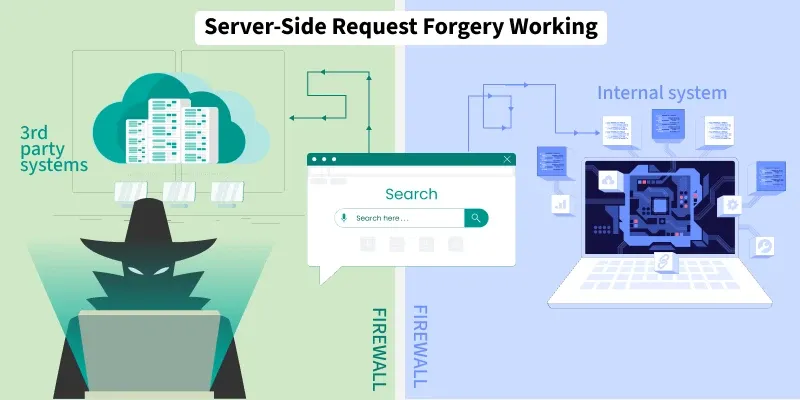
SSRF (Server-Side Request Forgery) is a newly added vulnerability to the list of OWASP-10, it refers to when a web application does not validate the user-supplied URLs before fetching them, which lets the attacker force the legit website to send a forged request to an unexpected destination, despite being protected by firewalls, access controls etc.
This is the internal metadata service IP used by cloud providers like AWS. The server, running in a cloud environment, fetches the internal URL and returns sensitive cloud instance credentials to the attacker.
The attacker tricked the server into making a request to an internal resource that would otherwise be inaccessible, leading to credential theft or internal network access
Server-Side Request Forgery can be prevented by
Sanitization and validation of all client-side input data
HTTP redirections should be disabled
Avoid using server-side functionality to fetch remote URLs unless absolutely necessary.
If URL fetching is required, limit it to internal logic with strict controls.
Use firewalls and network policies to prevent outbound requests to internal or sensitive systems.