Role-Based Access Control is a security framework used to restrict and manage user access to systems, applications, databases and network resources based on predefined job roles. Instead of assigning permissions to every individual user, organizations assign permissions to roles and users inherit access rights through those roles.
Controls access to sensitive data, applications and systems.
Assigns permissions according to job responsibilities.
Reduces unauthorized access and insider threats.
Simplifies permission management in large organizations.
Supports security compliance and auditing requirements.
Components of RBAC
Users: Users are individual people or accounts that access the system.Example Students, employees, professors or administrators.
Roles: Roles represent job functions or responsibilities within an organization.Example Student, Professor, HR Manager, IT Admin.
Permissions: Permissions define the actions a role is allowed to perform.Examples Read data, Edit records, Delete files, Manage users.
Role Assignments: Users are assigned one or multiple roles depending on their responsibilities.Example A user can be both a Student and a Lab Assistant.
Working Of RBAC
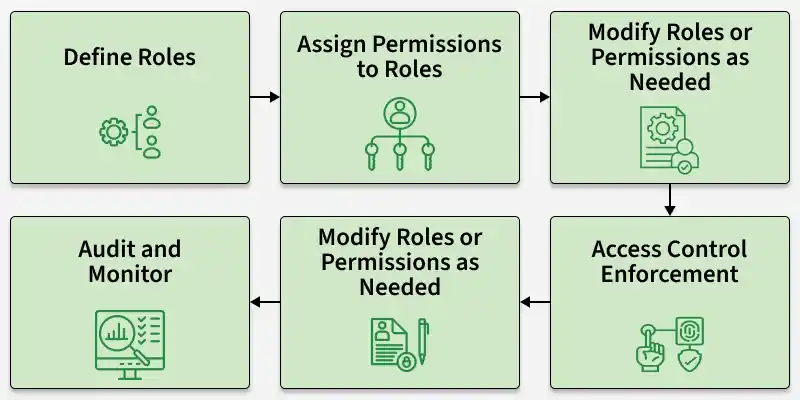
RBAC works through a structured process that connects users, roles and permissions securely.
Organizations first create roles according to job functions and responsibilities.
Identify organizational responsibilities
Group similar access needs
Create role categories
Example: Student, Professor, Registrar and IT Admin.
2. Assign Permissions to Roles
Each role receives only the permissions required to perform its duties. Prevents unnecessary access, Strengthens system security, Simplifies permission management
Example Permissions:
Student: Submit assignments and view grades.
Professor: Edit course content and grade submissions.
Registrar: Modify academic records.
IT Admin: Manage accounts and system settings.
3. Assign Users to Roles
Users are mapped to one or more roles depending on their responsibilities.
Example:
Jane is assigned the Professor role.
John is assigned both Student and Lab Assistant roles.
4. Access Control Enforcement
When a user attempts to access a resource, the system verifies their assigned role and corresponding permissions. Access Verification Process:
User logs into the system
System identifies assigned roles
Permissions linked to the role are checked
Access is granted or denied
Example: A Professor trying to access the grading dashboard will receive access because the role includes grading permissions.
5. Modify Roles and Permissions
Organizations can update roles whenever responsibilities or business requirements change.
Easy access updates.
Reduced administrative effort.
Consistent permission management.
Example: If Professors require access to a new analytics tool, administrators simply update the Professor role permissions.
6. Audit and Monitor Access
RBAC systems maintain logs of user activities and access attempts for monitoring and security analysis. Audit Functions:
Track user activities
Detect suspicious behavior
Investigate security incidents
Support compliance reporting
Example: If unauthorized access occurs, administrators can review logs to identify which role accessed the affected resource.
Simulation of The RBAC Work
Limitations
Initial role setup can be time-consuming
Complex organizations may require many roles
Poor role design can create permission overlap
Frequent organizational changes may require continuous updates