|
VOOZH | about |
|
VOOZH | about |
String extraction is the process of retrieving human-readable text from a suspicious file without executing it. These readable strings can include URLs, IP addresses, file paths, registry entries, commands, or error messages that give analysts valuable clues about the malware’s behavior and intent. It helps in identifying indicators of compromise (IOCs) and understanding how the malware interacts with the system or network.
Enumerated below are the core features of string extraction
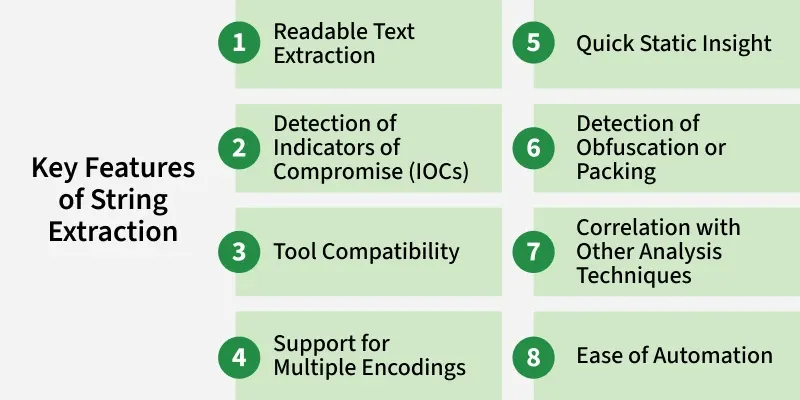
String extraction focuses on retrieving all human-readable text (ASCII and Unicode) embedded within a suspicious file. This helps analysts quickly identify meaningful data without running the malware.
Extracted strings often contain valuable IOCs such as URLs, IP addresses, registry paths, file names, and system commands. These indicators provide insights into how malware communicates or operates.
The process is supported by various tools like strings (Linux), FLOSS, Sysinternals Strings, and rabin2. These tools allow analysts to easily extract and analyze text data from executable files.
Malware may use different text encodings. String extraction tools can handle both ASCII and Unicode (UTF-16) formats, ensuring no potential indicators are missed.
Since the analysis is done without executing the file, it provides a safe, fast, and effective way to gather initial intelligence about the malware’s behavior and intent.
A lack of readable strings or the presence of random-looking text can indicate that the malware is packed, encrypted, or obfuscated—signaling that deeper analysis is required.
The extracted strings can be cross-referenced with import tables, PE headers, and YARA rules to validate findings and better understand the malware’s purpose.
String extraction can be easily automated and integrated into malware analysis pipelines, allowing large-scale scanning and pattern detection across multiple samples.
Below is a list of tools commonly employed for string extraction.
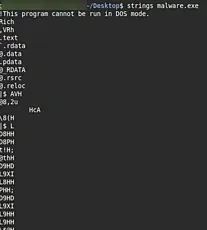
The strings utility is a classic tool used to extract readable text from binary files. It scans an executable (or any binary) for sequences of printable ASCII or Unicode characters and outputs them for analysis.
strings tool helps analysts quickly identify these human-readable clues from within compiled executables.Example
strings -n 5 sample.exe | egrep -i 'http|https|cmd|powershell'-n 5 extracts strings of at least 5 characters.egrep highlights potentially malicious indicators.Practical insight:
This is usually the first step in static malware analysis to understand what the binary might do, before disassembling or debugging it.
PEStudio is a powerful static analysis tool for Windows executables (Portable Executable format). It allows you to inspect strings, imports, resources, and security indicators without running the file. PEStudio automatically scans and categorizes strings extracted from the malware. It highlights suspicious entries such as:
Practical steps:
sample.exe).Practical insight:
PEStudio goes beyond simple text extraction by correlating strings with behavior, making it one of the best GUI tools for static malware triage.
Shell extensions are small utilities that integrate directly into the Windows Explorer right-click menu to perform quick actions like extracting file details, hashes, or strings — without using the command line.
Example:
Right-clicking a sample → choosing “Analyze with PEStudio” or “View Strings” quickly opens the file’s properties and extracted string data.
Practical insight:
Ideal for analysts who prefer a graphical approach rather than command-line tools. These extensions save time during triage.
PEiD is a lightweight tool that detects the compiler, packer, or cryptor used in Windows executables. Packed files often hide or encrypt their strings, making strings or PEStudio output incomplete.
Practical steps:
sample.exe.Practical insight:
Unpacked or raw executables reveal the true strings and code, while packed files only show garbage data. Hence, PEiD acts as a pre-string extraction check.
Strings matter in Linux malware analysis because they can reveal embedded commands, file paths, IP addresses, or hidden functionality that provide critical clues about the malware’s behavior.
Example:
strings suspicious.elf | grep -i "ssh"If you see references to ssh or scp, it suggests the malware may try to steal SSH credentials or use SSH for spreading.
Strings often contain clues that defenders can use to detect or block malware. These include:
/etc/passwd, /tmp/malware.sh.@reboot /usr/bin/malicious.Example: A string like http://badserver.com/update.sh clearly shows a C2 server or download location.
Strings can expose the purpose of the malware.
Examples:
execve("/bin/bash"): The malware may spawn a shell for remote control.wget or curl: It may download additional payloads.kill -9: It may try to terminate security processes.Advanced Linux malware often uses packers (like UPX) or strips symbols to hide its intent. If strings shows very few or meaningless results, that itself is a clue.
Example:
main, printf, socket.String extraction is usually the first step, but it becomes powerful when combined with other tools.
Example workflow:
strings to find a suspicious domain → malicious.example.com.readelf, objdump) to see if networking functions are present.