|
VOOZH | about |
|
VOOZH | about |
Protocol Buffers (Protobuf) are Google’s format for serializing structured data. Wireshark uses Protobuf Search Paths to locate custom .proto files and decode captured messages.
.proto files.proto Files are locatedProtocol Buffers (Protobuf) are Google’s efficient method for serializing structured data, and Wireshark can decode these byte-stream messages using .proto files.
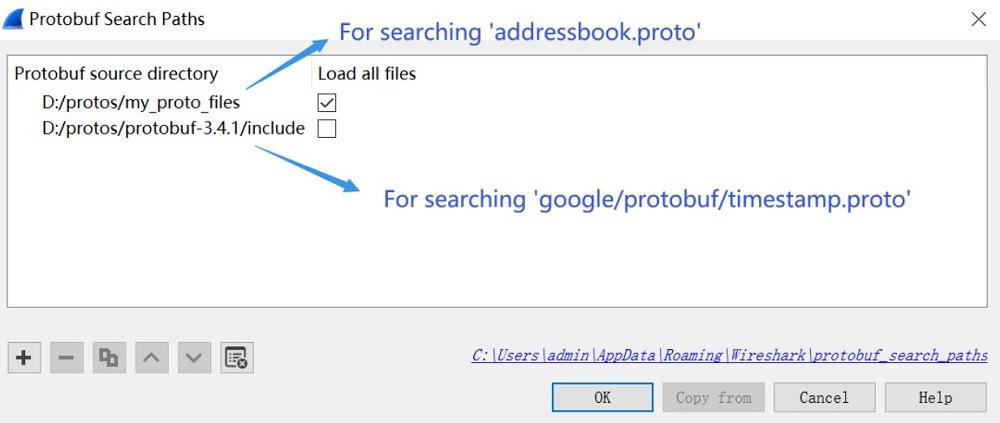
.proto definitionsProtobuf Search Paths are directories that Wireshark (and tshark) use to locate .proto files referenced in captured network traffic. If your capture contains Protobuf-encoded fields, Wireshark uses these search paths to:
.proto definitionsWithout these paths, Protobuf traffic may appear as “Opaque Field” or undecoded binary.
You'll want to set your protobuf search paths value in your Wireshark preferences file (usually located at C:\Users\<username>\AppData\Local\Programs\Wireshark\).
The default value is “wiretap”, which uses the Wireshark binaries compiled with system libraries:
Wireshark –version …
Protocol Buffers Version: 2.3.0
Application Version: 1.10.1
Library Version: 2.3.0
Protobuf Search Paths are “key=value" pairs, separated by a semicolon and surrounded by quotes (e.g., “path=C:\Users\<username>\AppData\Local\MyProtoshare\").
tshark is Wireshark’s command-line equivalent. It uses the same preference system, so you can specify Protobuf search paths using either:
Both methods work on headless servers where the GUI is unavailable.
This is the simplest and most direct method:
tshark -o "protobuf.search_paths: /path/to/protos:/more/paths" -r capture.pcapNotes:
Export your Wireshark preferences (or create a new file), then use:
tshark -C /path/to/preferences -r capture.pcapInside that file, have:
protobuf.search_paths: /your/proto/dir:/another/dirThis is ideal for automated environments, CI pipelines, or decoding large batch captures.