|
VOOZH | about |
|
VOOZH | about |
Front-end development, also known as client-side development, focuses on building the user interface (UI) and user experience (UX) of a website or web application.
HTML stands for Hyper Text Markup Language. It is used to define the structure of the web pages. It is a markup language that consists of different tags. HTML is the basic building block of the web page, which is used to display text, images, and other content.
The semantic elements in HTML are the elements that contain the meaning of the content and the structure of the HTML document. These elements contain content that is related to their names or reflects their names. These are some of the semantic HTML elements listed below:
| Inline Element | Block Element |
|---|---|
| Does not start on a new line | Always starts on a new line |
| Takes up only as much width as necessary | Takes up the full width available |
| Cannot contain block elements | Can contain both inline and block elements |
| Height and width are usually not adjustable | Height and width can be set freely |
Example: <span>, <a>, <strong>, <em> etc | Example: <div>, <p>, <h1> etc |
In HTML, lists are used to represent a collection of different items. There are three types of lists available in HTML, as listed below:
1. Unordered List: It is defined using the <ul> and <li> tags. By default, it represents the items with a bulleted dot.
2. Ordered List: It is defined using the <ol> and <li> tags. By default, it represents the list of items with numeric digits.
3. Definition List: It is a special kind of list that is used to list the terms with their definitions in a structured way. It can be defined using the <dl>(definition list), <dt>(definition term), and <dd>(definition description) tags.
The table below will show the differences between the div and span tags in HTML:
<div> tag | <span> tag |
|---|---|
It is a block-level element. | It is an inline element. |
It can be used to group and structure the content of the web page. | It is mainly used to interact with and style a particular part of the web page. |
It represents a bigger section of the web page. | It is used to target small parts of the web page. |
It starts from a new line and takes up the full width available. | It does not start from a new line and takes up only the required width as taken by the content. |
In HTML, the DOCTYPE declaration is also known as the document type declaration. It defines the document type and tells the browser in which version of HTML the document is written.
The <iframe> tag is used to embed external documents or web pages inside the current document by specifying their link inside it. It is mainly used to embed external videos, maps, and other external content.
The <b> and <strong> tags are both used for making the text bold. The <b> is used when we want to highlight only the text. The <strong> is used when we want to indicate the importance of the text.
In HTML, meta tags are used to define the metadata about the HTML document, including character set, description, keywords, author, and viewport settings. Placed within the <head> element.
CSS stands for Cascading Style Sheets. It helps us to design and style the web page to make it attractive for users. It is used to describe how the elements should be displayed on the screen. CSS provides us with a lot of selectors to select the HTML elements and style them according to the requirements. Some of the CSS selectors are Element Selectors, Class Selectors, and ID Selectors.
In CSS, selectors are used to select elements and style them element by providing CSS properties to them. Below is the list of some common CSS selectors:
We can include the CSS in the webpage in the following ways:
1. Inline CSS
Inline CSS is added directly to the HTML element using the style attribute.
<p style="color: blue; font-size: 20px;">This is a paragraph with inline CSS.</p>2. External CSS
External CSS is written in a separate .css file and linked to the HTML document using the <link> tag.
p {
 color: red;
 font-size: 16px;
}
3. Internal CSS
Internal CSS is written inside a <style> tag within the <head> section of the HTML file.
<style>
 p {
 color: green;
 font-size: 18px;
 }
 </style>
</head>
<body>
 <p>This paragraph is styled using internal CSS.</p>
</body>
4. CSS @import Method
We can import an external CSS file inside another CSS file using @import.
The visibility: hidden property only hides the content of the element on which it is used. It does not remove the element from the document and keeps the space as it is, so that no other element can replace it on the UI.
The display: none property not only hides the element but removes it from the document, and the space acquired by the element is now free to be acquired by the other elements.
| CSS Grid | Flexbox |
|---|---|
| Two-dimensional layout | One-dimensional layout |
| Controls both rows and columns | Controls either row or column, not both |
| Suitable for complex, structured layouts | Ideal for simple, linear layouts |
| Allows item placement anywhere in the grid | Items follow the document/source order |
| Can define both rows and columns together | Defines layout in a single direction |
The float property allows you to set the child elements of a container either on the left side of it or on the right side of it. The possible values for this property are left, right, initial, inherit, and none.
JavaScript is a high-level scripting language. It is a dynamically typed language. JavaScript is used to add dynamic elements and styles to the HTML document to make the web page more interactive and attractive. JavaScript is used in both the frontend as well as backend.
var | let | const |
|---|---|---|
Function-scoped | Block-scoped | Block-scoped |
Hoisted but initialized as undefined | Hoisted but not initialized | Hoisted but not initialized |
No TDZ (accessible before declaration) | Has TDZ (not accessible before declaration) | Has TDZ (not accessible before declaration) |
Reassigning and redeclaring within the same scope is allowed. | Reassigning is allowed, but redeclaration in the same scope is not allowed. | Neither reassigning nor redeclaring is allowed; it is a constant and cannot be reassigned or redeclared. |
The == operator is known as the double-equal operator in JavaScript. The == operator checks only for the values of the operands and returns true if the values are the same.
The === operator is known as the triple-equal the operator. It not only checks for the values of the operands but also the types of the operands. It returns true only if the values and the type of the operands are the same.
true
false
DOM stands for the Document Object Model. In JavaScript, the DOM is used to represent the structure of the web page. It allows us to manipulate the elements, attributes, and content of a web page using JavaScript. It is a tree-like representation of a web page's HTML structure.
Undefined Value:
Null Value:
undefined
null
false
React is an open-source front-end JavaScript library created by Facebook that is used for building user interfaces(UI) based on components. There are various features that are provided by React.
Key Features of React
There are five building blocks of React
DOM refers to the Document Object Model. Virtual DOM is a virtually created DOM. It is exactly like DOM and it has all the properties that DOM has. But the main difference is Whenever a code runs JavaScript Framework updates the whole DOM at once which gives a slow performance. Whereas virtual DOM updates only the modified part of the DOM.
JSX stands for the JavaScript XML. It is the syntax extension for JavaScript. JSX allows us to write the HTML code inside the JavaScript, then React compiles this code into pure JavaScript that can be rendered by the browser.
import React from 'react';
function App() {
 return <h1>Hello, React!</h1>;
}
export default App;
In this example, the JSX code inside the App function returns an <h1> element with the text "Hello, React!" which will be displayed in the browser when the component is rendered.
A Component is one of the core building blocks of React. In other words, we can say that every application we develop in React will be made up of pieces called components.
There are the two types of the components in the React
Angular is an open-source framework that is used for building web applications using TypeScript. Angular is used for building single-page applications (SPAs). It was developed by Google.
Key Features of Angular
AngularJS and Angular are both web application frameworks developed by Google, but they differ in architecture, language, and performance.
| Features | AngularJS | Angular |
|---|---|---|
| Release Year | 2010 | 2016 |
| Language | JavaScript | TypeScript |
| Architecture | MVC (Model-View-Controller) | Component-based |
| Mobile Optimization | Limited | Built-in support |
| Performance | Slower | Faster with Ahead-of-Time (AOT) compiler |
| Routing | Using third-party libraries | Provided by Angular Router |
Components are the building blocks of Angular. It consists of a TypeScript class, an HTML template, and optional CSS styles.
Example: Creating a reusable header component for your application.
import { Component, Input } from '@angular/core';

@Component({
 selector: 'app-header',
 templateUrl: './header.component.html',
 styleUrls: ['./header.component.css']
})
export class HeaderComponent {
 @Input() title: string;
 @Input() links: { name: string, url: string }[];

 constructor() { }
}Angular supports two-way data binding, which allows the automatic synchronization of data between the view and the component. If any changes are made in the component will be reflected in the view, and if any changes are made in the view, they will be reflected in the component. This is known as the two-way data binding.
Angular Services are reusable classes used to store shared logic such as API calls, authentication, or data processing. They are injected into components through Angular’s dependency injection system.
Use them when you want to separate business logic from UI components or share data/functions across multiple components.
Angular Pipes are used to transform the displayed data in the template. They apply the transformation on the input values and return the transformed value. Due to this, we can directly manipulate the data in the HTML templates.
Syntax
{{ value | pipeName }}Vue.js is the framework of JavaScript, that is used for building single-page applications(SPAs) and user interfaces (UI) for websites. It stands out for its simplicity, seamless integration with other libraries, and reactive data binding.
A component in VueJS is a reusable piece of code that signifies a part of the user interface. Components make it simpler to handle complex applications by breaking them down into minor, controllable pieces.
Props in VueJS are custom attributes that permit parent components to pass data to child components. They empower component reusability by making it possible to handle child components from their parent component. They are specified in the child component and received as arguments from the parent.
Syntax
Vue.component('child-component', {
 props: ['propName'],
 // define component
});Routing in VueJs is used to navigate the Vue application, permitting the formation of single-page applications with multiple views. Vue Router helps link between the browser’s URL/History and Vue’s components empowering certain paths to render whatever view is linked with it. A Vue router is utilized in making single-page applications.
Git is an open-source version control system that helps developers to store, track, and manage code. Git was created by Linus Torvalds in 2005 for Linux kernel development. The latest version of git is 2.48.1.
The advantages of using Git is mentioned below
Git is a distributed version control system (VCS) that helps track changes in source code. | GitHub is a cloud-based platform for hosting Git repositories and facilitating collaboration. |
Used to manage source code locally and track changes. | Provides a remote hosting service for Git repositories with collaboration features. |
Does not provide cloud hosting for repositories. | Offers cloud hosting for repositories with features like private/public repositories. |
Helps developers track, commit, and merge code changes. | Provides features like issue tracking, pull requests, and code review. |
Other Git hosting services: GitLab, Bitbucket, etc. | GitHub is a Git hosting service with additional features for teamwork. |
In Git, the repository is the location in which all the files and the versions of projects are stored, which allows the developers to track the changes made in the code. There are two types of repository.
localStorage is a client-side web storage mechanism that allows web applications to store key-value pairs persistently in a user’s web browser. It provides a simple interface for storing data locally.
sessionStorage is a web storage API provided by web browsers to store data in a similar way as stored in the localStorage in the form of key-value pairs. The data stored in the sessionStorage will only be accessible for one session, such that if the user closes the window or tab, the stored data will be lost.
In HTML, tables are created using the <table> element. Each table consists of rows <tr> and cells <td> for data, and <th> for headers.
GET Method | POST Method |
|---|---|
It is an insecure way to send data to the server. | It is a secure way of sending the form data. |
All the form data parameters are visible in the URL. | None of the parameters are visible anywhere. |
It has a URL length limit that varies for different browsers. | It has a bigger URL length limit as compared to the limit of the GET method. |
Results are cached by the browser by default. | Does not cache the responses in the browser by default. |
Users can bookmark the form submission. | Responses can be bookmarked easily. |
Client-side form validation can be done using built-in HTML attributes (required, pattern, type="email"), custom JavaScript checks (running on input or form submission), or framework-based solutions like Angular Reactive Forms or React Hook Form.
These methods help catch user errors early and improve user experience, but server-side validation should still be used for security.
In HTML, void elements are also known as empty elements. Void elements are the elements that do not have a closing tag, they only have the opening tag. Example: <img>, <meta>, <link>, <br>.
The z-index property is used to control the stacking order of the elements that are positioned using the position property in CSS.
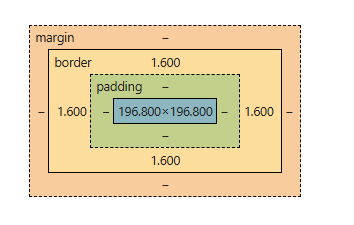
The CSS Box Model defines how elements are sized, positioned, and rendered on a webpage. When a browser loads an HTML document, it creates a DOM tree and assigns a box to each element. This box calculates the element’s dimensions and position relative to its parent or the root <html> element, ensuring accurate layout and spacing.
👁 Screenshot-2024-12-10-105714CSS Sprites are a technique used in web development to combine multiple images (such as icons, buttons, or other UI elements) into a single image file. This single image is then displayed in different parts on the web page using CSS, reducing the number of HTTP requests required to load multiple images.
In this example
CSS specificity determines which style rule is applied when multiple rules target the same element. The priority order is: inline styles > IDs > classes/attributes/pseudo-classes > tag selectors.
Conflicts are resolved by using more specific selectors, adjusting rule order, or simplifying styles. Avoid using !important unless absolutely necessary.
CSS Preprocessor is a scripting language that generates the Cascading Style Sheets (CSS) from its own syntax.
In JavaScript, Hoisting is the behavior in which during the compilation phase, the variables and the functions declarations are moved to the top of their respective scopes.
Example with the var
10
Example with let
It will show the Reference ErrorImplicit Conversion (Coercion) | Explicit Conversion |
|---|---|
Automatically converts data types during operations. | Manually converts data types using built-in functions. |
Controlled by JavaScript. | Controlled by the developer. |
Converts string → number, boolean → number, etc., based on context. | Uses methods like Number(), String(), Boolean(), parseInt(), etc. |
console.log("5" + 3); // "53" (number converted to string) console.log("5" - 3); // 2 (string converted to number) | console.log(Number("5") + 3); // 8 console.log(String(5) + " is a number"); // "5 is a number" |
In JavaScript, the implicit type conversion or coercion conversion can be defined as the automatic conversion of the data type of the variables from one type to another type. Implicit type conversion mostly occurs when we are performing the arithmetic or the logical operations.
A closure is a function that has access to its scope, the outer function’s variables, and global variables, even after the outer function has finished executing. This enables functions to “remember” their environment.
I'm in the outer scope!
In this example
The this Keyword in JavaScript is an identifier that based on the scope of the function or variable from which it is invoked. The scoping behavior of this keyword changes based on the scope where it is used.
Hello, GFG
In this example
Browsers are not capable of reading JSX they can only read pure JavaScript. The web browsers read JSX with the help of a transpiler. Transpilers are used to convert JSX into JavaScript. The transpiler used is called Babel.
React Router is a standard library for routing in React. It enables the navigation among views of various components in a React Application, allows changing the browser URL, and keeps the UI in sync with the URL.
To install react router type the following command.
npm i react-router-domReact hooks was introduced in React 16.8, with the help of the React hooks we can use the state and lifecycle features in the functional components without using the class components.
Some of the commonly used React Hooks are
Custom Hooks are user-defined functions that encapsulate reusable logic. They enhance code reusability and readability by sharing behavior between components.
Lifecycle methods in the React are the special methods in class component that allow us to run the code at different stages of a component lifecycle.
There are the three main phases of the Component Lifecycle
Angular CLI is a command-line interface tool that helps automate the development workflow, including creating, building, testing, and deploying Angular applications.
A module is a container for a cohesive group of components, directives, pipes, and services. It is defined using the @NgModule decorator.
A directive in Angular is a special instruction that extends HTML functionality by attaching custom behaviors to elements in the DOM. Directives help manipulate the structure, appearance, and behavior of elements dynamically.
Angular provides three types of directives
Apart from that, Angular allows us to create custom directives to add reusable functionalities and enhance HTML elements based on specific project needs.
VueJS instance is the root of all Vue application. It is JavaScript object formed by the 'Vue' constructor function and assists as the initiating point for building a Vue application.
Creating Vue Instance
var app = new Vue({
 // Options object
 el: '#app', // The element to mount the Vue instance to
 data:
 {
 message: 'Hello GeeksForGeeks!'
 }
)}A watcher in Vue.js is a mechanism designed to monitor changes in data properties within a component. It allows developers to execute specific functions in response to those changes, making it useful for handling complex logic when reactive properties are updated.
In VueJS, the Virtual DOM (VDOM) is an approach used to upgrade execution when updating web pages. It works like a blueprint of the real web page's structure, kept in memory.
Hooks are a new feature introduced in VueJS 3. Hooks are functions that permit adding reusable logic to components. They permit managing state, lifecycle events, and side effects within functional components.
Some of the most typically used hooks include
Vue CLI (Command Line Interface) is a tool for fast support VueJS projects. This is a command-line utility that permits you to choose from a range of build tools. With Vue CLI, developers can rapidly set up a new project with best practices and modern build tools like Webpack or Vite.
The <a> tag (anchor tag) in HTML is used to create a hyperlink on the webpage. This hyperlink is used to link the webpage to other web pages. It’s either used to provide an absolute reference or a relative reference as its “href” value. Click Here to know more in detail.
Syntax
<a href = "link"> Link Name </a>This task can be achieved through <marquee> tag in HTML that helps to create scrolling text or image on a webpage. It scrolls either from horizontally left to right or right to left, or vertically from top to bottom or bottom to top.
Syntax: The marquee element comes in pairs. It means that the tag has an opening and closing elements.
<marquee>
<--- contents --->
</marquee>Scripts can be placed inside the body, the head section of an HTML page, inside both head and body, or can be added externally.
We can use the colspan and the rowspan attributes with the <td> element and specify the number of rows and columns to be merged by passing a numerical value to the defined attributes. The colspan attribute can be used to merge columns while the rowspan to merge the rows.
The <figure> element is used to display the media content on the web page like audios, videos etc. While, the <figcaption> element is used to give a caption or legend to the content shown by the <figure> element.
The pseudo classes and pseudo elements are different entities in CSS. They are combinely known as pseudo selectors in CSS. Below is the explanation for them:
Media queries are the block of CSS code defined for a particular width or range of the width. These can be defined using the @media keyword with screen to specify styles for a particular width or range of width. They are used very commonly to create responsive designs.
There are some key concepts available in CSS that can help you in creating responsive designs as listed below:
There are multiple techniques available to optimize loading of CSS files as listed below
Feature | em | rem |
|---|---|---|
Reference Point | Relative to the parent element’s font size. | Relative to the root (<html>) element’s font size. |
Dependency | Affected by the font size of its parent. | Independent of the parent element's font size. |
Common Use Case | Often used for adjusting font sizes and spacing relative to the parent container. | Used for consistent and predictable font sizes across the entire page. |
Inheritance | Cascades and can be compounded by the parent’s font size. | Does not cascade, always references the root element’s font size. |
Example | font-size: 2em; (if parent font-size is 16px, it will be 32px) | font-size: 2rem; (if root font-size is 16px, it will be 32px) |
Redux is the state management library for React applications. Redux simply helps to manage the state of your application or in other words, it is used to manage the data of the application. It is used with a library like React.
To install the redux follow the below command
npm install redux react-reduxContext API in React is used to share data between the components without passing the props(prop drilling) manually through every level. It allows to create global state of data providing global access to all the components.
The Context API consists of the three main parts
Context API | Redux |
|---|---|
Built-in React feature for prop drilling prevention and state sharing across components. | A state management library for complex global state handling. |
Works best for lightweight state sharing (e.g., theme, language, auth state). | Best for large-scale applications with complex data flow. |
No extra installation needed (built into React). | Requires installing Redux (npm install redux react-redux). |
Every consumer component re-renders on state updates. | Efficient updates using Redux's selective rendering (connect, useSelector). |
Small to medium apps user authentication, language settings. | Large-scale apps, Complex state like API caching, notifications, user sessions. |
Prop drilling in React refers to the process of passing data (props) from a parent component down to deeply nested child components through multiple intermediate components, even if those intermediate components do not directly use the data. This can lead to unnecessary complexity and reduced maintainability.
We can avoid the prop drilling by two ways
In JavaScript, debouncing is commonly used to enhance browser performance by ensuring that expensive operations (like complex calculations, API calls, or DOM updates) are executed only when necessary. JavaScript operates in a single-threaded environment, meaning it can only handle one operation at a time. When certain actions are triggered too frequently, such as during continuous scrolling or typing, it can overload the browser and cause sluggish performance.
Java | JavaScript |
|---|---|
Object-Oriented Programming (OOP) Language | Scripting Language for web development |
Compiled into bytecode (.class files) that runs on JVM | Runs in the browser (Frontend) and also on servers (Node.js) |
Class-based OOP (Objects are created from classes) | Prototype-based OOP (Objects inherit from other objects) |
Faster for heavy computations (since it runs on JVM) | Slower for CPU-intensive tasks (single-threaded) |
Automatic Garbage Collection (JVM handles it) | Automatic Garbage Collection (handled by the browser/Node.js) |
Template Literal in ES6 provides new features to create a string that gives more control over dynamic strings. Traditionally, String is created using single quotes (‘) or double quotes (“) quotes. Template literal is created using the backtick (`) character.
let s=`some string`;Higher-order components or HOC is the advanced method of reusing the component functionality logic. It simply takes the original component and returns the enhanced component.
const EnhancedComponent = higherOrderComponent(OriginalComponent);The Temporal Dead Zone refers to the period between the entering of a scope and the actual declaration of a variable using let or const. During this period, the variable is in an "uninitialized" state and accessing it will result in a ReferenceError.
call() Method | bind() Method |
|---|---|
Calls a function immediately with a given this value and arguments. | Returns a new function with this value and arguments bound, but does not execute it immediately. |
function.call(thisArg, arg1, arg2, ...) | function.bind(thisArg, arg1, arg2, ...) |
Executes the function immediately. | Does not execute the function immediately, instead returns a new function. |
Returns the result of the function execution. | Returns a new function with this permanently bound. |
js function greet() { console.log(this.name); } let user = { name: "Sandeep" }; greet.call(user); // Output: "Sandeep" | js function greet() { console.log(this.name); } let user = { name: "Sandeep" }; let newGreet = greet.bind(user); newGreet(); // Output: "Sandeep" |
There are four kinds of directives in AngularJS those are described below
AngularJS Factory Method makes the development process of AngularJS application more robust.
It is the most important part of the process of data binding in AngularJS. It basically compares the old and new versions of the scope model. The digest cycle triggered automatically. If we want to trigger the digest cycle manually then we can use $apply().
The Angular router is a library that helps to manage navigation and routing in Angular applications, enabling single-page application (SPA) behavior.
Angular lifecycle hooks are methods that allow you to tap into key moments in a component’s lifecycle. Here are the main lifecycle hooks:
Vue Loader is a webpack loader for VueJS that permits to write Vue components in '.vue' file format. It empowers VueJS applications to use Single File Components (SFCs), which encapsulate HTML, CSS, and JavaScript into a single file. They compile these components into JavaScript modules that the browser can grasp, easing component-based development in VueJS projects.
The 'v-cloak' directive in VueJS hides components until they are compiled, preventing the display of compiled Vue templates on page load. It assures an effortless user experience by excluding the wavering outcome generated by delayed rendering, utilizing CSS to hide elements as far as Vue processing completes.
Developers can form and add global level features to Vue via Vue plugin. This can be utilized to add globally available methods to an application. VueFire, Vue plugin that adds Firebase specific methods and binding to the intact application, is an example of Vue plugin.
To install VueJS in your project, you can follow these steps:
<script src="https://cdn.jsdelivr.net/npm/vue@2.x.x/dist/vue.min.js"></script>npm install vuevue create my-vue-app
cd my-vue-app
npm run serveHere, we've compiled a wide range of front-end technology interview questions with detailed answers. These questions cover essential topics in front-end development, providing thorough preparation for interviews.