|
VOOZH | about |
|
VOOZH | about |
Babel is a JavaScript compiler that converts modern JavaScript code (like ES6+ and JSX) into a backwards-compatible version that older browsers can understand. In the context of React, Babel allows to use modern syntax like JSX and ES6+ features.
Babel works through a series of transformations that take your modern JavaScript (including JSX) and convert it into backwards-compatible JavaScript. This process typically involves three main stages:
Babel is often referred to as a transpiler rather than a compiler because its primary function is to translate one version of JavaScript into another version of JavaScript.
Step 1: Create a directory for the project.
mkdir my-app
cd my-app
Step 2: Initialize the application using the following command.
npm init -yStep 3: Install the required React dependencies
npm i react react-dom Step 4: Install webpack and babel using the command
npm install webpack webpack-cli webpack-dev-server \
@babel/core @babel/preset-env @babel/preset-react babel-loader \
html-webpack-plugin --save-dev
Step 5: Inside the scripts section of package.json file add the following code
"scripts": {
 "start": "webpack-dev-server --mode development --open",
 "build": "webpack --mode production"
}
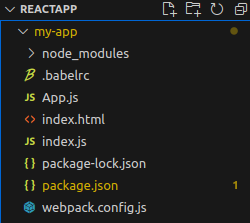
Step 6: Create the files named index.html, App.js, index.js, webpack.config.js, .babelrc
Folder Structure
👁 ImageDependencies
{
 "scripts": {
 "start": "webpack-dev-server --mode development --open",
 "build": "webpack --mode production"
 }
 "dependencies": {
 "babel-core": "^6.26.3",
 "babel-preset-env": "^1.7.0",
 "babel-preset-react": "^6.24.1"
 },
 "devDependencies": {
 "@babel/core": "^7.22.9",
 "@babel/preset-env": "^7.22.9",
 "@babel/preset-react": "^7.22.5",
 "babel-loader": "^9.1.3",
 "html-webpack-plugin": "^5.5.3",
 "react": "^18.2.0",
 "react-dom": "^18.2.0",
 "webpack": "^5.88.2",
 "webpack-cli": "^5.1.4",
 "webpack-dev-server": "^4.15.1"
 }
}
Step 7: Add the following code in index.html, index.js, and App.js
Step 8: Inside the .babelrc file add the following code
{
 "presets": ["@babel/preset-env", "@babel/preset-react"]
}
Step 9: To run the application type the following command in a web browser
npm startOutput
👁 ImageYou only need to manually install Babel when not using Create React App (CRA). Some common cases include:
Note => CRA includes Babel under the hood, so no manual Babel setup is needed unless you eject or start from scratch
Babel has various presets and plugins that can be used to customize the transpilation process for ReactJSdevelopment.
Tool/Plugin | Purpose |
@babel/preset-env | Auto-transpiles based on target environments |
@babel/preset-react | Converts JSX to JavaScript |
@babel/plugin-transform-runtime | Reduces duplicated helper code, smaller bundles |
@babel/plugin-proposal-class-properties | Allows using class fields syntax |