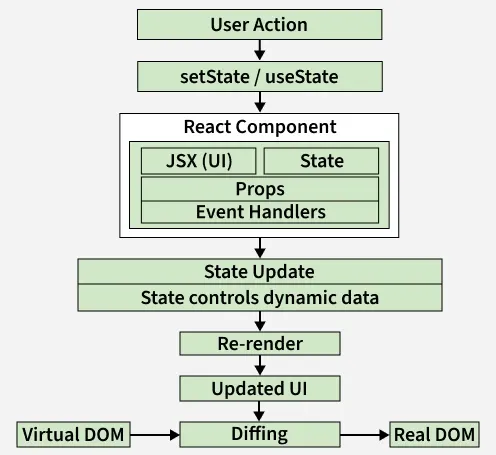
React components are reusable UI units that handle their own logic, accept data through props, manage state, and efficiently update only the parts of the UI that change.
👁 user_action Working of React Components User Action triggers an event (click, input, etc.). setState / useState updates the component’s state. React Component uses props, state, JSX, and event handlers to define UI logic. State Update changes dynamic data inside the component. Re-render is triggered for the affected component. Updated UI is generated as a new Virtual DOM. Diffing compares the new Virtual DOM with the previous one. Real DOM updates only the changed parts for better performance. Output:
Hello, welcome to React! Greeting is a React functional component. It returns JSX: <h1>Hello, welcome to React!</h1>. ReactDOM.render mounts it to the DOM at an element with id root. Syntax:
function ComponentName() {
 return (
 <JSX />
 );
}
Types of React Components There are two primary types of React components:
1. Functional Components Functional components are JavaScript functions that return React elements and are the preferred way to build modern React applications.
Can manage state and lifecycle logic using React Hooks. Use a simpler syntax, making them ideal for reusable components. Offer better performance by avoiding the use of the this keyword. 2. Class Components Class components are ES6 classes in React that extend React.Component and support state and lifecycle handling.
Core Concepts in React Components These concepts explain how components manage data, update UI, and work together in a React application.
1. Props in React Components Props (short for properties) are read-only inputs passed from a parent component to a child component . They enable dynamic data flow and reusability.
Props are immutable. They enable communication between components. They allow components to be configured and customized from outside. 2. State in React Components State is a component-controlled JavaScript object used to store and manage dynamic data over time.
Updating state automatically triggers a re-render. Functional components manage state using the useState hook. 3. Rendering a Component Rendering in React means displaying a component in the browser’s DOM, and React automatically updates the UI when a component’s props or state change.
Components must be imported before they can be rendered ReactDOM.render() is typically used in the root file to mount the app 4. Components in Components In React, you can nest components inside other components to build a modular and hierarchical structure.
Components can be reused multiple times within the same or different components. Props can be passed to nested components for dynamic content. Promotes code reusability and better component organization. Best Practices for React Components Keep components small and focused on a single responsibility. Prefer functional components unless class-specific features are needed. Validate props using PropTypes for reliability. Lift state to a common parent when multiple components share data.