VOOZH about

URL: https://www.geeksforgeeks.org/html/how-to-style-a-table-with-css/

⇱ How To Style a Table with CSS? - GeeksforGeeks


  • Courses
  • Tutorials
  • Interview Prep

How To Style a Table with CSS?

Last Updated : 23 Jul, 2025

A table organizes data in rows and columns, making information easy to read and compare, like a spreadsheet or chart. To style a table with CSS, use properties like border for cell borders, padding for spacing, text-align for alignment, and background-color to color rows or headers for clarity.

Approach to Style Table with CSS

  • Use the <link> tag within the <head> section of your HTML document to link an external CSS file.
  • Use the <table>, <thead>, <tbody>, <tr>, <th>, and <td> tags to structure your table and its content.
  • Define styles in your CSS file (style.css) to customize the appearance of the table, headers (<th>), and data cells (<td>).

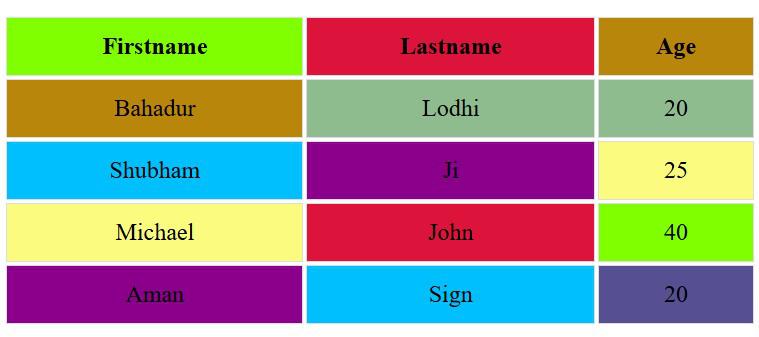
Example 1: Styling a table using External CSS.

Output

👁 Output
Styled Table

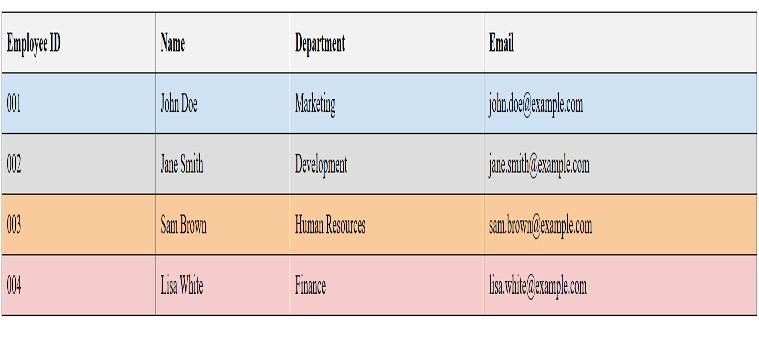
Example 2: Style a table using Internal CSS.

Output

👁 Output
Styled Table
Comment
Article Tags: