HTML is a markup language used to structure and organize content on webpage, enabling browsers to interpret and display it correctly.
- Uses elements (tags) enclosed in angle brackets < >.
- Tags usually come in pairs, i.e., (opening and closing tags).
- Defines structure for text, images, links, videos, etc.
- Helps browsers render content in a readable format.
Basic Structure
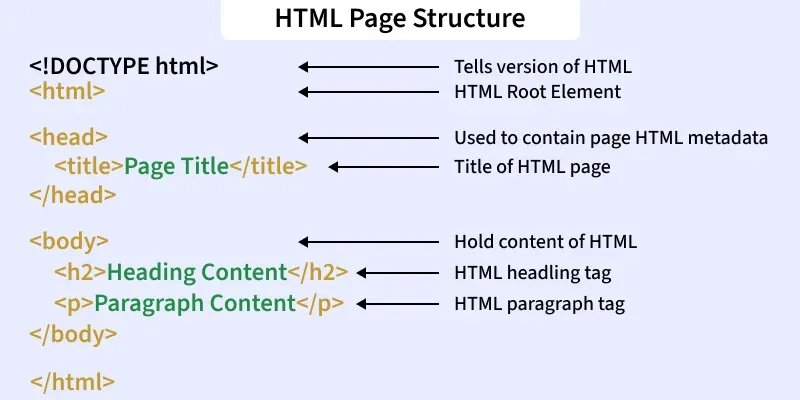
An HTML document is essentially a series of nested elements that work together to form a complete webpage. The document follows a standard structure to ensure consistency and compatibility across different browsers.
👁 html_page_structure1. <!DOCTYPE html>
The <!DOCTYPE html> declaration is used to specify the version of HTML. In this case, it indicates that the document is written in HTML5, which is the latest version of HTML.
2. <html>
The <html> element is the root element of the HTML document. Everything inside this element is considered part of the HTML document.
3. <head>
The <head> section contains metadata about the document that isn't displayed on the webpage. This section includes important elements like:
- <meta charset="UTF-8">: Specifies the character encoding for the document (UTF-8 supports most characters from all languages).
- <meta name="viewport" content="width=device-width, initial-scale=1.0">: Controls the layout on mobile devices by setting the viewport width and scaling.
4. <body>
The <body> tag contains the actual content of the webpage that will be visible to users, such as text, images, and links.
Example:
Tags and Elements for Structuring an HTML Document
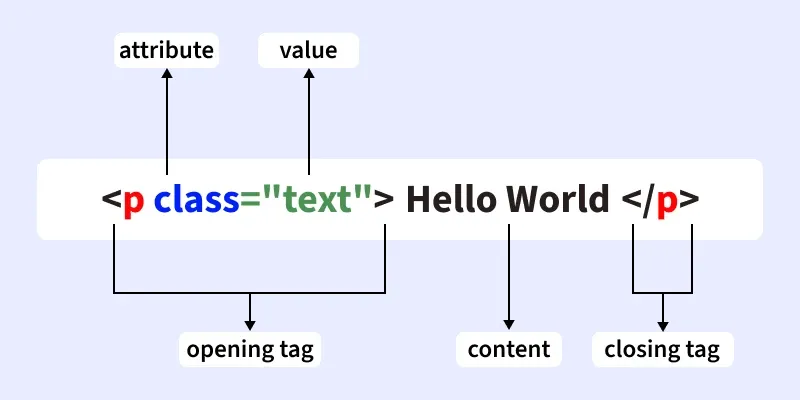
HTML tags are structural components enclosed in angle brackets. They are typically opened and closed with a forward slash (e.g., <h1></h1>). Some tags are self-closing, while others support attributes like width, height, and controls for defining properties or storing metadata.
There are generally two types of tags in HTML:
- Paired Tags: These tags come in pairs i.e. they have both opening(< >) and closing(</ >) tags.
- Empty Tags: These tags are self-closing and do not require a closing tag.”
Below is an example of a <b> tag in HTML, which tells the browser to bold the text inside it.
👁 htmltag- Headings (<h1>–<h6>):Headings (
<h1>–<h6>) define a heading hierarchy in a webpage, with <h1> as the highest level. - Paragraphs (<p>): The
<p> tag is used to create a paragraphs, grouping text into readable sections with automatic spacing. - Images (<img>): Add images using src for path and alt for accessibility.
- Links (<a>):Links are created with the <a> tag. The href attribute defines the destination URL, and the text within the <a> tag serves as the clickable link text.
- Lists (<ul>, <ol>, <li>): Organize items in bullet or numbered format using lists tags (<li>, <ol>, <ul>).
- Div (<div>): <div> tag is container for grouping elements, mainly used for layout and styling.
👁 _p_class_text_hello_world_p_Best Practices for Writing HTML
Here are some best practices to follow when writing HTML:
- Use semantic HTML: Use appropriate tags such as <header>, <footer>, <article>, and <section> to improve the structure and accessibility of your page.
- Include alt text for images: Always use the alt attribute for images to improve accessibility.
- Minimize inline styles and scripts: Keep your HTML clean by linking to external CSS and JavaScript files instead of using inline styles or scripts.
Also Check:
HTML Tags – A to Z List