|
VOOZH | about |
|
VOOZH | about |
PL/SQL (Procedural Language/Structured Query Language) is Oracle's extension to SQL that allows for procedural programming within databases. It features various conditional statements to control the flow of execution based on specific conditions.
In this article, We will learn about the various PL/SQL Conditional Statements in detail with the help of examples and so on.
PL/SQL (Procedural Language/Structured Query Language) is an extension of SQL used in Oracle databases to write procedural code. It includes various conditional statements that allow developers to execute different blocks of code based on specific conditions. Decision-making statements in programming languages decide the direction of the flow of program execution. Conditional Statements available in PL/SQL are defined below:
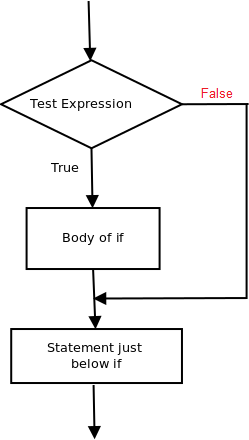
if then the statement is the most simple decision-making statement. It is used to decide whether a certain statement or block of statements will be executed or not i.e if a certain condition is true then a block of statement is executed otherwise not.
Syntax:
if condition then
-- do something
end if;
Here, condition after evaluation will be either true or false. if statement accepts boolean values – if the value is true then it will execute the block of statements below it otherwise not. if and endif consider as a block here.
Example:
As the condition present in the if statement is false. So, the block below the if statement is not executed. Output:
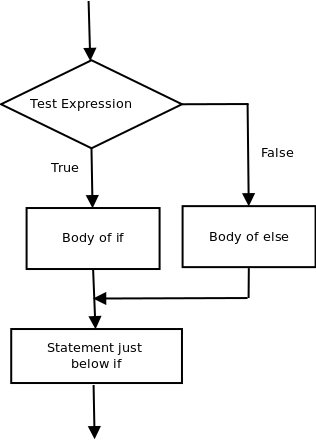
I am Not in ifThe if statement alone tells us that if a condition is true it will execute a block of statements and if the condition is false it won’t. But what if we want to do something else if the condition is false. Here comes the else statement. We can use the else statement with if statement to execute a block of code when the condition is false.
Syntax:-
if (condition) then
 -- Executes this block if
 -- condition is true
else
 -- Executes this block if
 -- condition is false
Example:-
Output:-
i'm in if Block
i'm not in if and not in else Block
The block of code following the else statement is executed as the condition present in the if statement is false after calling the statement which is not in block(without spaces).
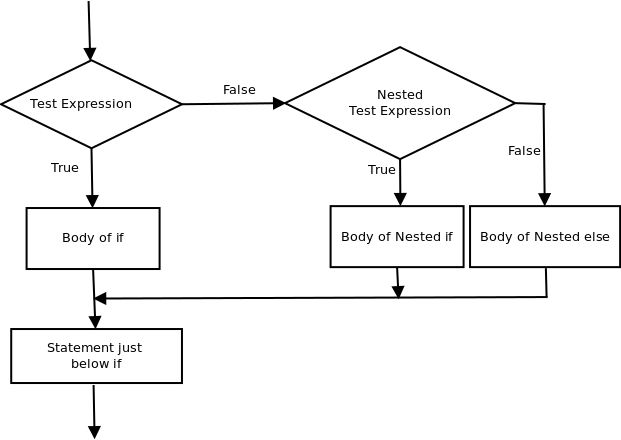
A nested if-then is an if statement that is the target of another if statement. Nested if-then statements mean an if statement inside another if statement. Yes, PL/SQL allows us to nest if statements within if-then statements. i.e, we can place an if then statement inside another if then statement. Syntax:-
if (condition1) then
 -- Executes when condition1 is true
 if (condition2) then
 -- Executes when condition2 is true
 end if;
end if;
Output:-
num1 small num2
num1 small num3 also
after end if
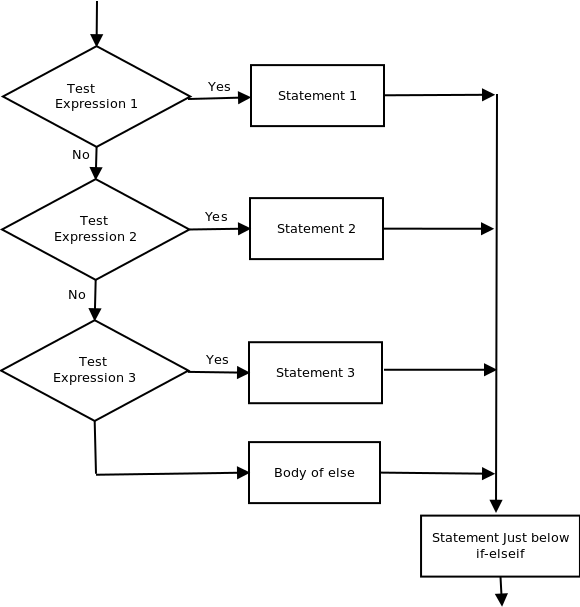
Here, a user can decide among multiple options. The if then statements are executed from the top down. As soon as one of the conditions controlling the if is true, the statement associated with that if is executed, and the rest of the ladder is bypassed. If none of the conditions is true, then the final else statement will be executed. Syntax:-
if (condition) then
 --statement
elsif (condition) then
 --statement
.
.
else
 --statement
endif
Flow Chart:-
👁 Image
Example:-
Output:-
num1 small
after end if
PL/SQL conditional statements are essential for effective procedural programming in Oracle databases. The IF THEN and IF THEN ELSE statements provide straightforward decision-making, while NESTED-IF-THEN supports complex nested logic. The IF THEN ELSIF-THEN-ELSE ladder allows handling multiple conditions in a structured manner.