|
VOOZH | about |
|
VOOZH | about |
PL/SQL provides variables to store, process and manipulate data within programs. Variables act as placeholders for values used during program execution and help perform calculations efficiently.
%TYPE and %ROWTYPE for flexible declarations. The below methods are used to declare a variable in PL/SQL are as follows:
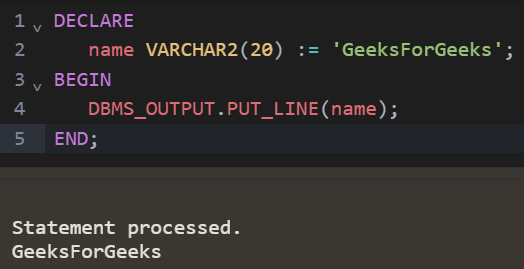
In PL/SQL, variables are declared using the DECLARE keyword. A variable stores data and can also be given an initial value using the := operator.
Syntax:
DECLARE
 variable_name datatype := initial_value;
Example:
DECLARE
 name VARCHAR2(20) := 'GeeksForGeeks';
BEGIN
 DBMS_OUTPUT.PUT_LINE(name);
END;
Output:
In this method Variables can be initialized in two ways either during declaration or later in the code.
1. Initializing during declaration
Variables can be assigned values when declared, as shown below:
Syntax:
DECLARE
 my_variable NUMBER := value;
BEGIN
 -- PL/SQL code
END;
Example:
DECLARE
 name VARCHAR2(20) := 'GeeksForGeeks';
BEGIN
 DBMS_OUTPUT.PUT_LINE(name);
END;
Output:
👁 Initializing during declaration
2. Initialization After Declaration
You can also assign a value to a variable later in the code using the := operator.
Syntax:
DECLARE
 my_variable NUMBER;
BEGIN
 my_variable := value;
END;
Example:
DECLARE
 num1 NUMBER;
 num2 NUMBER;
 result NUMBER;
BEGIN
 num1 := 5;
 num2 := 3;
 result := num1 + num2;
 DBMS_OUTPUT.PUT_LINE('Sum: ' || result);
END;
Output:
Variable scope determines where a variable can be accessed within a program. In PL/SQL, variable scope can be either local or global.
DECLARE
 global_var NUMBER; -- global variable
BEGIN
 -- PL/SQL code using global_var
 DECLARE
 local_var NUMBER; -- local variable
 BEGIN
 -- PL/SQL code using local_var and global_var
 END;
 -- Here you can't access local_var
END;
PL/SQL provides two powerful attributes, %TYPE and %ROWTYPE, which allow variables to inherit data types from existing columns or entire rows.
Example: The below example is demonstrating the use of %TYPE and %ROWTYPE attribute
Create a employees table and Insert some records into a employees table
-- Creating a employees table
CREATE TABLE employees (
 employee_id NUMBER PRIMARY KEY,
 first_name VARCHAR2(50),
 last_name VARCHAR2(50),
 salary NUMBER
);

-- Inserting some records
INSERT INTO employees VALUES (1, 'John', 'Doe', 50000);
INSERT INTO employees VALUES (2, 'Jane', 'Smith', 60000);
INSERT INTO employees VALUES (3, 'Bob', 'Johnson', 55000);
In this example, salary_var is declared using %TYPE to use the same data type as the salary column in the employees table. A value is assigned to it and displayed using DBMS_OUTPUT.PUT_LINE.
DECLARE
 salary_var employees.salary%TYPE;
BEGIN
 -- Assign a value to the variable
 salary_var := 70000;

 -- Display the assigned value
 DBMS_OUTPUT.PUT_LINE('Assigned Salary: ' || salary_var);
END;
Output:
👁 Declaring a variable using type
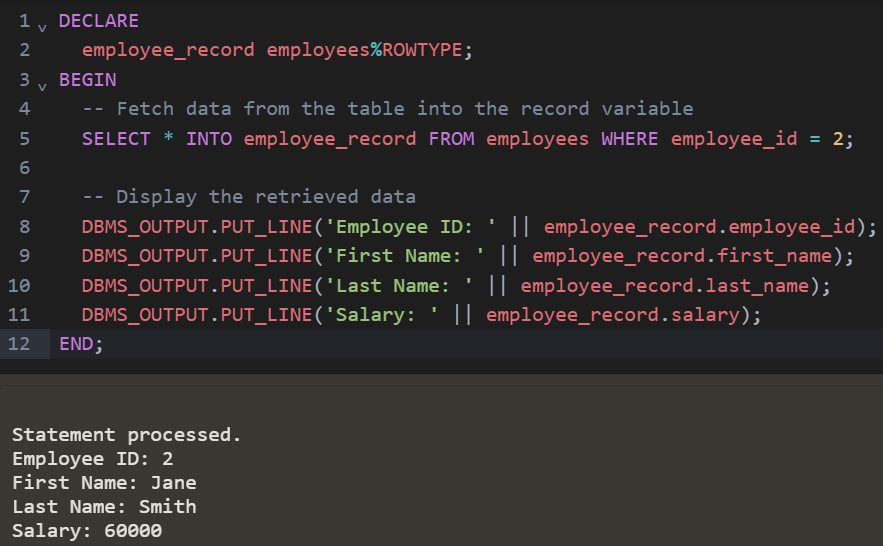
In this example, a record variable employee_record is declared using %ROWTYPE to match the employees table structure. Data is fetched into it using SELECT INTO and displayed using DBMS_OUTPUT.PUT_LINE.
DECLARE
 employee_record employees%ROWTYPE;
BEGIN
 -- Fetch data from the table into the record variable
 SELECT * INTO employee_record FROM employees WHERE employee_id = 2;

 -- Display the retrieved data
 DBMS_OUTPUT.PUT_LINE('Employee ID: ' || employee_record.employee_id);
 DBMS_OUTPUT.PUT_LINE('First Name: ' || employee_record.first_name);
 DBMS_OUTPUT.PUT_LINE('Last Name: ' || employee_record.last_name);
 DBMS_OUTPUT.PUT_LINE('Salary: ' || employee_record.salary);
END;
Output:
👁 Declaring a record variable using rowtype