|
VOOZH | about |
|
VOOZH | about |
PL/SQL is Oracle’s procedural extension of SQL that allows developers to combine SQL queries with programming features like loops, conditions and exception handling.
PL/SQL brings the benefits of procedural programming to the relational database world. Some of the most important features of PL/SQL include:
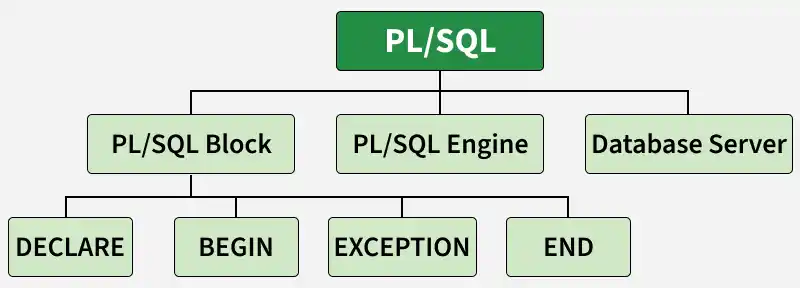
PL/SQL extends SQL with procedural language features, making it more powerful. The basic unit of PL/SQL is a block and PL/SQL programs are made of nested blocks.
Typically, each block performs a logical action in the program. A block has the following structure:
DECLARE
 -- Declaration statements

BEGIN
 -- Executable statements

EXCEPTION
 -- Exception handling statements

END;
/
PL/SQL code is written in blocks, which consist of three main sections:
DECLARE and is optional.In PL/SQL, identifiers are names used to represent various program elements like variables, constants, procedures, cursors, triggers etc. These identifiers allow you to store, manipulate and access data throughout your PL/SQL code.
A variable in PL/SQL is a named memory location used to store data during program execution. Each variable has a name, datatype and optional initial value.
Syntax:
variable_name datatype [NOT NULL := value ];Example: Declaring Variables
This example shows how to declare variables in a PL/SQL block.
SET SERVEROUTPUT ON;

DECLARE
 var1 INTEGER;
 var2 REAL;
 var3 VARCHAR2(20);

BEGIN
 NULL;
END;
/
Output:
PL/SQL procedure successfully completed.DBMS_OUTPUT is a built-in package in PL/SQL used to display output messages and debugging information from PL/SQL blocks, procedures, packages and triggers.
Example: Displaying Output
SET SERVEROUTPUT ON;

DECLARE
 var VARCHAR2(40) := 'I love GeeksForGeeks';

BEGIN
 DBMS_OUTPUT.PUT_LINE(var);

END;
/
Output:
I love GeeksForGeeks
PL/SQL procedure successfully completed.
In PL/SQL, comments can be put within the code which has no effect in the code. There are two syntaxes to create comments in PL/SQL :
-- This is a single-line comment

/*
 This is a multi-line comment
 that spans over multiple lines.
*/
In PL/SQL, user input can be taken using substitution variables. These variables start with the & symbol and store the entered value in a variable.
SET SERVEROUTPUT ON;

DECLARE

 -- taking input for variable a
 a NUMBER := &a;

 -- taking input for variable b
 b VARCHAR2(30) := &b;

BEGIN
 NULL;

END;
/
Output:
Enter value for a: 24
old 2: a number := &a;
new 2: a number := 24;
Enter value for b: 'GeeksForGeeks'
old 3: b varchar2(30) := &b;
new 3: b varchar2(30) := 'GeeksForGeeks';
Apart from variables, PL/SQL also supports several other identifiers used for different purposes.
Let’s combine all the above concepts into one practical example. We’ll create a PL/SQL block that takes two numbers from the user, calculates their sum and displays the result.
-- PL/SQL code to print sum of two numbers taken from the user.
SET SERVEROUTPUT ON;

DECLARE

 -- taking input for variable a
 a INTEGER := &a;

-- taking input for variable b
 b INTEGER := &b;
 c INTEGER;

BEGIN
 c := a + b;
 DBMS_OUTPUT.PUT_LINE('Sum of ' || a || ' and ' || b || ' is = ' || c);
END;
/
Example :
Enter value for a: 2
Enter value for b: 3

Sum of 2 and 3 is = 5

PL/SQL procedure successfully completed.
The PL/SQL engine works inside the Oracle database engine. When a PL/SQL block is executed, SQL and PL/SQL statements are processed together in one request. This reduces network traffic and improves performance.
| SQL | PL/SQL |
|---|---|
| SQL is a query language used to manage databases. | PL/SQL is a procedural extension of SQL. |
| Executes one statement at a time. | Executes multiple statements in a block. |
| Does not support loops or conditions. | Supports loops, conditions and variables. |
| Used for data manipulation and queries. | Used for writing complete programs. |
| Error handling is limited. | Supports exception handling. |
| SQL statements are executed individually. | Entire block is executed together. |
| Mainly declarative language. | Combination of procedural and SQL language. |