|
VOOZH | about |
|
VOOZH | about |
The AND operator in PL/SQL is used to combine two or more conditions in a query. A record is returned only when all specified conditions evaluate to TRUE.
WHERE clause. SELECT, UPDATE, and DELETE statements. SELECT column1, column2, ...
FROM table_name
WHERE condition1 AND condition2;
Explanation:
SELECT column1, column2, ...
FROM table_name
WHERE condition1 AND condition2 AND condition3;
SELECT column1, column2, ...
FROM table_name
WHERE condition1 AND (condition2 OR condition3);
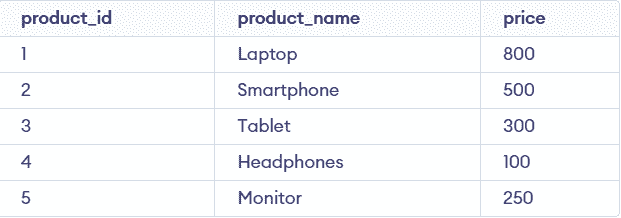
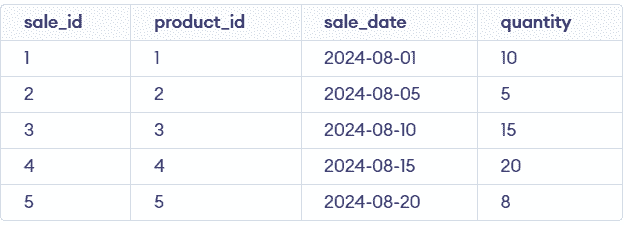
In this example, two tables are used: products, which stores product details such as ID, name, and price, and sales, which stores sales records including sale ID, product ID, sale date, and quantity sold. These tables help demonstrate how the AND operator can be used to filter data based on multiple conditions.
The provided SQL commands create a table named products with columns for product_id, product_name, and price. The table is then populated with five rows, each representing a different product with its unique identifier, name, and price.
Query:
CREATE TABLE products (
 product_id INT PRIMARY KEY,
 product_name VARCHAR(50),
 price DECIMAL(10, 2)
);

INSERT INTO products (product_id, product_name, price) VALUES (1, 'Laptop', 800.00);
INSERT INTO products (product_id, product_name, price) VALUES (2, 'Smartphone', 500.00);
INSERT INTO products (product_id, product_name, price) VALUES (3, 'Tablet', 300.00);
INSERT INTO products (product_id, product_name, price) VALUES (4, 'Headphones', 100.00);
INSERT INTO products (product_id, product_name, price) VALUES (5, 'Monitor', 250.00);
Output:
The provided SQL commands create a table named sales with columns for sale_id, product_id, sale_date, and quantity. The table is populated with five rows, each representing a sales transaction with its unique ID, associated product ID, sale date, and quantity sold.
Query:
CREATE TABLE sales (
 sale_id INT PRIMARY KEY,
 product_id INT,
 sale_date DATE,
 quantity INT
);

INSERT INTO sales (sale_id, product_id, sale_date, quantity) VALUES (1, 1, '2024-08-01', 10);
INSERT INTO sales (sale_id, product_id, sale_date, quantity) VALUES (2, 2, '2024-08-05', 5);
INSERT INTO sales (sale_id, product_id, sale_date, quantity) VALUES (3, 3, '2024-08-10', 15);
INSERT INTO sales (sale_id, product_id, sale_date, quantity) VALUES (4, 4, '2024-08-15', 20);
INSERT INTO sales (sale_id, product_id, sale_date, quantity) VALUES (5, 5, '2024-08-20', 8);
Output:
This query combines conditions to filter products that have a price greater than 250 and have been sold in quantities greater than 5. It joins two tables, products and sales, to ensure that both conditions are met before retrieving the results.
Query:
SELECT p.product_name, p.price
FROM products p
JOIN sales s ON p.product_id = s.product_id
WHERE p.price > 250 AND s.quantity > 5;
Output:
👁 Screenshot-2026-06-06-124937This query filters sales records that occurred on a specific date (e.g., August 15, 2024) and where the quantity sold exceeds 10. It checks two conditions: the exact sale date and the quantity of items sold.
Query:
SELECT s.sale_id, s.product_id, s.sale_date, s.quantity
FROM sales s
WHERE s.sale_date = '2024-08-15' AND s.quantity > 10;
Output:
👁 Screenshot-2026-06-06-125150This query selects products sold within a specific date range (e.g., between August 1 and August 10, 2024) and with a price below 300. It combines conditions on the sale date and product price to refine the results.
Query:
SELECT p.product_name, p.price
FROM products p
JOIN sales s ON p.product_id = s.product_id
WHERE s.sale_date BETWEEN '2024-08-01' AND '2024-08-10' AND p.price < 300;
Output:
👁 Screenshot-2026-06-06-125420This query retrieves sales records where the quantity sold is greater than 10 and the product name includes 'Phone'. It joins the sales and products tables and applies both conditions to filter the data.
Query:
SELECT s.sale_id, p.product_name, s.quantity
FROM sales s
JOIN products p ON s.product_id = p.product_id
WHERE s.quantity > 10 AND p.product_name LIKE '%Phone%';
Output:
👁 Screenshot-2026-06-06-125632