|
VOOZH | about |
|
VOOZH | about |
PL/SQL stands for Procedural Language/ Structured Query Language. It has block structure programming features. PL/SQL supports SQL queries. PL/SQL contains a declaration section, execution section, and exception-handling section. Declare and exception handling sections are optional.
This article explores two effective methods in PL/SQL to retrieve the top 10 records: using a SELECT statement with subqueries and employing a PL/SQL cursor. Each approach has unique advantages, from direct query retrieval to row-by-row processing, providing flexibility for various data needs.
In this article, we will learn how to retrieve the top n values from the database using PL/SQL. We are often required to display specific values to get insights about the database such as top performers, top gainers, or other data.
We will use a SELECT statement, table name, along with the condition or ORDER BY keyword to fetch the specific values. PL/SQL cursor can also be used to display the top 10 values.
Table of Content
To demonstrate, let’s create a sample table named GEEKS and insert sample data for testing:
Table:
This method is efficient for quickly retrieving the top 10 records from a database table using the SELECT statement with the ROWNUM clause.
SELECT * FROM table_name
WHERE ROWNUM <= 10
ORDER BY column DESC;
If we use the above query it will consider only the first 10 rows from the table and log them in the descending order. It will not consider the remaining rows of the table and not order them in descending order.Hence we will use the subquery to log the top 10 values.
SELECT column1,column2
FROM (SELECT * FROM Table_name ORDER BY column DESC )
WHERE ROWNUM <=10;
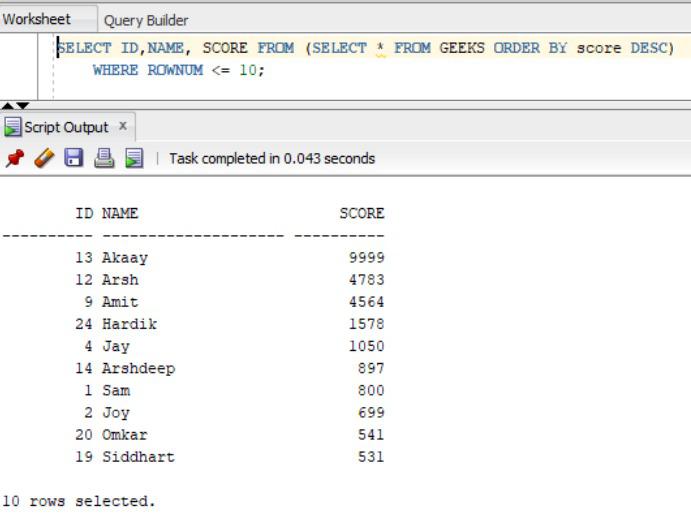
SELECT ID,NAME, SCORE FROM (SELECT * FROM GEEKS ORDER BY score DESC)
 WHERE ROWNUM <= 10;
Output:
Oracle uses a special memory space called a context area for storing and retrieving information. The context area contains all the details related to the database. The cursor is the virtual pointer to the context area, in the database.
The major function of a cursor is to retrieve data, one row at a time, from a result set, unlike the SQL commands which operate on all the rows in the result set at one time. We will use cursor to fetch top 10 values from the database.
DECLARE
 --declare variable
--declare cursor
 CURSOR cursor IS
 SELECT column1,column2 .... FROM (SELECT * FROM table_name ORDER BY colmun) WHERE ROWNUM <= 10;
BEGIN
 OPEN cursor;
 LOOP
 FETCH cursorINTO declared variables;
 EXIT WHENcursor%NOTFOUND;
 -- print the values
 DBMS_OUTPUT.PUT_LINE(variables);
 END LOOP;
 -- Close the cursor
 CLOSE cursor;
END;
where,
DECLARE
 c_NAME GEEKS.NAME%TYPE; c_SCORE GEEKS.SCORE%TYPE;
 --declare cursor
 CURSOR top_val IS
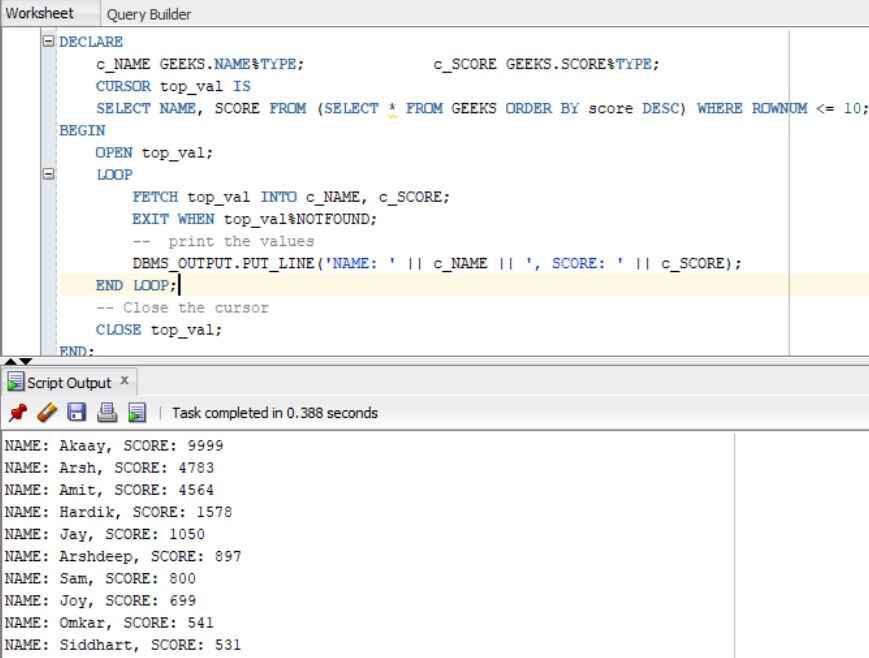
 SELECT NAME, SCORE FROM (SELECT * FROM GEEKS ORDER BY score DESC) WHERE ROWNUM <= 10;
BEGIN
 --open cursor
 OPEN top_val;
 LOOP
 FETCH top_val INTO c_NAME, c_SCORE;
 EXIT WHEN top_val%NOTFOUND;
 -- print the values
 DBMS_OUTPUT.PUT_LINE('NAME: ' || c_NAME || ', SCORE: ' || c_SCORE);
 END LOOP;
 -- Close the cursor
 CLOSE top_val;
END;
Output:
Explanation:
Retrieving top values from databases is crucial for gaining insights. In this article, we explored two effective methods using PL/SQL: utilizing subqueries and PL/SQL Cursors. If it's analyzing top performers or identifying trends, mastering these techniques empowers developers to extract valuable information efficiently from their databases.