|
VOOZH | about |
|
VOOZH | about |
Statement-level triggers in Oracle databases execute actions for each transaction, responding to various database events like DML and DDL statements, system events, and user interactions. They act as programmed responses to specific table events, enhancing database management and automation.
Stored as named PL/SQL blocks, triggers execute automatically upon occurrence of a predefined event, crucial for efficient database operation.
In this article, we will cover PL/SQL Statement level Triggers syntax, their importance, characteristics, common use cases, and examples, illustrating their role in Oracle database management.
Statement-level triggers are said to be specialized PL/SQL code blocks that execute once per triggering DML statement like, Insert, Update, and Delete on any table. The triggers respond to various events, including DML changes, DDL operations, and system events, offering an automated way to maintain the consistency and integrity of the database.
CREATE [OR REPLACE] TRIGGER trigger_name //start
 {BEFORE | AFTER } triggering_event
 ON table_name
 [FOLLOWS | PRECEDES another_trigger]
 [ENABLE / DISABLE ]
 [WHEN condition]
DECLARE
 declaration statements
BEGIN
 executable statements
EXCEPTION
 exception_handling statements
END;
NOTE: Assume that you have created a database for some customers with constraints like, orders, sales etc.
Let us assume the same example. Suppose there exists a table named customers.
Create a trigger to log updates to a customers table into an audit table called customer_audit.
CREATE OR REPLACE TRIGGER cust_update_audit
AFTER UPDATE ON customers
FOR EACH ROW
WHEN (NEW.name != OLD.name OR NEW.email != OLD.email OR NEW.phone != OLD.phone)
BEGININSERT INTO customer_audit (customer_id, old_name, old_email, old_phone, new_name, new_email, new_phone, update_time)
 VALUES (:OLD.customer_id, :OLD.name, :OLD.email, :OLD.phone, :NEW.name, :NEW.email, :NEW.phone, SYSDATE);
END;
/
Let us assume we have the following entry in the customers table.
Query:
UPDATE customers
 SET name = 'GFG',
 email = 'GFG@EMAIL.COM'
 WHERE customer_id = 1;
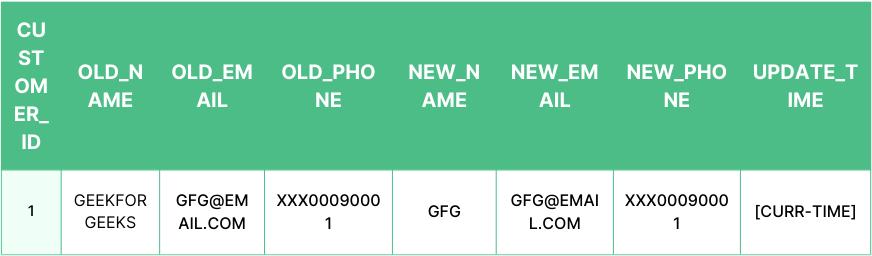
Output:
Explanation: The customer_audit table will now be updated with a new entry. But only the name will be changed, nothing else as per the above query or we can say, that, the trigger captures the old and new values of the updated customer and logs them into the customer_audit table.
This trigger automatically applies a discount to new orders if the total order amount exceeds a certain threshold.
CREATE OR REPLACE TRIGGER order_discount
BEFORE INSERT ON orders
FOR EACH ROW
BEGINIF :NEW.order_total > 100 THEN
 :NEW.order_total := :NEW.order_total * 0.9; -- Applying 10% discount
 END IF;
END;
/
INSERT INTO orders (order_id, customer_id, order_total)
VALUES (1, 1, 120);
Output:
Explanation: Before the insertion query is executed, the trigger will check the order_total of the new order. But since the order_total (as per query, it is $120) exceeds $100, the trigger will apply a 10% discount. After trigger execution, the order_total for this order will be updated to $108. The orders table gets updated accordingly.
- Unlike row-level triggers, statement-level triggers do not have direct access to individual row data using :OLD and :NEW.
- These triggers fire only once for the entire DML operation, regardless of the number of rows affected.
- Statement-level triggers are not subject to mutating table errors, which occur in row-level triggers.
- Use FOLLOWS or PRECEDES clauses to control the execution order of multiple triggers.