|
VOOZH | about |
|
VOOZH | about |
In this article, we will create the 15 Puzzle Game using ReactJS. 15 puzzle game is basically a tile-based game in which there are 16 tiles out of which 1 tile is left empty and the remaining tiles are filled with numbers from 1 to 15 in random order. The user has to arrange all the tiles in numerical order with the rule that they can only move the tile that is a direct neighbor of the empty tile.
In this project, we have basically used React Functional Components and used React hooks like useState, useEffect, etc. The player can drag the tile from its position to a neighboring empty position. The logic of dragging and winning is implemented using JSX.
Let’s have a look at what our final project will look like:
Containers are Stateful React components (class Based). Components are Stateless React Components (function based). In this project, I have used components (function based) and to make them stateful, I used hooks in ReactJs like useState, useEffect etc.
1. Set up React project using the command
npm create vite@latest <name-of-project> --template react2. Navigate to the project folder using
cd <name_of_project>3. Install necessary dependencies:
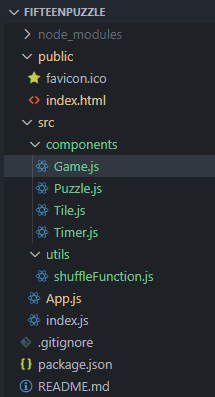
npm install 3. Create a folder named "components" for storing the components and a folder named "utils" where we'll create the utility function to randomly create an array of numbers. Inside the "components" folder, add 4 files namely "Game.js", "Puzzle.js", "Tile.js", "Timer.js" and inside the "utils" folder create a file named "shuffleFunction.js".
4. To add tailwindcss in your project, add the following script tag in the "index.html".
<script src="https://cdn.tailwindcss.com/3.4.16"></script>Write the following code in different files (The name of the files is mentioned in the first line of each code block)
1. Type the following command in the terminal:
npm start2. Open the following URL in the web browser:
http://localhost:3000/Output: