|
VOOZH | about |
|
VOOZH | about |
The Appointment Management System is a web application that allows users to schedule, manage, and view appointments. It provides an easy-to-use interface for clients to book and keep track of appointments. Below is a simplified outline for creating an Appointment Management System using React JS.
Preview of final output: Let us have a look at how the final output will look like.
Users can book an appointment and view a list of all appointments. Ability to add, edit, and delete appointments. In this project, I have a state that stores appointment variables like name, date, etc., and when we update the name and date it is responsible for state management.
Step 1: Setting Up the React App:
npm create vite@latest appointment-management-system --template reactStep 2: Navigate to the project folder using:
cd appointment-management-system Step 3: Install dependencies:
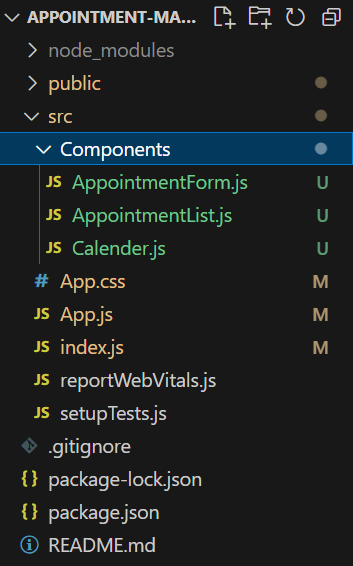
npm installStep 4: Create a folder “Components” and add three new files in it namely AppointmentForm.js,AppointmentList.js and Calender.js.
Project Structure:
👁 Screenshot-2023-12-01-171440Write the following code in respective files:
Steps to run the application:
Step 1: Type the following command in terminal.
npm run devStep 2: Open web-browser and type the following URL
http://localhost:5173/Output: